
Summarize this article with AI
In Brief
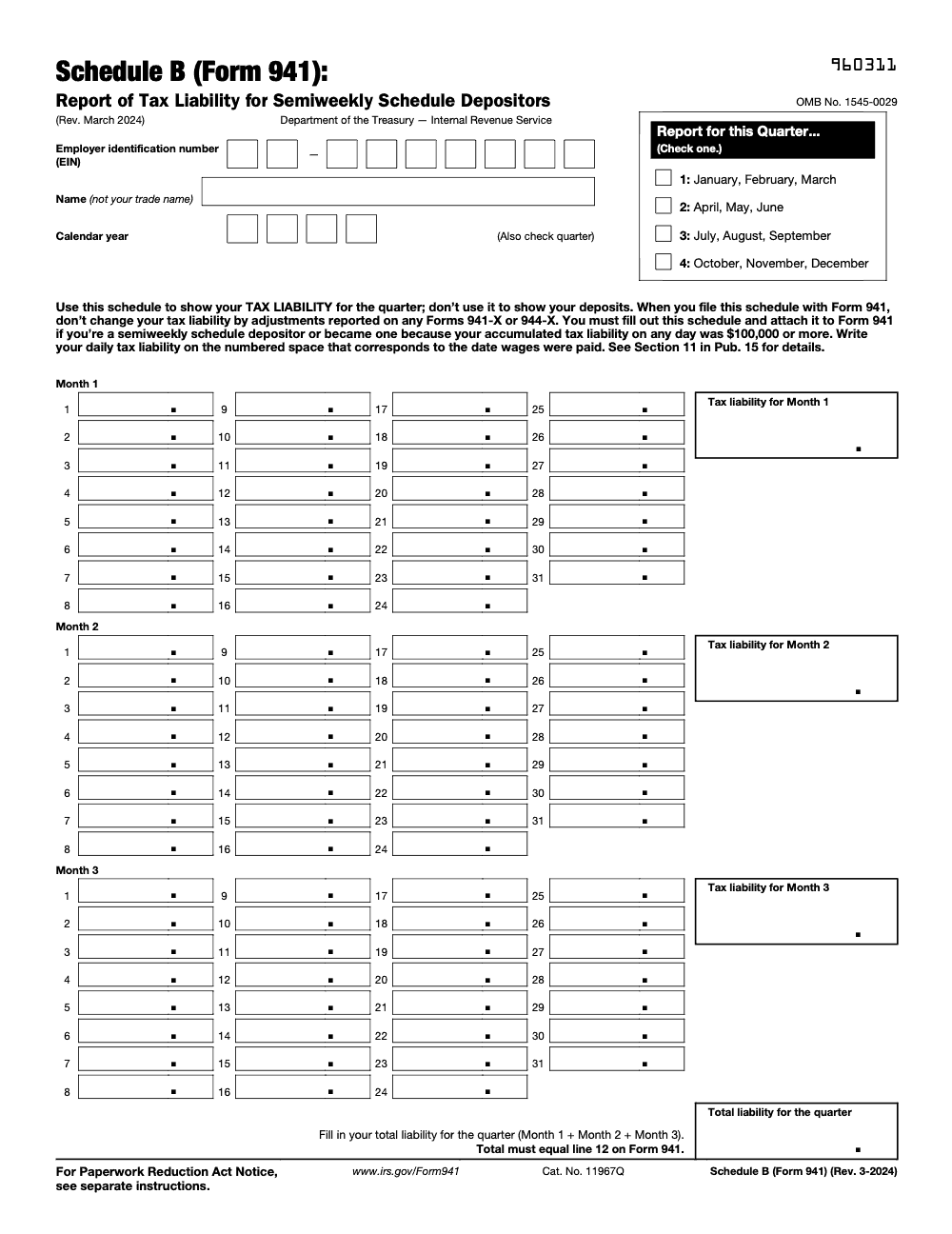
Schedule B (Form 941) is the daily tax-liability record for semiweekly depositors – use it when your Form 941 four-quarter lookback exceeded $50,000 or a single-day accumulated liability hit $100,000. Enter the liability on the pay date (not the deposit date), and the quarterly total must equal Form 941 line 12 or the IRS may assess an averaged failure-to-deposit penalty of 2% to 10% (per IRS Publication 15, Section 11).
Schedule B (Form 941) reports daily payroll tax liabilities by actual pay date, not deposit date, so entering deposit dates throws off the daily liability record for the quarter. Schedule B is a day-by-day log of what you owed on each payday, and you do not list deposits or negative amounts.
You file it as a semiweekly depositor, which generally means your four-quarter lookback exceeded $50,000 or a single day's accumulated liability hit $100,000. The quarterly total has to equal Form 941 line 12, or the IRS may assess an averaged failure-to-deposit penalty of 2% to 10%. Do not file it if your line 12 total tax for the quarter is under $2,500, unless you otherwise meet the semiweekly criteria or triggered the $100,000 rule.
Key Takeaways
- Schedule B reports daily payroll tax liabilities by actual pay date, not deposit date. Do not list deposits or negative amounts.
- You file it when you are a semiweekly depositor, which generally means your lookback period exceeded 50,000 or you hit 100,000 in tax liability on a single day. If you hit 100,000 on any day, the next day you follow the semiweekly schedule and you must complete Schedule B for the entire quarter.
- File Schedule B with Form 941 by the quarterly due dates, and check the semiweekly box on Form 941, line 16. If deposits were made on time and in full, you may file by the 10th day of the second month after the quarter.
- Do not file Schedule B if your Form 941 line 12 total tax for the quarter is under 2,500, unless you otherwise meet semiweekly criteria or triggered the 100,000 rule.
- Annual Form 944 filers do not attach Schedule B. They use Form 945‑A for daily liability reporting.
What is Schedule B for Form 941
Schedule B is the IRS’s way to see exactly when your payroll tax liability arises. Each time you pay wages, you create liability for federal income tax withheld plus both the employer and employee portions of Social Security and Medicare, including Additional Medicare Tax when applicable. You record those liabilities on the precise calendar day employees were paid. You never record deposits on Schedule B, since the IRS receives deposit data separately through EFT.
The IRS uses Schedule B to determine whether your deposits were timely. If you are a semiweekly depositor and you do not file Schedule B correctly with Form 941, the IRS may propose an averaged failure‑to‑deposit penalty – even when your actual deposits were timely and in full, since missing, mislabeled, or improperly populated Schedule B is itself a trigger. That is not a good letter to get, and it is avoidable.
Who must file as a semiweekly depositor
You are a semiweekly depositor for the year if your lookback period total for employment taxes is over $50,000, or if you accumulate $100,000 or more in a single day in the current or prior year. If the $100,000 rule is triggered mid‑quarter, you still complete Schedule B for the entire quarter. Measure the $100,000 threshold before nonrefundable credits.
The deposit timing itself follows the semiweekly pattern described in Publication 15. Liabilities for wages paid on Wednesday, Thursday, or Friday are due the following Wednesday. Liabilities for wages paid on Saturday, Sunday, Monday, or Tuesday are due the following Friday (semiweekly depositors always get at least 3 business days after the period closes, and any legal holiday inside those 3 weekdays adds an extra day). Also, if you accumulate $100,000 or more in any deposit period, the next‑day deposit rule applies.
On Form 941, line 16, you must check the correct box. If you are semiweekly, you attach Schedule B and do not enter monthly liabilities on line 16. If you meet the de minimis exception – Form 941 line 12 under 2,500 for either the current or the prior quarter, and no 100,000 next‑day trigger in the current quarter – you can check the first box and skip Schedule B.
When Schedule B is not required
You skip Schedule B if your quarterly total tax on Form 941 line 12 is less than 2,500, unless your lookback makes you semiweekly or you triggered the 100,000 rule. If you are not a semiweekly depositor and you did not hit 100,000 on any day, you do not complete Schedule B. Annual filers on Form 944 do not attach Schedule B at all, they use Form 945‑A to report daily liabilities.
If you become semiweekly mid‑quarter because of a 100,000 day, you must still complete Schedule B for the entire quarter. This one catches teams who assume they only start the calendar after the trigger. Do not do that, complete it for the full quarter.
Deadlines and filing methods for 2025
File Schedule B with Form 941 by the quarterly due dates. For 2025, those due dates are April 30 for Q1, July 31 for Q2, October 31 for Q3, and February 2, 2026 for Q4 (January 31, 2026 falls on a Saturday, so the deadline shifts to the next business day). If you made deposits in full and on time, you may file by the 10th day of the second month after the quarter, which means May 10, August 10, November 10, and February 10, 2026. If a due date falls on a weekend or legal holiday, the next business day applies.
Pro tip, e‑file your Form 941 and include Schedule B when required. It is faster, reduces clerical errors, and gives you a clear electronic timestamp.
2025 filing calendar at a glance
| Quarter | Months covered | Standard due date | If all deposits were on time |
| Q1 | Jan, Feb, Mar | Apr 30, 2025 | May 10, 2025 |
| Q2 | Apr, May, Jun | Jul 31, 2025 | Aug 10, 2025 |
| Q3 | Jul, Aug, Sep | Oct 31, 2025 | Nov 10, 2025 |
| Q4 | Oct, Nov, Dec | Feb 2, 2026 | Feb 10, 2026 |
Source for dates and the 10‑day rule, Instructions for Form 941, March 2025.
How to complete Schedule B correctly
Accuracy starts with the calendar. Post the day’s liability on the exact date employees were paid. Use the month columns that match the quarter, and enter positive amounts only. Do not enter deposits, the IRS already has those through EFT. Your three‑month total must equal Form 941 line 12 for the quarter. If line 12 is under 2,500 and you are not otherwise semiweekly, you do not file Schedule B.
Controlled process checklist
| Task | Control check |
| Use actual pay dates | Amounts fall in the correct month lines |
| Sum daily lines | Three‑month total equals Form 941, line 12 |
| Exclude deposits | No negatives for credits on daily lines |
| Amend if needed | Form 941‑X and, if required, an amended Schedule B |
Source, Schedule B instructions and Form 941 instructions.
Step‑by‑step flow you can follow
- Pull your payroll register for the quarter and highlight every pay date.
- For each pay date, compute federal income tax withheld plus both halves of Social Security and Medicare for that payroll, including Additional Medicare Tax withholding as applicable.
- Enter that day’s total on the matching line for the calendar date in the correct month column.
- Repeat for every pay date, then total each month and add the three months. Your total must match Form 941 line 12.
- On Form 941, line 16, check the semiweekly box to indicate you attached Schedule B. Do not put your liabilities on line 16 if you are semiweekly.
Why “deposits vs liabilities” matters
Deposits are cash movements. Schedule B is a liability calendar. Mixing them leads to mismatches, and mismatches are what trigger averaged penalties. The IRS explicitly warns that if you are semiweekly and you do not properly complete Schedule B, it may propose an averaged failure‑to‑deposit penalty.
Mapping pay dates to daily liabilities
Let’s make this concrete. Say you run biweekly payrolls in Q2 2025, with pay dates April 12 and 26, May 10 and 24, June 7 and 21. For each pay date, you compute that day’s total liability and post it on the matching line for the calendar date in Month 1, Month 2, or Month 3. You do not post the deposit date, even if you use EFT the next week.
Mini example, Q2 2025
| Pay date | Month column | Schedule B line | Example liability |
| Apr 12, 2025 | Month 1 | Line 12 | 18,450 |
| Apr 26, 2025 | Month 1 | Line 26 | 19,120 |
| May 10, 2025 | Month 2 | Line 10 | 18,980 |
| May 24, 2025 | Month 2 | Line 24 | 19,010 |
| Jun 7, 2025 | Month 3 | Line 7 | 18,760 |
| Jun 21, 2025 | Month 3 | Line 21 | 19,040 |
At month end, total each column. Then add Month 1, Month 2, and Month 3 to reach your Schedule B quarterly total. That number must equal Form 941 line 12 for Q2 2025.
Matching totals with Form 941 line 12
Your three‑month sum on Schedule B must equal the amount on Form 941 line 12. If something is off, review whether you posted by pay date, accidentally netted a credit below zero, or added a deposit amount by mistake. Fix the calendar, and the total usually snaps into place.
Sum monthly liabilities
| Component | Action |
| Daily entries | Record each pay date’s liability in the right month |
| Monthly totals | Sum each month’s 31 lines |
| Quarterly total | Add Month 1 to Month 3 |
| Match check | Compare to Form 941 line 12, they must agree |
If your quarter total later changes because of an error you discovered, use Form 941‑X. Depending on whether your correction is a tax increase or a decrease, you may also need to attach an amended Schedule B to avoid or reduce an averaged penalty. The IRS gives specific scenarios for when to include an amended Schedule B with Form 941‑X.
Reconcile with line 12 without creating negatives
The IRS is clear. Do not reduce a daily liability below zero on Schedule B. Credits and adjustments are handled on Form 941, not by forcing negatives into the daily grid. If you are a monthly depositor completing line 16 on Form 941, the instructions give similar guidance for handling months with net negative adjustments.
Deposit schedule changes and the $100,000 rule
If you accumulate $100,000 or more in employment tax liability on any day during a deposit period, you must deposit by the next business day. If that happens when you were on a monthly schedule, you immediately become a semiweekly depositor for the rest of the year, and you remain so for the next calendar year (the rule is not a one‑time accelerator – the schedule flip persists, and Schedule B is required throughout). The $100,000 threshold is determined before nonrefundable credits.
Triggering the threshold
Cross the $100,000 mark on a single day, measured on pay date, and your deposit schedule flips the very next day. You also complete Schedule B for the full quarter in which the trigger occurred. Teams sometimes forget the full‑quarter requirement and only track after the trigger, which invites notices.
Immediate status change and timing
Under the semiweekly schedule, liabilities for wages paid on Wednesday through Friday are due the following Wednesday, and liabilities for wages paid on Saturday through Tuesday are due the following Friday. The next‑day deposit rule sits on top of this, so a very large single‑day liability can be due the next business day.
Filing and penalties
If you are semiweekly, check the semiweekly box on Form 941 line 16 and attach Schedule B. Missing Schedule B or putting liabilities on line 16 when you should use Schedule B can lead to an averaged failure‑to‑deposit penalty. Avoid that by keeping a clean pay‑date calendar and reconciling to line 12 before you file.
Common errors and how to avoid penalties
Because Schedule B is a timing tool, most errors are simple calendar mistakes, not math problems. Here is what to watch.
| Risk | Feeling | Fix |
| EIN or name mismatch | Dread | Match headers to Form 941, line for line |
| Wrong dates used | Panic | Tie every entry to the payroll calendar, not deposit dates |
| Totals do not match line 12 | Anxiety | Reconcile monthly and quarterly sums, then tie out to line 12 |
| Negative daily entries | Confusion | Do not enter negatives, handle credits on Form 941 |
| Deposits listed | Frustration | Remove deposits from Schedule B, it is liabilities only |
These points come straight from the Schedule B instructions and the line 16 guidance in the Form 941 instructions.
Correcting previously reported tax liability
If your previously filed Schedule B has wrong daily entries but the quarter’s total tax does not change, send an amended Schedule B as directed in the IRS penalty notice. You do not file Form 941‑X in that scenario. If your quarter total does change, file Form 941‑X for that quarter and follow the IRS guidance on whether to include an amended Schedule B with the 941‑X. The rules differ depending on whether your 941‑X shows a tax increase or a decrease and whether it is timely.
Keep evidence for your corrections, including payroll registers, pay dates, and the calculation behind each daily liability. Clean documentation is your best defense if a notice arrives.
Quick compliance checklist for 2025
- Confirm depositor status from the lookback period, or note any 100,000 day.
- Build a single source calendar of pay dates for the quarter, then post each day’s liability.
- Total each month, then tie the quarter to Form 941 line 12.
- If you are semiweekly, check line 16 and attach Schedule B.
- File by the standard due date, or by the 10th day of the second month if deposits were timely and in full.
Compliance note, this article reflects IRS guidance current as of March to July 2025 publications and pages cited above. Always confirm whether the IRS has issued updates for your filing period.
When to ask for help
If your team is buried in production work and reviewers are stuck in loops over messy workpapers, it may be time to institute stronger process discipline. That can be in‑house, or with a partner that builds controlled delivery. If you decide to get support, keep the focus on structured calendaring of liabilities, documented SOPs, quality checks before review, and clean tie‑outs to line 12. Accountably helps firms implement that kind of structure without losing control of workflow or quality, which is often the real unlock for on‑time, penalty‑free filings.
Conclusion
Schedule B becomes simple when you treat it like a daily ledger of liability tied to pay dates. Keep deposits out of it, keep negatives off daily lines, and keep your quarterly total equal to line 12. Use line 16 correctly, follow the 100,000 rule without delay, and file on time. Do those things, and you will turn notices into non‑events, quarter after quarter.
Common Mistakes We See Every Season
Across hundreds of payroll engagements, the same Schedule B mistakes keep producing averaged failure-to-deposit notices even when actual deposits were timely. Each one is preventable once you treat the schedule as a liability log tied to pay dates, not a deposit log.
Reusable Checklists
These three checklists are copy-paste ready for firm SOPs and engagement workpapers. They map directly to the Publication 15 Section 11 deposit rules and the line 12 reconciliation that drives most FTD penalty exposure on Schedule B.
Annual depositor classification
- Pull the four-quarter lookback window (July 1 through June 30 ending in the prior calendar year).
- Sum Form 941 line 12 across the four lookback quarters.
- If total exceeded $50,000, classify the client as a semiweekly depositor for the upcoming calendar year.
- If total was $50,000 or less, classify as a monthly depositor and skip Schedule B.
- Document the result in the client workpaper file and update the depositor flag in payroll software.
- Flag any client within 10% of the $50,000 threshold for mid-year monitoring.
- Re-run the test in January of each calendar year, before the first Q1 deposit is due.
Daily liability capture (each pay run)
- Record liability on the pay date (cash basis), not the pay-period end date.
- Sum federal income tax withheld, employee plus employer Social Security at 6.2%, and employee plus employer Medicare at 1.45% for each pay date.
- Add the 0.9% Additional Medicare withholding once an employee crosses $200,000 in calendar-year wages.
- Leave any day with zero liability blank or enter zero, and never enter a negative figure.
- Reconcile monthly Schedule B subtotals against payroll register totals before quarter-end close.
- Trigger a next-business-day deposit and immediate semiweekly reclassification the moment a single day reaches $100,000 of accumulated liability.
Quarter-end line 12 tie-out
- Confirm Schedule B 'Total liability for the quarter' equals Form 941 line 12 to the cent.
- Verify month 1 + month 2 + month 3 subtotals roll cleanly to the quarterly total.
- Cross-check the filing deadline: Q1 2025 due April 30, 2025; Q2 due July 31, 2025; Q3 due October 31, 2025; Q4 due February 2, 2026.
- Run an EFTPS deposit timing review to confirm each deposit posted within its Wednesday-Friday or Saturday-Tuesday window.
- Archive the signed Schedule B, the line 12 worksheet, and the EFTPS confirmations per client per quarter.
- Route the package to senior review at least 5 business days before the filing deadline.
Keep 941 Schedule B Season From Stalling
Schedule B work runs on a relentless quarterly clock, with 2025 filings due April 30, July 31, October 31, and February 2, 2026 for Q4 (per IRS Publication 15, Section 11). Every quarter, payroll registers, daily liability entries, and Form 941 line 12 must reconcile to the cent. A single mis-keyed pay date or a mistimed semiweekly deposit can convert a clean quarter into an averaged failure-to-deposit assessment of 2% to 10% under IRC §6656.
The quarters that stall in production almost always stall for the same reasons: liability captured against accrual instead of pay date, deposit logs muddled into the liability grid, and no documented owner for the lookback test that decides who must file Schedule B in the first place. Each of these is a process problem, not a knowledge problem.
- Lock the lookback test into the annual close calendar so the $50,000 four-quarter threshold is reviewed every November, not the morning before Q1 deposits begin.
- Capture daily liability on the pay date in a single source workbook, with EFTPS deposit evidence in a separate file, so the two streams never cross on Schedule B.
- Build a Form 941 line 12 tie-out as a hard gate before any Schedule B is signed off, since the IRS treats any line-12-to-Schedule-B discrepancy as grounds for an averaged FTD assessment.
- Flag any client crossing $100,000 in a single day for immediate next-business-day deposit and permanent semiweekly reclassification through the next calendar year.
- Reserve the 90-day designation-of-deposits window under Revenue Procedure 2001-58 the moment a penalty notice arrives, so deposits can be redirected to minimize the assessment.
Accountably's payroll and quarterly compliance teams run that calendar across every client engagement, with documented SOPs and review checkpoints that protect line 12 reconciliation before any return ships. See how our taxation delivery is structured.
FAQs
Report daily payroll tax liabilities tied to pay dates, which include federal income tax withheld plus both employer and employee Social Security and Medicare. Do not report deposits and do not enter negatives on daily lines.
Complete it when you are a semiweekly depositor because your lookback was over $50,000 or you hit $100,000 in a single day. If you triggered the $100,000 rule mid‑quarter, you still complete Schedule B for the full quarter.
You need payroll registers, check dates, quarterly summaries, and the tax components for each pay date. Keep bank evidence for deposits, but remember, deposits do not go on Schedule B.
No. Annual filers do not attach Schedule B. If they are semiweekly depositors or they trigger a 100,000 day, they report daily liabilities on Form 945‑A with Form 944.
Use line 16. Check the correct box. Semiweekly depositors attach Schedule B. Monthly depositors complete the monthly liability grid on line 16. The de minimis rule under 2,500 applies as described in the instructions.
Other forms this guide names
- Form 941: Employer's Quarterly Tax Return Guide 2025
- Form 941‑X: Correct Payroll Tax Errors and Claim Refunds
- Form 944: Eligibility & Due Dates
- Form 945-A: Daily Liability, Next-Day Rule, Line M Guide
Summarize this article with AI
About this guide
Accountably helps US CPA, EA, and accounting firms hire trained accountants and tax preparers in India.
About us Reviewed byJugal Thacker, CPAFounder and CEO at Accountably
A Washington-licensed CPA with 7+ years inside US firms – PwC, a real-estate tax practice, then a full-service firm, rising from reviewer to manager to advisory. This article was reviewed against current IRS guidance for the 2025 tax year and updated for filers preparing late returns, amendments, and 2026 estimates.
View profile →How we research, review, and update this guide
Every Accountably guide is researched against primary IRS sources, reviewed by a U.S. CPA, and refreshed as guidance evolves. Read our Editorial Guidelines to see how we source, fact-check, and update our content.




