
Summarize this article with AI
In Brief
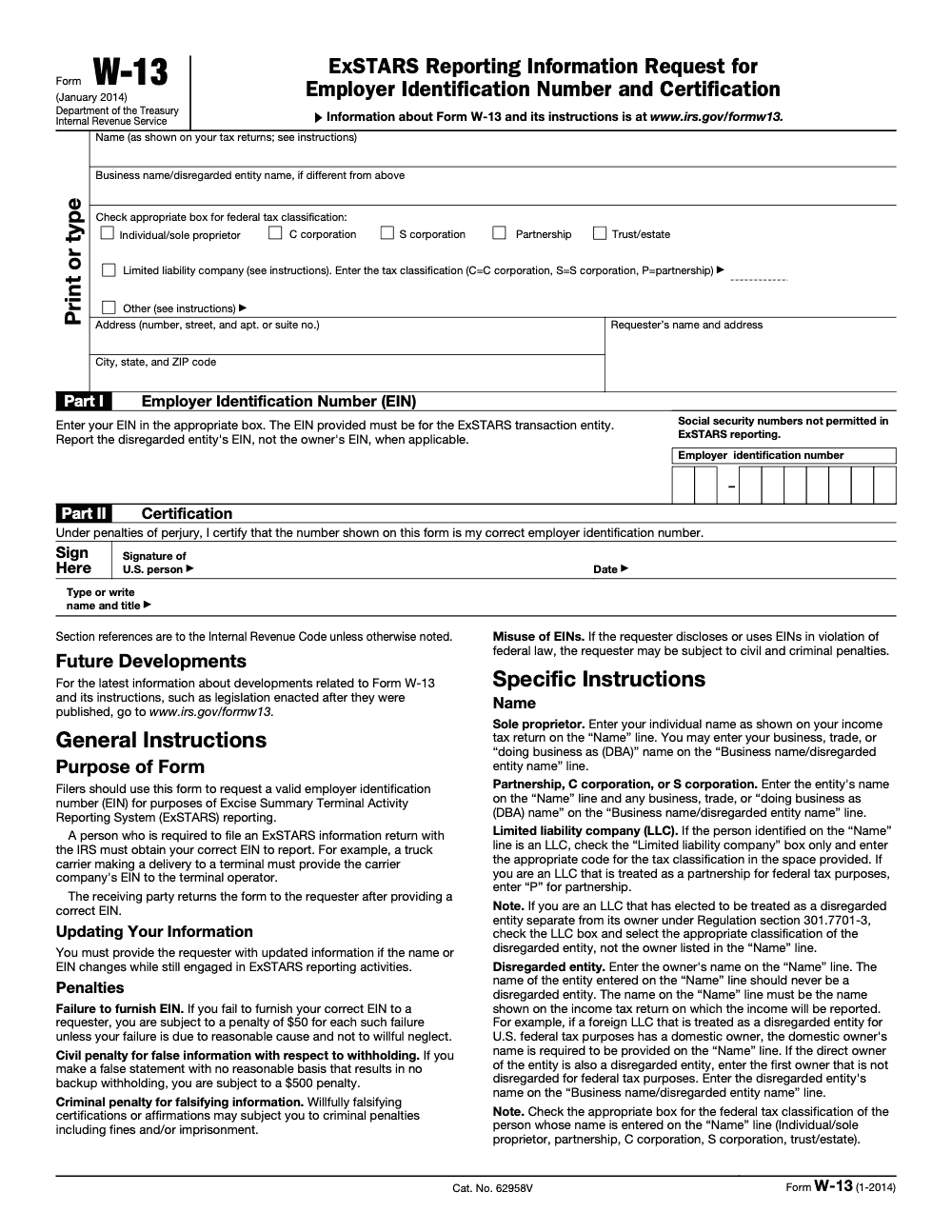
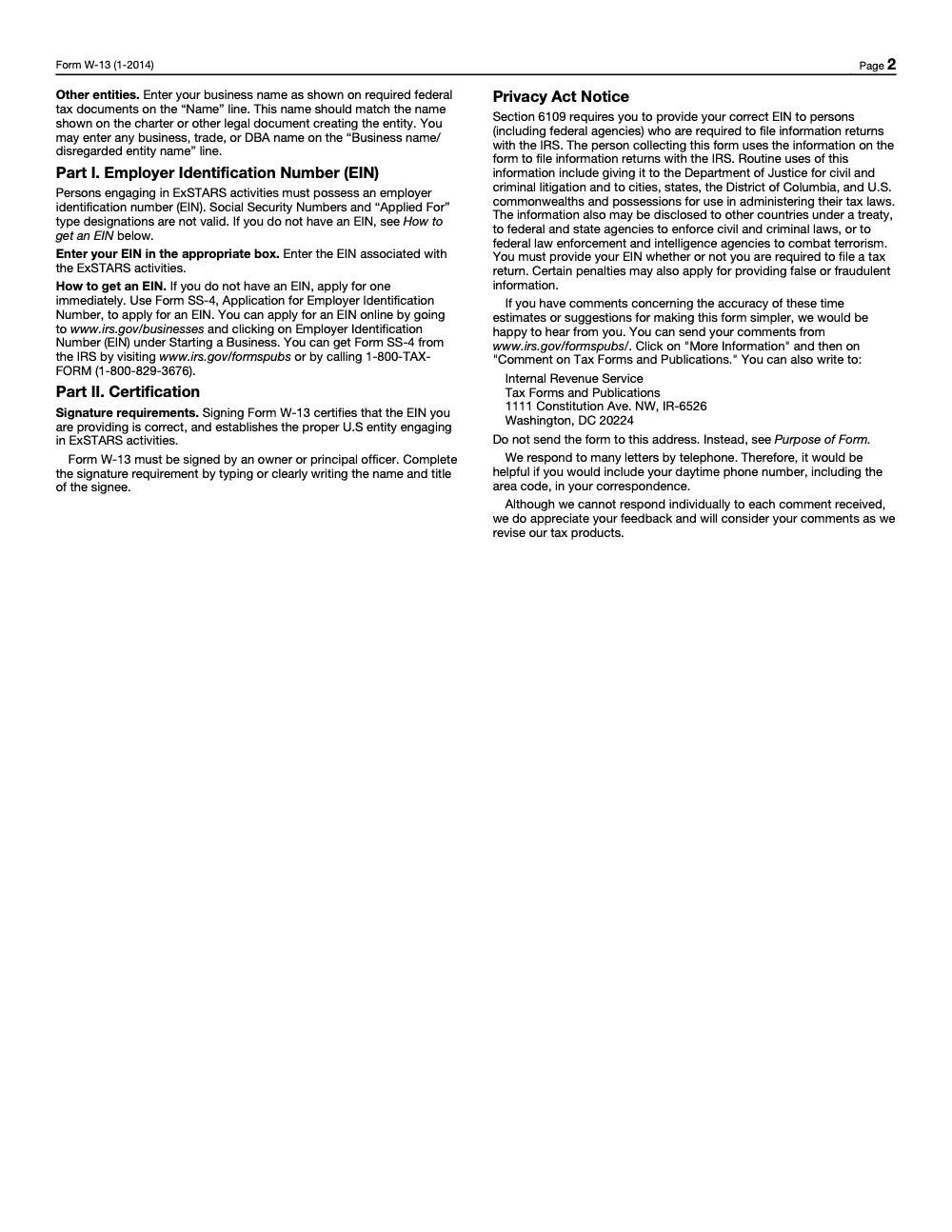
Form W-13 is the EIN request and certification used exclusively for Excise Summary Terminal Activity Reporting System (ExSTARS) reporting – not a substitute for Form W-9. The filer enters a 9-digit EIN in Part I in XX-XXXXXXX format (Social Security Numbers and "Applied For" designations are not valid), signs Part II under penalties of perjury, and returns the completed form to the requester – never to the IRS (per Form W-13 instructions, Rev. January 2014). Failing to furnish a correct EIN carries a $50 penalty for each failure, and the penalty stacks across repeated requests.
A terminal operator is about to release a rack lift, and the carrier's paperwork is missing a clean EIN. The catch is that Form W-13 should already be signed and validated before lift privileges are granted, because terminal operators use its data to map each lift to the correct taxpayer in ExSTARS.
Form W-13 is the EIN request and certification used exclusively for ExSTARS reporting, not a substitute for Form W-9. The carrier enters a 9-digit EIN in Part I in XX-XXXXXXX format, signs Part II under penalties of perjury, and returns it to the requester, never to the IRS. Pair the EIN with the SCAC, re-validate the moment the legal name, EIN, or SCAC changes, and note that failing to furnish a correct EIN carries a $50 penalty for each failure.
Key Takeaways
- Form W-13 is used to capture and certify the purchaser’s or position holder’s legal name, mailing address, and EIN for terminal rack lifts, and it is part of the IRS ExSTARS ecosystem.
- Terminal operators map each lift to the correct taxpayer in ExSTARS by using W-13 data, which reduces corrections and penalty exposure.
- Capture the carrier’s SCAC with the EIN to pinpoint the lifting party. Keep SCAC data synchronized with access agreements and dispatch records.
- Obtain, validate, and retain a signed W-13 before granting lift privileges. Re‑validate immediately if the legal name, EIN, or SCAC changes.
- Validate EIN and name combinations against IRS resources, for example TIN Matching for authorized payers, and document your checks.
What Is Form W-13 And Who Uses It?
Think of Form W-13 as the rack identity anchor. It records the purchaser or position holder’s legal name, address, and EIN so your ExSTARS reports tie each lift to the right taxpayer. The IRS publishes W-13 specifically for ExSTARS reporting and EIN certification, which means it is recognized inside the same reporting framework that covers Forms 720‑TO and 720‑CS.
Who relies on it day to day
- You, the terminal operator or controller, to ensure lift attribution is correct.
- Compliance and tax teams, to reconcile ExSTARS files to terminal activity without chasing mystery entities.
- Carriers and position holders, to certify identity and keep their lifts flowing without blocks.
You should also capture the carrier’s SCAC alongside the EIN. SCAC is a two to four letter code issued by NMFTA that uniquely identifies transportation companies, and it is your best tool for matching the physical lifter to the reported taxpayer.
When Terminals Should Request Form W-13
Request a signed W-13 before the first lift. Build it into your onboarding checklist with SCAC, carrier access agreements, and a current certificate of insurance. Re‑request W-13 immediately when the legal name or EIN changes, and block lifts if the form is missing or out of date. That sounds strict because it is, yet it keeps your ExSTARS file clean and avoids rework.
| Event | Action | Control Note |
| Onboarding | Collect W‑13, SCAC, access agreement, certificate of insurance | Identity and authorization verified |
| First lift scheduled | Confirm W‑13 on file | Block lift if missing |
| Name or EIN change | Re‑request W‑13 | Update all maps and reporting |
| Quarterly control review | Run quick documentation check | Keep teams audit‑ready |
Information Required On Form W-13
W-13 is simple, and that is the point. Capture only what you need to get identity, reporting, and audit support right.
- Legal business name and any trade name, spelled exactly as registered.
- EIN for the purchaser or position holder. Social Security Numbers and "Applied For" designations are not valid for ExSTARS reporting, so a sole proprietor without an EIN must obtain one via Form SS-4 before the W-13 can be completed.
- Mailing address, city, state, and ZIP code for record matching and notices.
- A phone number and a named contact for quick issue resolution.
- An authorized signature and date to certify the information – the signer must be an owner or principal officer of the entity, not a delegated bookkeeper, controller, or outside CPA.
Incomplete, inconsistent, or unsigned submissions slow reviews and lead to errors later. Treat the form like a gate, not a suggestion. The IRS positions W‑13 as an ExSTARS identity document, so you want every field complete and certified.
W‑13 At A Glance: What It Is And How To Use It
- What: W‑13 is the EIN certification and identity capture form used to attribute rack lifts to the right taxpayer in ExSTARS.
- How: Bake W‑13 into onboarding, validate EIN and SCAC, pair it with access agreements and insurance, and block lifts if anything is missing.
- Wow: Add live validation steps, keep SCAC synchronized with dispatch, and document checks so month‑end reconciliation and audits become fast and defensible. You will feel the difference at filing time.
How To Obtain And Validate A Carrier’s EIN
You want a repeatable, documented flow. Here is a model you can adopt and tailor.
Step‑By‑Step EIN Validation Flow
- Collect identity at onboarding
- Require a completed Form W‑13 with the legal name and EIN. Store it in your controlled repository.
- Match name to EIN
- Compare the legal name on W‑13 to the EIN documentation your counterparty provides, such as an IRS CP 575 or 147C letter when available.
- For payers who issue information returns, use the IRS TIN Matching service inside e‑Services to confirm name and EIN combinations, interactive or bulk, then log results, date, and user.
- Link physical lifts to identity
- Capture the SCAC on intake, align it with your access agreement, and tie it to the EIN in your system. Keep this linkage visible to the rack team.
- Re‑validate on change
- If the carrier’s legal name, ownership, or EIN changes, re‑collect W‑13, update the linkage, and pause lifts until verification is complete.
Evidence You Should Keep
- Signed W‑13 and any IRS name/EIN support letters.
- System screenshots or logs from TIN Matching, if you are authorized to use it.
- Access agreement with the same legal name and SCAC.
- Current certificate of insurance that matches the W‑13 entity.
Using SCAC To Identify The Lifting Carrier
The Standard Carrier Alpha Code (SCAC) is your practical check on who actually picked up fuel. SCACs are issued by the National Motor Freight Traffic Association and are two to four letters, which makes them easy to capture at the rack and in dispatch.
- Verify SCAC status in NMFTA’s SCAC resources or SCAC Online so you know the code is active and correctly tied to the company you expect.
- Store SCAC next to the EIN in your terminal system, then audit the linkage monthly so expiring or changed codes do not break your mapping.
- Watch for the 2026 NMFTA change for non‑Class 8 carriers, where NMFTA becomes the sole issuer and implements extra verification, which helps reduce fraud risk. Plan process updates now so your validations stay current as of February 26, 2026.
| Field | Purpose | Control |
| SCAC | Identify lifting carrier | Validate format, confirm active status via NMFTA |
| EIN | Taxpayer identity | Match to legal name, retain proof of validation |
| Lift ID | Transaction link | Cross‑check with dispatch and BOLs |
Form W-13 vs. Form W-9, Which One And When?
- Use W‑13 when you are documenting the entity tied to a terminal rack lift for ExSTARS reporting. It is about identity at the rack and monthly information reports, not vendor payment reporting.
- Use W‑9 when you need a U.S. person’s TIN for payment reporting, backup withholding, or information returns, such as 1099s. The W‑9 requestor instructions explain this clearly.
A helpful mental model
- Rack attribution and ExSTARS, pick W‑13.
- Payee setup and information returns, pick W‑9.
How Form W-13 Supports ExSTARS Reporting
ExSTARS uses monthly information reports from terminal operators and carriers, including Form 720‑TO and 720‑CS. Those files rely on clean identity mapping to tie actual movements to the correct taxpayers. W‑13 is your ground truth for that mapping. When the EIN, legal name, and SCAC are aligned in your systems, your ExSTARS submissions reconcile to terminal activity without noisy variances.
Practical tips that keep reports clean
- Require W‑13 for every purchaser or position holder that can lift.
- Integrate EIN and SCAC from W‑13 into your bill of lading and lift records.
- Run a monthly compare between dispatch logs and your ExSTARS export to confirm that each lift points to a purchaser that has a valid W‑13 on file.
Bottom line, when W‑13 is tight, ExSTARS is quiet. Your team spends time shipping fuel, not correcting files.
Pair W-13 With Carrier Access Agreements
W‑13 anchors identity. Your access agreement documents authorization. Keep them in lockstep.
- Match the legal name and SCAC on both documents.
- Spell out who can enter, how badges are issued, how access logs work, and when credentials expire.
- Reconcile access logs and BOLs to W‑13 data in a quick monthly control so your audit trail stays complete.
Pair W-13 With Insurance Certificates
An up‑to‑date certificate of insurance protects your terminal and verifies that you have the right entity name tied to the lifting carrier.
| Document | Checkpoint | Action |
| W‑13 | Legal name and EIN | Match against the certificate’s insured name |
| Certificate | Policy types | Confirm auto liability and cargo at your minimums |
| Certificate | Limits | Verify current limits and endorsements |
| Both | Effective dates | Track expirations and collect renewals before lapse |
| File | Audit trail | Retain copies with access agreement and W‑13 |
If ownership, EIN, or SCAC changes, collect a fresh W‑13 and updated certificate before the next lift. Do not assume coverage follows a name change.
Verify Carrier Identity And Authorization, A Quick Checklist
- Completed, signed Form W‑13 with legal name and EIN on file.
- SCAC verified and active, linked to the same legal entity.
- Access agreement with identity details that match W‑13 and SCAC.
- Current certificate of insurance that matches the same entity.
- Authorization log updated with validation dates, responsible user, and evidence location.
- Re‑validation triggered any time ownership, EIN, SCAC, or insurance changes.
Store And Update Form W-13 Data
Build A Controlled Repository
- Use a secure document store with electronic indexing by terminal, customer, and SCAC.
- Give role‑based access to limit who can add, change, or delete files.
- Keep resilient backups so you can retrieve W‑13 and support files quickly during an audit.
Version Control That Works
- When a carrier’s EIN, legal name, or SCAC changes, add a new version, time‑stamp it, and keep the prior version for your audit trail.
- Record the validator’s name, date, method, and outcome, for example TIN Matching result ID where applicable.
- Run an annual documentation review, plus a quick quarterly check, to catch expirations and mismatches before filing month‑end reports.
Report The Correct Rack Purchaser With W-13
ExSTARS hinges on who bought or took possession at the rack. Your W‑13 is the source of truth for the legal name and EIN you must report. Tie each lift to that EIN so the inventory and tax responsibility fall to the right entity in your 720‑TO and carrier files.
Make it practical
- Require a W‑13 from every position holder before lift privileges.
- Match EIN and legal name to IRS records, then bind SCAC so the physical lift and reported purchaser stay in sync.
- Keep W‑13, access agreements, and insurance together in one folder per counterparty so audits are fast and focused.
Common W-13 Mistakes To Avoid
- Using a trade name where the legal name is required.
- Accepting an invalid or missing EIN, which cascades into ExSTARS misreports.
- Skipping SCAC capture, which breaks traceability between the lifter on site and the purchaser you report.
- Allowing unsigned or outdated forms to linger in the file.
- Onboarding without verifying access agreement and insurance details match the W‑13.
- Failing to schedule periodic documentation checks, so changes slip past your team.
State And Local Implications Of W-13 Data
State revenue agencies use ExSTARS data to attribute purchases and liabilities. If your W‑13 or EIN data is wrong, a state can map terminal activity to the wrong filer, which invites notices and assessments. Clean W‑13 data lowers the risk of cross‑jurisdiction mismatches when states compare ExSTARS movements to state motor fuels returns and licensing records. ExSTARS exists to enable this matching across forms and periods, so getting identity right is worth the extra five minutes up front.
Where To Get Form W-13 Guidance And Updates
- IRS About Form W‑13 page for the current form and revision history. Check the “Last Reviewed” date for freshness, for example February 19, 2025 on the most recent IRS update.
- IRS ExSTARS overview, related forms, and the 720‑TO and 720‑CS instructions, which outline who files and how data is used.
- IRS Internal Revenue Manual sections that describe how ExSTARS data flows and how discrepancies are handled.
- NMFTA resources for SCAC definitions and verification procedures, including SCAC Online and the 2026 verification change for non‑Class 8 carriers. Build this change into your playbooks now.
Where Accountably Fits
If your firm is stretched thin and documentation drifts during peak season, the gap is usually capacity, not effort. Accountably places trained offshore accountants and tax preparers inside your firm, ramped on your tools, templates, and SOPs, to run W‑13 collection, EIN checks, SCAC mapping, and evidence retention as a disciplined workflow. Multi-layer review keeps quality high and partner review time low, and you prove the work on a small pilot before you scale. Not a fit in 45 days? We replace them free.
Conclusion
W‑13 is small, but it does big work. When you collect it before first lift, validate EIN and SCAC, and keep the paperwork in sync with access and insurance, your ExSTARS files line up cleanly with what actually moved at the rack. Add quarterly checks, document your validations, and pause lifts when information changes. Do that, and audits feel routine, not risky.
Common Mistakes We See Every Season
From my side of the desk, the same five mistakes show up almost every time a terminal collects W-13s from a new batch of carriers. Each one is cheap to prevent at intake and expensive to unwind months later when ExSTARS data fails a match.
Reusable Checklists
The checklists below are copy-paste ready for terminal or firm SOPs. Each one is built from the Form W-13 instructions (Rev. January 2014) and the rack-level patterns we see during ExSTARS reporting cycles.
W-13 intake validation
- Confirm the Name line matches the entity that reports income (sole proprietor's individual name for SPs, entity name for partnerships and corporations, first non-disregarded owner for disregarded entities).
- Confirm the Business name / disregarded entity name line carries the DBA, trade name, or disregarded entity name where applicable.
- Verify exactly one federal tax classification is checked; if the Limited Liability Company box is checked, confirm a single-letter code (C, S, or P) is present in the adjacent space.
- Verify Part I shows a 9-digit EIN in XX-XXXXXXX format with no SSN and no "Applied For" placeholder.
- Confirm Part II is signed by an owner or principal officer with name and title typed or clearly written next to the signature.
- Cross-check the EIN against any prior W-13 on file for the same entity and flag mismatches before clearing the lift.
- Log the request date, response date, and validation result in your W-13 tracker keyed by EIN.
Carrier onboarding packet
- Issue the W-13 request before the first rack lift is authorized; do not back-fill after product moves.
- Collect the Standard Carrier Alpha Code (SCAC) alongside the W-13 so ExSTARS submissions can identify the lifting carrier on Form 720-TO and Form 720-CS.
- Collect a current certificate of insurance and confirm the named insured matches the legal name on the W-13.
- Execute or refresh the Carrier Access Agreement with terms tied to the same legal entity that signs Part II.
- Store the W-13 PDF, SCAC, certificate of insurance, and Carrier Access Agreement together under one record keyed to the EIN.
- Set a calendar reminder to revalidate the W-13 if the carrier reports any legal name or EIN change.
Name or EIN change response
- Treat any reported legal name or EIN change as a new W-13 request, not an amendment.
- Pause new rack lifts until the updated W-13 is received and validated end-to-end.
- Re-run the intake validation steps above against the new form before clearing the next lift.
- Update the SCAC mapping, certificate of insurance, and Carrier Access Agreement to match the new entity.
- Archive the prior W-13 with a clear superseded-on date so historical ExSTARS submissions stay traceable.
- Notify accounts payable so vendor master data, 1099 setup, and remittance details realign to the new EIN.
Keep W13 Season From Stalling
ExSTARS season does not look like the April tax crunch, but it has the same shape: a narrow window where a terminal collects W-13s from every carrier moving product through the rack, validates EINs, and reconciles SCAC mappings before Form 720-TO and Form 720-CS submissions go out. According to the Form W-13 instructions (Rev. January 2014), every filer engaged in ExSTARS activities must furnish a correct EIN, and the per-failure penalty stacks at $50 each under IRC §6109, so the cost of a delayed or wrong W-13 compounds across a carrier roster of any size.
The fix is not more people running the same intake. It is a documented W-13 workflow that catches the predictable issues before they hit the ExSTARS submission, so production capacity stays focused on rack-level operations instead of EIN cleanup weeks later.
- Standardize a W-13 intake checklist that validates the Name line, Business name / disregarded entity name line, and federal tax classification (including the LLC C / S / P code) before Part I is reviewed.
- Treat Part I as a hard gate: only an issued 9-digit EIN in XX-XXXXXXX format clears it. SSNs, "Applied For" notes, and missing hyphens send the form back the same day.
- Lock the Part II signer policy to owner or principal officer, with the typed name and title captured in the same scan as the signature, so audit-ready certifications are the default.
- Pair every W-13 with the carrier's SCAC, certificate of insurance, and Carrier Access Agreement under one EIN-keyed record so ExSTARS lookups stay a single query.
- Run a quarterly W-13 reconciliation against your rack-lift ledger to catch legal name or EIN changes the filer forgot to re-furnish.
That is where we plug in. Accountably handles the W-13 intake, EIN validation, SCAC reconciliation, and ExSTARS file preparation as a structured workflow inside our U.S. accounting and tax outsourcing service, so terminal teams keep their attention on rack operations and the Form 720-TO and Form 720-CS submissions go out clean.
FAQs
Form W‑13 captures and certifies a purchaser’s or position holder’s EIN and legal name for ExSTARS reporting. Terminal operators use it to tie each rack lift to the correct taxpayer and to support clean 720‑TO and 720‑CS files.
There is no standard U.S. federal “Form 13” income tax form. If you see something labeled that way, verify the issuing agency because it may be a state or administrative document. When in doubt, check the agency site or speak with your advisor.
Use Form 4684 for casualties and thefts, which can include certain involuntary conversions. Evaluate whether Section 1033 rules apply to defer gain when property is replaced.
Yes. Form W‑14 is the Certificate of Foreign Contracting Party Receiving Federal Procurement Payments, used under Internal Revenue Code Section 5000C to document an exemption or modified withholding on the 2% tax on certain federal procurement payments to foreign contracting parties. It is unrelated to ExSTARS, and it is not used for terminal rack identity.
Other forms this guide names
- Form 720-TO: Terminal Operator Fuel Report Guide
- Form W-9: Guide & Instructions
- Form W-14: 2% Section 5000C Relief for Federal Contracts
Summarize this article with AI
About this guide
Accountably helps US CPA, EA, and accounting firms hire trained accountants and tax preparers in India.
About us Reviewed byJugal Thacker, CPAFounder and CEO at Accountably
A US-licensed CPA with 7+ years inside US firms – PwC, a real-estate tax practice, then a full-service firm, rising from reviewer to manager to advisory. This article was reviewed against current IRS guidance for the 2025 tax year and updated for filers preparing late returns, amendments, and 2026 estimates.
View profile →How we research, review, and update this guide
Every Accountably guide is researched against primary IRS sources, reviewed by a U.S. CPA, and refreshed as guidance evolves. Read our Editorial Guidelines to see how we source, fact-check, and update our content.




