
Summarize this article with AI
In Brief
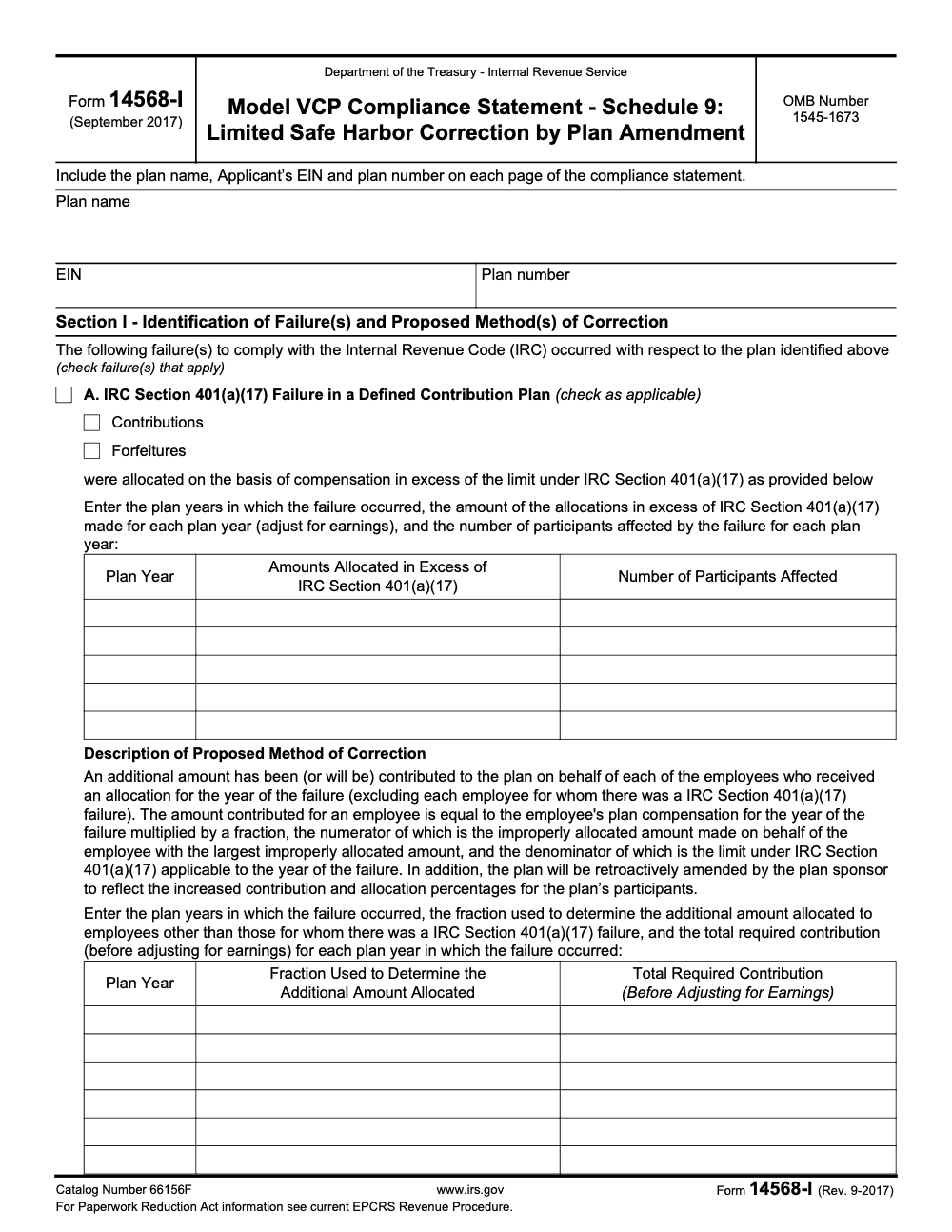
Form 14568-I is the IRS Model VCP Compliance Statement Schedule 9 – a limited safe harbor for correcting four qualified-plan operational failures (Failures A through D) by retroactive plan amendment, per Rev. Proc. 2021-30. It is always filed as an attachment to Form 8950; the 2025 IRC 401(a)(17) compensation limit used in Failure A correction math is $350,000 (per IRS Notice 2024-80).
The first Form 14568-I I packaged was for a defined contribution plan that had been allocating contributions above the IRC 401(a)(17) compensation limit. The legal theory was sound; what nearly sank the submission was the correction math and the missing labels, plan name, EIN, and plan number, on every attachment page. Form 14568-I, Schedule 9, is the limited safe harbor for fixing certain operational failures by retroactive plan amendment.
It addresses four qualified-plan operational failures, Failures A through D, under Rev. Proc. 2021-30, and the 2025 401(a)(17) compensation limit that drives the Failure A math is $350,000. It cannot be filed standalone; it always rides as part of a Form 8950 VCP package on Pay.gov, as one non-fillable PDF of 15MB or less. The schedule wants an amendment-based correction with exact language and dates, not a story about fixing something operationally and moving on.
Key Takeaways
- Form 14568-I (Schedule 9) is used in a VCP submission to document a Limited Safe Harbor Correction by Plan Amendment.
- You always submit it as part of a Form 8950 VCP package filed through Pay.gov (Form 14568-I cannot be filed standalone), along with required forms, narratives, and enclosures.
- Your Pay.gov upload must be one PDF, ≤ 15MB, and not fillable/editable, or Pay.gov can reject it.
- Schedule 9 is about an amendment-based correction, not “we fixed it operationally” and not “we made a payment and moved on.”
- The IRS expects a clean correction story, meaning exact amendment language, dates, and support that shows the amendment solves the failure and is timely.
What Is Form 14568-I (Schedule 9)?
Form 14568-I is part of the IRS “Model VCP Compliance Statement” schedule set. Specifically, it is Schedule 9 (an attachment to the main Form 14568, not a standalone filing), titled Limited Safe Harbor Correction by Plan Amendment, and it covers only four specific failure types: IRC 401(a)(17) compensation-limit failures in defined contribution plans, hardship distribution failures, plan loan failures, and early inclusion of otherwise eligible employees.
In plain terms, Schedule 9 is where you explain a very specific kind of fix, a fix that works because a retroactive plan amendment brings the plan document back into compliance under the IRS correction rules in Rev. Proc. 2021-30 (EPCRS).
What Schedule 9 is not
This matters because a lot of VCP packets go sideways when teams treat all schedules like generic worksheets.
Schedule 9 is not meant for:
- General operational failures that require different correction methods
- Corrections that are mostly “we recalculated and funded an amount,” with no plan amendment doing the real work
- A broad plan redesign that goes far beyond the year and issue being corrected
If you are not correcting via a plan amendment under the “limited safe harbor” concept, you are probably in the wrong schedule.
When to Use Form 14568-I
You use Form 14568-I (Schedule 9) when your VCP filing relies on a limited safe harbor correction that is made through a plan amendment for one (or more) of the four failure types Schedule 9 covers: 401(a)(17) DC-plan failures, hardship distribution failures, plan loan failures, and early inclusion of otherwise eligible employees. Schedule 9 cannot be mixed-and-matched with other correction methods or applied to failures outside those four categories.
The IRS has also published practical VCP guidance around amendment-based correction methods, and it specifically points filers to using Form 14568 and the relevant schedules, including Form 14568-I, as part of the submission package.
Here is the simplest way to think about it.
The “why” behind Schedule 9
The IRS is trying to confirm three things:
- What failed, and which plan year(s) it impacted
- What your amendment says, and why that language cures the failure
- That the amendment was adopted within the permitted timeframe, based on EPCRS rules
Your Schedule 9 responses, narratives, and attachments should make those three points hard to misunderstand.
Where Form 14568-I Fits in the VCP Filing (and why formatting matters)
Most people do not get tripped up by the theory. They get tripped up by packaging.
VCP submissions are made through Pay.gov using the Pay.gov version of Form 8950, and Pay.gov instructs filers to have a single PDF file (not exceeding 15MB) that contains the relevant forms and enclosures.
Pay.gov also warns you not to upload a PDF with fillable or editable content. If you do, you can get an error, and the practical fix is to “print to PDF” so the fields flatten.
What typically goes into that single PDF
Pay.gov’s own checklist mentions the items you should be ready to include, depending on your situation, including:
- Applicable attachments to Form 8950
- Form 2848 or Form 8821 if applicable
- Penalty-of-perjury statement if applicable
- Cover letter if applicable
- Form 14568 and narrative attachments if applicable
- Form 14568-I (and other schedules if applicable)
- Plan documents and any required enclosures listed in Rev. Proc. 2021-30, including organizing in the order suggested in section 11.11
Eligibility for a Limited Safe Harbor Correction by Plan Amendment (Schedule 9)
If you want Schedule 9 to work for you, you need to be honest about one thing up front. Is this truly a plan document fix that fits the limited safe harbor concept, or are you trying to squeeze a more complicated issue into the easiest looking bucket?
Rev. Proc. 2021-30 (as updated by SECURE 2.0 guidance) allows certain correction methods, including correction by plan amendment in specific situations, and the IRS’s own VCP content points filers back to the Rev. Proc. for what needs to be included and how to assemble the submission.
This section is a practical screening tool, not legal advice. For anything borderline, bring in ERISA counsel or a qualified retirement plan specialist.
Quick “Is Schedule 9 even possible?” checklist
You are usually in the right neighborhood for Form 14568-I when the following are true.
- The failure is a plan document or safe harbor design defect that can be cured by a corrective amendment
- The amendment is narrow and targeted, not a sweeping rewrite
- You can clearly state the affected plan year(s)
- You can support the effective date and adoption date with executed documents and governance records
- The amendment does not hide a second issue that really needs a different correction method
If you cannot answer these cleanly, your risk is not “the IRS disagrees,” your risk is “the IRS cannot follow the story,” which leads to delays and follow-up requests.
Common Scenarios Where Schedule 9 Makes Sense
The IRS titles Form 14568-I “Limited Safe Harbor Correction by Plan Amendment.” The “safe harbor” here is the correction method itself, not a safe harbor 401(k) plan design. The IRS has pre-approved a retroactive plan amendment as the cure for four specific failure types, and Schedule 9 covers only those four.
In real work, teams land here when the plan was operated one way for a year but the written plan document did not authorize it, and the fix is to amend the document retroactively so it matches what actually happened. The four failure categories Schedule 9 addresses are:
- An IRC 401(a)(17) compensation-limit failure in a defined contribution plan, where contributions or forfeitures were allocated on compensation above the annual limit ($350,000 for 2025 plan years, per IRS Notice 2024-80)
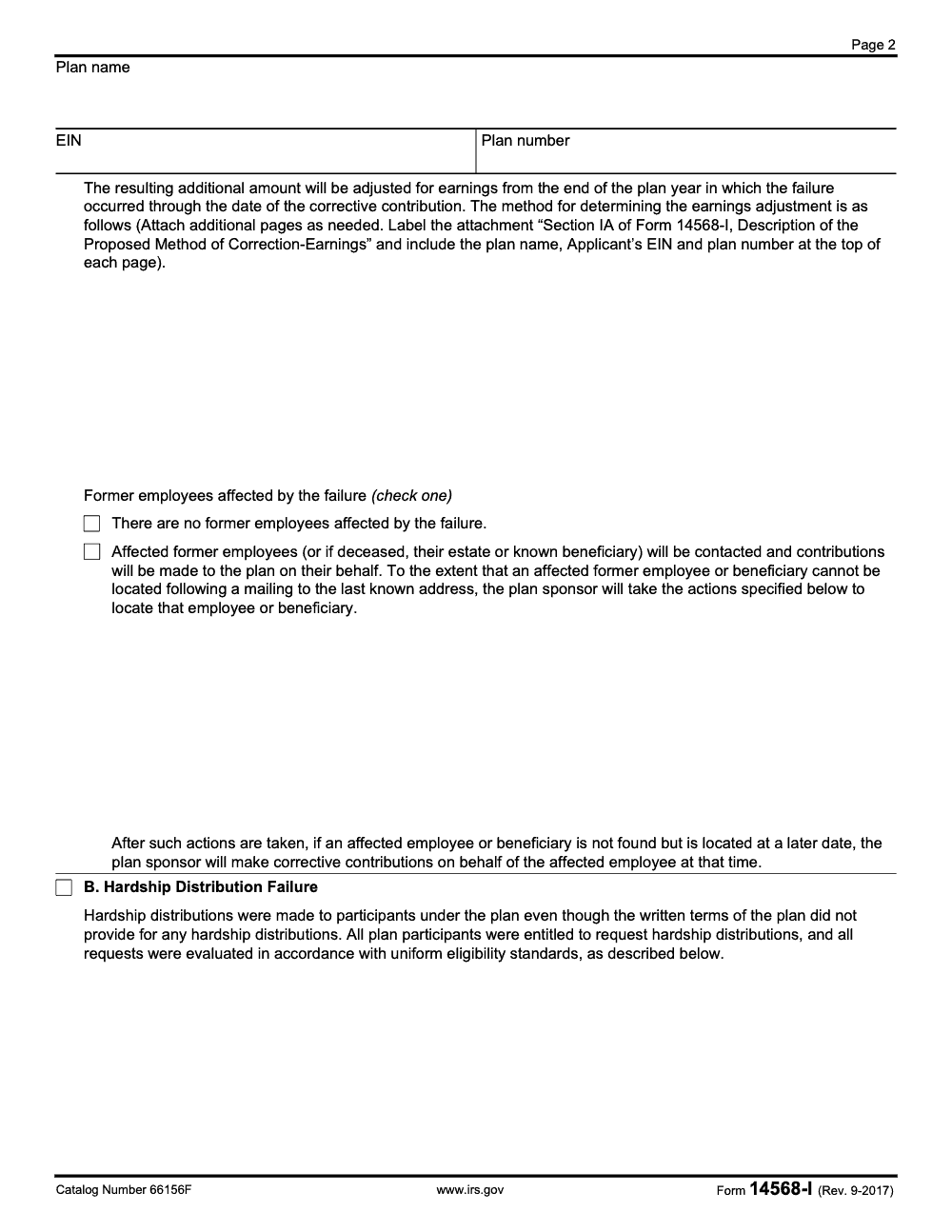
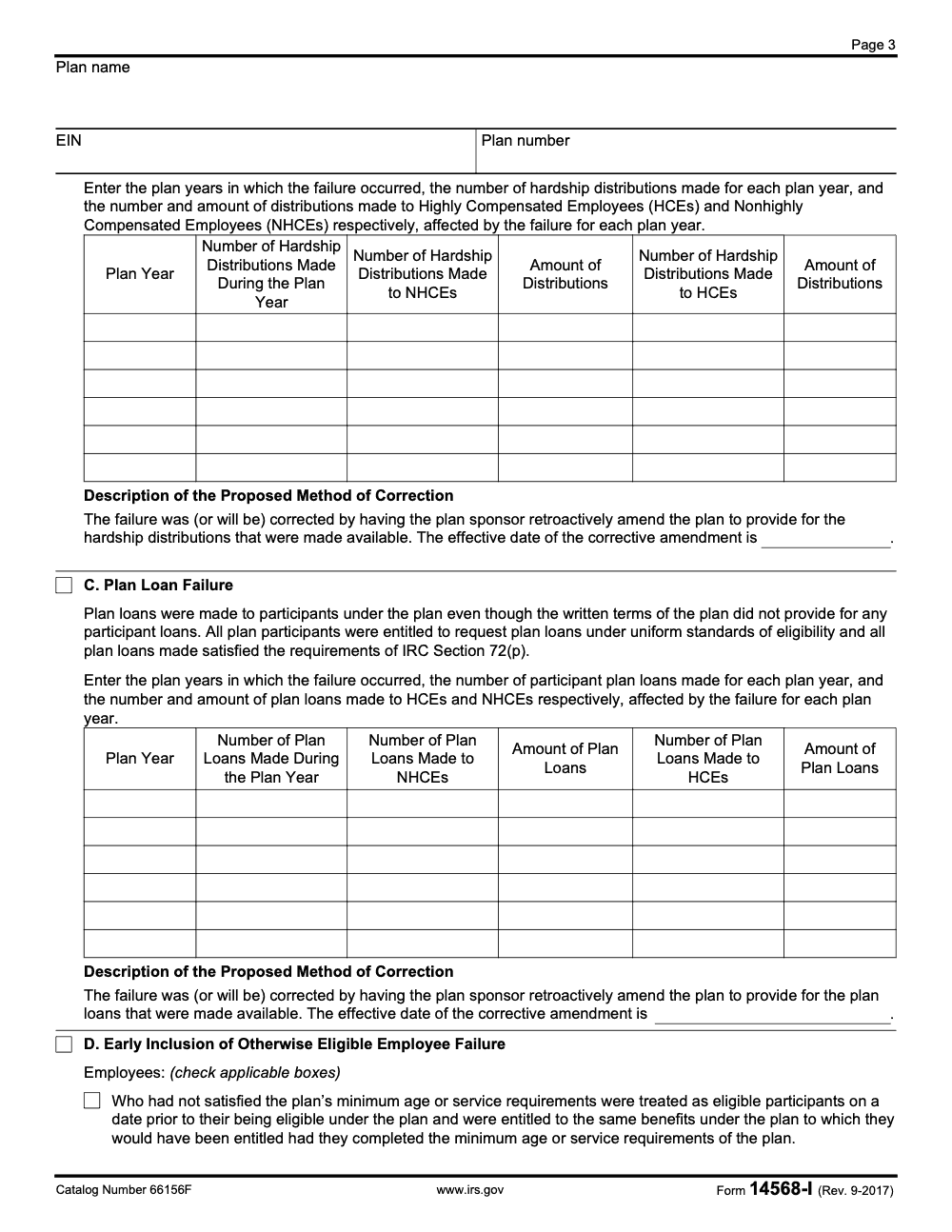
- A hardship distribution failure, where hardship distributions were made even though the written plan did not provide for them, and all participants were treated under uniform eligibility standards
- A plan loan failure, where participant loans were made even though the written plan did not provide for loans, and the loans themselves satisfied IRC 72(p)
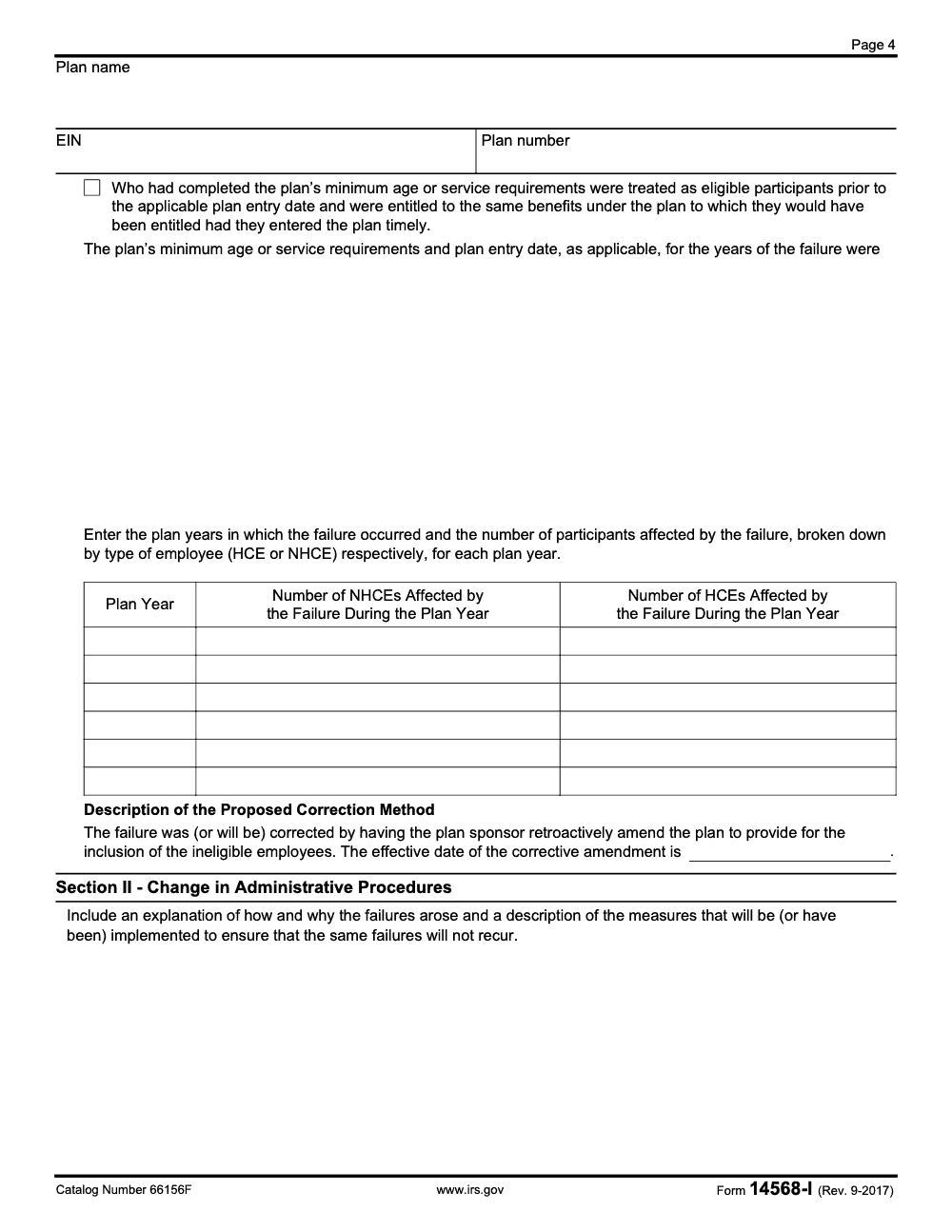
- An early inclusion failure, where employees were treated as eligible before they had met the plan’s minimum age or service requirements or before the applicable plan entry date
In each case the correction is a retroactive amendment that aligns the written plan with how it was actually operated. If your situation does not match one of these four categories, Schedule 9 is the wrong schedule and a different VCP correction method applies.
Timing, the Part That Creates the Most Anxiety
People get nervous about timing because they want a simple rule like “you have 12 months.” EPCRS is not built that way.
The core idea is that your amendment needs to be adopted within the window that makes the correction permissible under Rev. Proc. 2021-30, and your VCP submission should be assembled in line with the Rev. Proc. requirements and ordering guidance.
What you should document for timing
Even if you already know your dates, the IRS still needs proof. Your packet should make it easy to verify:
- The plan year(s) affected
- The date the defect was identified, if relevant
- The amendment’s effective date
- The amendment’s adoption and execution date
- Evidence the amendment was properly authorized, such as board or committee minutes, sponsor resolutions, or signed approvals
A good rule of thumb is this. If you had to defend the timing to a skeptical reviewer, could you do it with what is already in the PDF?
Disqualifiers and “Wrong Schedule” Warning Signs
Schedule 9 is not a cure-all. If the correction requires a different correction method, forcing it into Schedule 9 can backfire.
Red flags that often signal you need a different schedule or a different approach:
- The problem is mainly operational, meaning the plan was operated incorrectly and an amendment does not fully address participant impact
- The fix involves monetary restoration, distributions, or reallocations that go beyond what an amendment can cure on its own
- The issue spans multiple, unrelated failures, and your correction narrative reads like a list of unrelated cleanups
- You are missing executed plan documents, or you cannot prove adoption timing
If you are unsure, the IRS provides a central list of VCP schedules and forms for different failure types, and that list helps you confirm you are working in the right schedule family.
Schedule 9 Decision Table (fast way to sanity-check)
| Your situation | Schedule 9 (Form 14568-I) likely fits | You probably need something else |
| The correction is primarily a plan amendment tied to a limited safe harbor concept | Yes | No |
| You need to make participants whole with a payment or corrective distribution | Usually no | Often yes |
| You can clearly state the defect, the plan year, and the exact amendment language | Yes | No |
| You cannot support adoption dates, approvals, or signed amendment copies | No | Yes |
| The issue is a different failure type listed in other 14568 schedules | No | Yes |
Next, we’ll get practical about what to gather and how to build a packet that does not collapse in the final review.
Documents You Need for Form 14568-I (Schedule 9)
If you want your VCP submission to move smoothly, the best thing you can do is build a “proof stack” before you start writing narratives.
Pay.gov’s instructions for Form 8950 describe what should be ready for the single PDF upload. It includes the applicable 14568 forms and schedules, plan documents, correction descriptions, and any other required items listed in Rev. Proc. 2021-30.
Here’s a clean, real-world list that matches what reviewers typically need to see.
Core items (almost always needed)
- Form 8950 (your VCP application through Pay.gov); the initial VCP user fee is paid on Pay.gov when you submit Form 8950, so no separate fee form is needed to open the case
- Form 14568 (Model VCP Compliance Statement), when applicable
- Form 14568-I (Schedule 9) completed, unmodified
- A clear narrative attachment describing the failure and why the amendment-based correction fits
- The executed corrective plan amendment, plus clean and redlined versions if available
- The relevant portions of the plan document and adoption agreement that show the defective language and the corrected language
- Support for your dates, such as board minutes, committee approvals, or sponsor resolutions
“Only if applicable” items that still trip people up
- Form 8951 only if the IRS requests an additional user fee on an already-open VCP case; it is not part of the initial submission, because the original fee is paid with Form 8950 on Pay.gov
- Form 2848 if someone will represent the sponsor before the IRS, or Form 8821 if someone only needs to receive information copies
- A penalty-of-perjury statement, when required for the submission
- Participant notices or communications that show how safe harbor terms were communicated, when relevant
- Workpapers and calculations, if they support the correction story or participant impact
A Simple Pack List Table (use this as your internal checklist)
| Item | Why it matters | Practical tip |
| Form 14568-I (Schedule 9) | Documents the limited safe harbor correction by plan amendment | Do not edit the IRS format |
| Corrective amendment (executed) | Proves what you adopted, and when | Put signature page right after the amendment |
| Plan excerpts (before and after) | Shows the defect and the fix | Include section numbers in your narrative |
| Narrative attachment | Connects facts, law, and correction method | Write it like you are explaining to a new reviewer |
| Form 8950 and Pay.gov confirmation | Anchors the submission | Save the tracking number immediately |
Quick Start, Complete Schedule 9 and Assemble Your Packet in 7 Steps
This is the part most teams want. Not theory, just a reliable sequence.
Step 1, confirm Schedule 9 is the right schedule
Use the IRS schedule list as a sanity check. If your failure type is clearly covered by another schedule, do not force Schedule 9.
Step 2, write your “one paragraph correction story”
Before you fill out any form fields, write one paragraph that answers:
- What failed
- Which plan year(s) are affected
- What amendment fixes it
- Why the amendment fits EPCRS and the limited safe harbor concept
- What you are attaching as proof
This paragraph becomes your north star when review comments start flying.
Step 3, complete Form 14568-I with exact amendment language
Be precise.
- Identify the plan, sponsor, EIN, and plan number exactly as it appears in the rest of the packet
- Insert the amendment language as required by the form, or attach it clearly and cross-reference it
- State effective and adoption dates consistently across the schedule and narrative
Step 4, build your evidence set around dates
Create a mini section in the PDF that makes timing easy to verify:
- Signed amendment
- Approval documentation
- Any relevant notices
- Plan excerpts that show the impacted provisions
If a reviewer has to hunt for your adoption date, you are creating avoidable delay.
Step 5, flatten your PDFs early
Pay.gov warns against uploading PDFs with fillable or editable content, and recommends printing to PDF to create a clean copy when needed.
Do not wait until the last hour to discover your PDF cannot be uploaded.
Step 6, run a “review loop” that ends
This is where most teams get stuck. Use a short internal checklist:
- Names and EIN match everywhere
- Plan year references are consistent
- Amendment language matches what is executed
- Attachments are present and in the expected order
- No fillable form fields remain in the merged PDF
Step 7, merge into one PDF in the order the IRS expects
Pay.gov points filers to follow the ordering suggested in Rev. Proc. 2021-30, section 11.11.
Pay.gov Submission Tips (15MB limit, non-fillable PDFs, and fax add-ons)
Pay.gov is very clear about what it wants for a VCP upload tied to Form 8950:
- One PDF
- Not exceeding 15MB
- No fillable or editable content
- Organized in the order suggested in Rev. Proc. 2021-30, section 11.11
If your PDF is over 15MB, Pay.gov instructs you to remove items to get under the limit, and then fax additional documents to 855-203-6996 if needed.
The fastest way to avoid the “fillable PDF” problem
Pay.gov says that if you upload a PDF with fillable or editable content, you can get an error message, and it suggests using the print function to create a version without those problem elements.
Practically, your best approach is:
- Complete forms
- Print each to PDF to flatten fields
- Merge only the flattened versions into your final submission PDF
Common Mistakes on Form 14568-I (Schedule 9) and How to Avoid Them
Most Schedule 9 packets that get returned share the same packaging pattern: the correction theory is fine, but the documentation does not match what Rev. Proc. 2021-30 expects. These are the patterns we see most often in practice.
Form 14568-I vs Other 14568 Schedules (use cases only)
The IRS publishes a list of the schedules used to document different VCP correction situations.
| Schedule | Form | What it generally covers |
| Schedule 9 | Form 14568-I | Limited safe harbor correction by plan amendment |
| Other schedules | Forms 14568-A through 14568-H | Other specific failure types, like plan loans, employer eligibility, RMD issues, and more |
Conclusion
If you’re using Form 14568-I (Schedule 9), you’re telling the IRS a very specific story. A limited safe harbor issue happened, you are fixing it through a targeted plan amendment, and your documentation proves exactly what changed, when it changed, and why that cures the failure.
Reusable Checklists
These are paste-ready for a firm SOP or a VCP project file. Each list maps to a step where Schedule 9 packets typically lose time.
Schedule 9 packet completeness check
- Plan name, Applicant's EIN, and plan number appear at the top of every page (Form 14568-I and every attachment).
- Form 8950 procedural requirements checklist is completed and included in the packet.
- All applicable failure boxes (A, B, C, D) are checked – multiple categories can sit on a single submission.
- Section II contains a specific root-cause narrative AND forward-looking preventive procedures (not boilerplate).
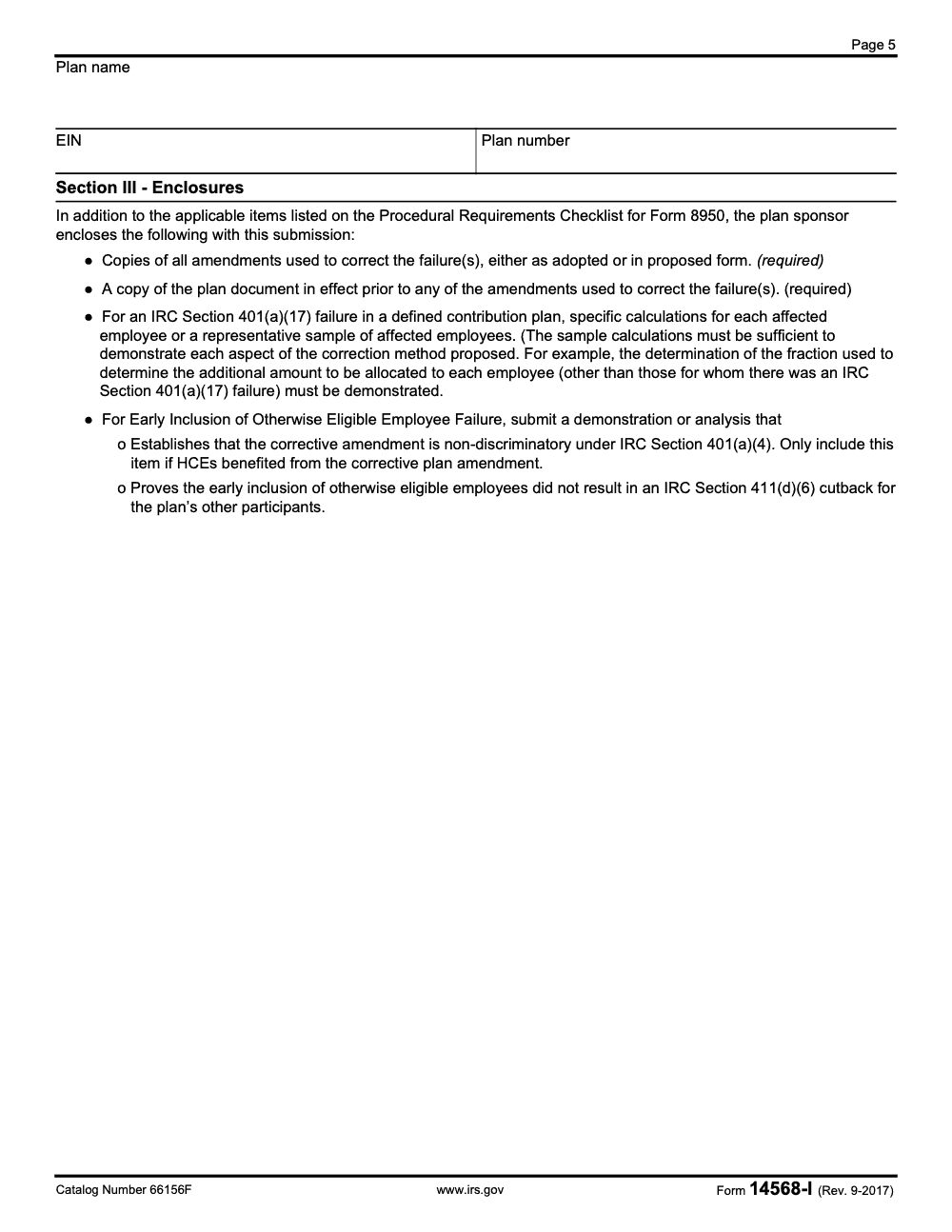
- Section III encloses copies of all corrective amendments (adopted or proposed) and a copy of the plan document in effect prior to the corrective amendments.
- For 401(a)(17) failures, per-employee calculations or a representative sample sufficient to demonstrate every aspect of the methodology are enclosed.
- The complete packet is a single PDF, not exceeding 15MB, with no fillable form fields, ready for Pay.gov upload.
Failure A (401(a)(17)) correction math
- Identify the plan year(s) of the 401(a)(17) failure and confirm the plan is a defined contribution plan. Failure A does not apply to DB plans.
- Quantify the improperly allocated amount per affected employee for each failure year.
- Set the corrective contribution fraction: numerator = largest single improperly allocated amount across all affected employees; denominator = the IRC 401(a)(17) compensation limit for the failure year ($350,000 for 2025 plan years, per IRS Notice 2024-80).
- Apply the fraction to each non-failure employee's plan compensation to compute the additional corrective allocation. Exclude employees for whom the failure occurred from this additional allocation.
- Calculate the earnings adjustment on each corrective contribution from the end of the plan year of failure through the date the corrective contribution is made.
- Label the earnings-method attachment as "Section IA of Form 14568-I, Description of the Proposed Method of Correction-Earnings" with plan name, EIN, and plan number at the top of every page.
- Confirm the retroactive plan amendment authorizing the higher contribution and allocation percentages is included as an enclosure in Section III.
- For affected former employees, document the contact attempt to the last known address AND the additional location steps (commercial locator, internet search, IRS letter-forwarding service, or equivalent).
Failure D (Early Inclusion) enclosure pack
- Identify which checkbox applies: employees who had not met minimum age/service, OR employees who had met requirements but joined before the plan entry date. Both can apply on the same submission.
- Confirm the early-included employees received the same benefits they would have received under proper inclusion. Benefit differences disqualify the Schedule 9 safe-harbor track.
- State the effective date of the corrective amendment, retroactive enough to cover all reported failure periods.
- Enclose the IRC 411(d)(6) cutback demonstration for the plan's other participants. This is required on every Failure D submission.
- If HCEs benefited from the corrective amendment, enclose the IRC 401(a)(4) non-discrimination demonstration. Skip this enclosure only when no HCEs benefited.
- Include the failure-quantification table with the HCE/NHCE breakdown per plan year.
- Route the packet through tax execution review before the Pay.gov upload to catch the 411(d)(6) vs 401(a)(4) confusion before it becomes a deficiency letter.
Keep 14568-I Season From Stalling
Form 14568-I submissions stall on completeness, not concept. The IRS rarely returns Schedule 9 packets because the correction approach is wrong – it sends them back because the per-employee calculations are not specific enough, the earnings-adjustment attachment is missing its required label, or Section II reads like boilerplate (per the procedural framework set by Rev. Proc. 2021-30). A 5-page form with three sections and four failure categories looks small until you assemble the full Form 8950 packet behind it.
The fix is workflow discipline, not more research. Treat every Schedule 9 as a packaging job with mandatory checkpoints before the Pay.gov upload.
- Use the largest single improperly allocated amount as the numerator in the Failure A correction fraction, not the average or the sum, and run the denominator off the IRC 401(a)(17) limit for the actual year of the failure ($350,000 for 2025 plan years, per IRS Notice 2024-80).
- Label every earnings-adjustment page verbatim as "Section IA of Form 14568-I, Description of the Proposed Method of Correction-Earnings" and repeat plan name, EIN, and plan number at the top of each page.
- For Failure D early-inclusion submissions, always enclose the IRC 411(d)(6) cutback demonstration; add the IRC 401(a)(4) non-discrimination demonstration only when HCEs benefited from the corrective amendment.
- Before checking Failure B, confirm hardship eligibility was applied uniformly across all participants; non-uniform administration disqualifies the Schedule 9 safe-harbor track and forces a different VCP approach.
- For Failure C plan-loan packets, verify the loans themselves met IRC 72(p) limits on amount, term, and level amortization before relying on Schedule 9; substantive 72(p) violations need a separate correction methodology.
That is where structured offshore execution earns its keep. Our tax execution teams pre-build VCP packets with documented calculation samples, properly labeled earnings attachments, and Section II root-cause memos with forward-looking preventive procedures, so reviewers spend their time on judgment calls instead of packaging cleanup.
FAQs
Usually, no. In practice it is included as part of a VCP submission, often alongside Form 14568 and other required items, and uploaded through Pay.gov with the Form 8950 process. To be precise, Form 14568-I cannot be filed standalone; it is always an attachment to a Form 8950 VCP application package (with the Form 8950 procedural requirements checklist).
Pay.gov instructs filers to upload a single PDF not exceeding 15MB, and it warns against PDFs that contain fillable or editable content. If the PDF exceeds 15MB, Pay.gov notes you may fax additional documents to 855-203-6996.
The IRS maintains a page that lists the VCP submission schedules, including Form 14568-I, Schedule 9. Use that IRS list to make sure you are working from the current version.
If someone needs to represent the plan sponsor before the IRS for the VCP submission, you generally use Form 2848. If someone only needs to receive copies of IRS correspondence, Form 8821 is used. The IRS includes both in its VCP submission document list.
Yes, in certain situations. The IRS describes amendment-based correction methods in EPCRS-related guidance and points sponsors to VCP when applicable, depending on eligibility and timing. Note that the Schedule 9 (Form 14568-I) limited safe harbor is restricted to four specific failure types (401(a)(17) DC-plan failures, hardship distributions, plan loans, and early inclusion of eligible employees); other amendment-based corrections require a different submission approach.
Other forms this guide names
- Form 8950: Complete VCP Filing Guide on Pay.gov
- Form 14568: VCP Compliance Statement Guide 2025
- Form 2848: Guide to Line 3, Filing, and Rules
- Form 8821: Tax Information Authorization
Summarize this article with AI
About this guide
Accountably helps US CPA, EA, and accounting firms hire trained accountants and tax preparers in India.
About us Reviewed byJugal Thacker, CPAFounder and CEO at Accountably
A US-licensed CPA with 7+ years inside US firms – PwC, a real-estate tax practice, then a full-service firm, rising from reviewer to manager to advisory. This article was reviewed against current IRS guidance for the 2025 tax year and updated for filers preparing late returns, amendments, and 2026 estimates.
View profile →How we research, review, and update this guide
Every Accountably guide is researched against primary IRS sources, reviewed by a U.S. CPA, and refreshed as guidance evolves. Read our Editorial Guidelines to see how we source, fact-check, and update our content.




