
Summarize this article with AI
In Brief
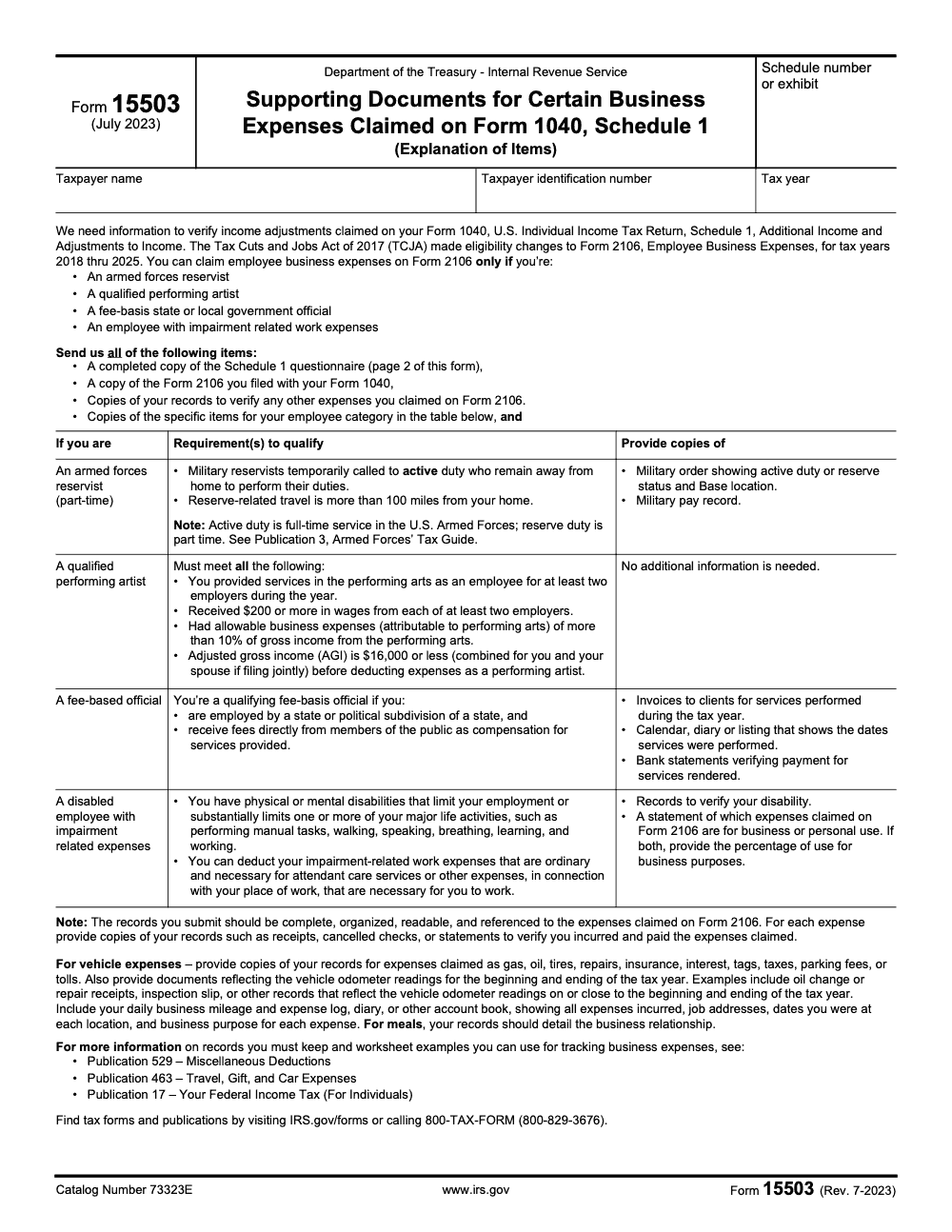
IRS Form 15503 is the IRS response packet for a Form 2106 documentation request tied to Schedule 1 employee-business-expense adjustments, and for tax years 2018 through 2025 only four employee categories qualify: armed forces reservists, qualified performing artists, fee-basis state or local officials, and employees with impairment-related work expenses (per IRS Form 15503 instructions, Rev. 7-2023). Most correspondence notices expect a reply within about 30 days.
The letter arrives asking for supporting documents, and the panic that follows usually outruns the actual problem. IRS Form 15503 is the response packet for a Form 2106 documentation request tied to Schedule 1 employee-business-expense adjustments, and most of the work is mechanical once you know which records the IRS expects.
Here is the catch that catches people: for tax years 2018 through 2025, only four employee categories can still deduct these expenses at all, namely armed forces reservists, qualified performing artists, fee-basis state or local officials, and employees with impairment-related work expenses. Most correspondence notices want a reply within about 30 days, and if your letter is really about identity verification, follow those instructions instead rather than reaching for Form 14039.
Key Takeaways
- IRS Form 15503 is used to request and transmit supporting documents for certain business expenses reported on Form 1040, Schedule 1. It is not an identity verification form.
- Since the Tax Cuts and Jobs Act, most unreimbursed employee expenses are not deductible for 2018 through 2025, except for specific groups like Armed Forces reservists, qualified performing artists, fee‑basis state or local officials, and employees with impairment‑related work expenses. The TCJA narrowing is bounded at tax year 2025, so what happens in 2026 depends on whether Congress extends or modifies these provisions. Form 15503 and the IRS publications echo these limits.
- The IRS prefers clean, well‑labeled attachments. Send all four required items: the completed page 2 questionnaire, a copy of the Form 2106 you filed, records for any other expenses claimed on Form 2106, and the category-specific documents for your employee category. Keep scans readable, organized, and referenced to the expenses claimed on Form 2106.
- Your deadline is set by the notice that asked for 15503. Many correspondence notices expect a response within about 30 days. If you cannot meet the date, call the number on the letter and request time.
- If your letter is about identity verification, follow the identity verification instructions instead. Most people should not file Form 14039 when they are directed to verify online or by phone.
What Form 15503 Is, In Plain English
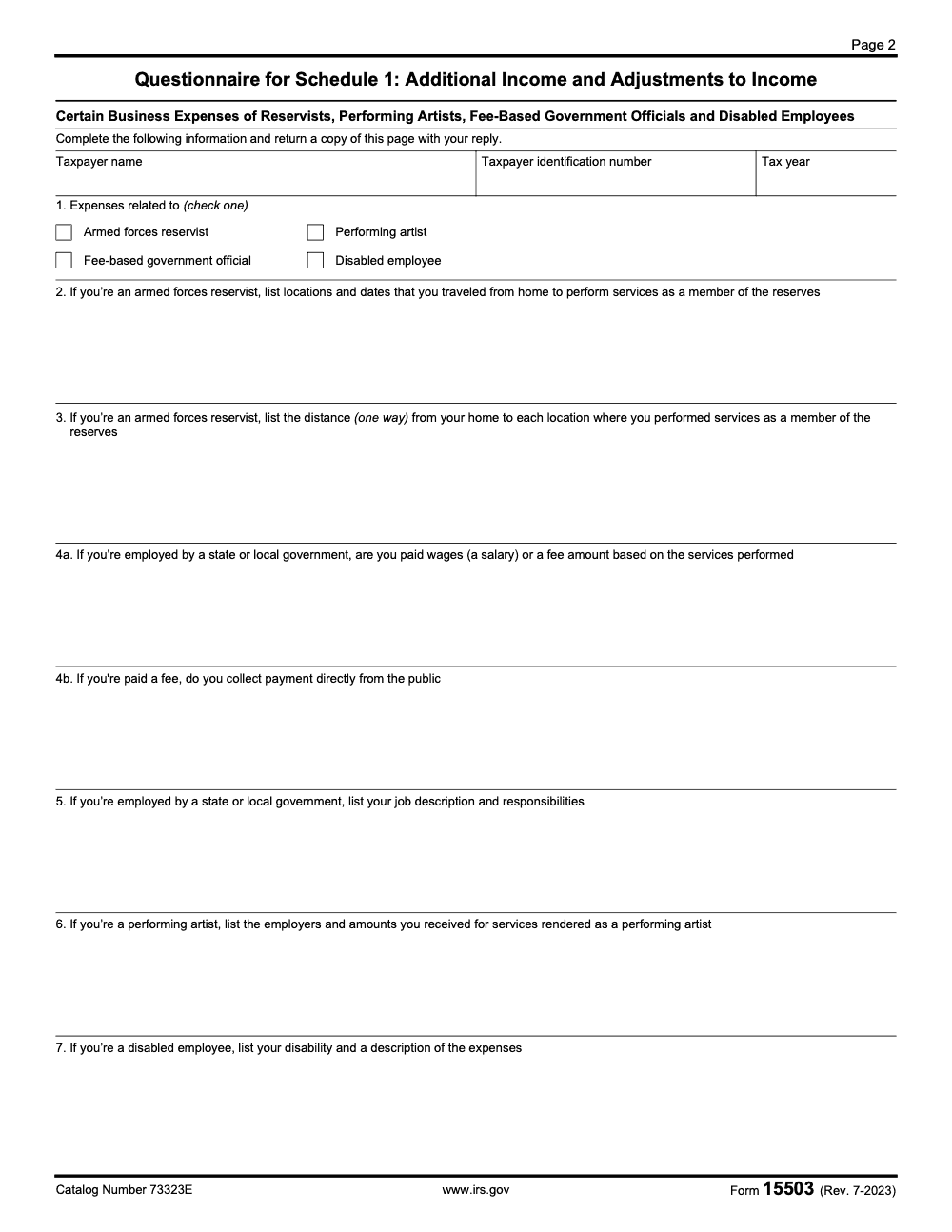
Form 15503, Supporting Documents for Certain Business Expenses Claimed on Form 1040, Schedule 1, is a two-page PDF the IRS uses to gather proof for adjustments you claimed. Page 1 holds the instructions and the requirements table for each employee category; page 2 is the Schedule 1 questionnaire you complete and return with your supporting documents. The form exists so examiners can see what you claimed, match it to receipts and logs, and update your case file with a traceable, auditable package.
Why the IRS asks for it. Since 2018, most unreimbursed employee expenses have been suspended for individual filers, with a few exceptions (the suspension runs through tax year 2025; rules may revert in 2026 absent further legislation). If you claimed business‑type employee expenses that fall into those exceptions, the IRS often wants documentation, for example mileage logs, travel records, and receipts that tie to your role. Form 15503 and the related publications outline what proof to send.
Form 15503 is a document request for Schedule 1 adjustments, not an identity theft notice. It is about eligibility and evidence, and it lives inside the correspondence exam workflow.
What Form 15503 Is Not
Many taxpayers confuse any IRS letter with identity theft. That is understandable, given how stressful tax mail can feel. But Form 15503 is not the identity verification process. If your letter directs you to verify identity online or by phone, use the IRS Identity and Tax Return Verification Service. The IRS specifically tells most people not to file Form 14039 in that scenario.
If you truly suspect tax‑related identity theft and you did not receive a verification letter, follow the IRS Identity Theft guidance and consider Form 14039 only when the IRS instructs you or when you cannot use the online verification route. The IRS pages spell out those decision points clearly.
When Form 15503 Shows Up
You will typically see 15503 after a correspondence examiner flags employee business expenses or other Schedule 1 adjustments that need proof. The letter tells you what year is in scope and what to send. Complete the page 2 questionnaire, identify which of the four eligible employee categories applies to you, and assemble the category-specific documents listed in the page 1 table. Then return the questionnaire with your Form 2106 copy and the records that prove the expenses you claimed.
Correspondence exams run on timetables. Most notices expect a reply in about 30 days, with longer windows for some notices sent abroad. If you cannot make the date, call the number on the notice to request more time, then document who you spoke with and when. The IRS confirms that many notices follow the 30‑day rhythm, and CP2000 materials describe similar timelines.
How To Complete Form 15503, Step By Step
Think of 15503 as a short intake plus an exhibit binder. Your job is to answer every question accurately, then attach proof that is easy to review.
1) Gather the Letter, Return Copy, And Your Records
- The IRS letter that asked for 15503, with the notice or control number visible.
- A copy of your filed return for the tax year, plus Schedule 1 and Form 2106 if used.
- Records that prove each expense, for example receipts, mileage logs, employer reimbursement policy, per diem records, or impairment‑related work expense documentation. Publications 463 and 529 explain what to keep.
2) Complete The Page 2 Questionnaire
- Header fields. Enter the taxpayer name, taxpayer identification number, and tax year at the top of page 2.
- Question 1. Check one category only: Armed forces reservist, Performing artist, Fee-based government official, or Disabled employee.
- Remaining questions. Answer the category-specific items, for example the one-way distance from your home to each reserve-duty location for reservists, or the wage-versus-fee questions for state and local employees.
- Assemble exhibits. Gather your Form 2106 copy, records for each expense claimed, and the category-specific documents listed in the page 1 table.
Tip, name files so a reviewer can follow the story. For example, 2106_MileageLog_2024.pdf, 2106_Receipts_Travel_Q2Q4.pdf, 2106_EmployerPolicy.pdf. The IRS wants complete, organized, readable proof that directly matches your claim.
3) Review, Return, And Keep A Copy
- Check totals and dates, fix typos, and confirm whole‑dollar amounts.
- Return the completed page 2 questionnaire with all four required items, following the response instructions on your IRS letter. Keep a copy of everything you send with your client file, include a copy of the notice, and never send originals. The IRS repeats these points across its notice and CP2000 guidance.
What Documents To Include
Use this table as a starting point. Always align evidence to the exact expense you claimed.
| Expense Type (Form 2106 category) | What Reviewers Expect To See | Notes |
| Vehicle expenses | Contemporaneous mileage log, dates, purpose, odometer readings, standard mileage calculation or actual expense worksheet, proof of ownership or lease (odometer values should be supported by third‑party documents such as oil‑change or inspection receipts on or near the start and end of the tax year – a self‑prepared log alone is not enough) | Keep logs consistent with Publication 463 examples. |
| Travel | Receipts for transportation, lodging, meals, dates, business purpose, trip itinerary, employer reimbursement policy | Per diem rules have limits. Show how you computed amounts. |
| Tools and supplies | Receipts, proof of payment, explanations linking items to your work | Tie each item to your job duties, not personal use. |
| Protective clothing or equipment | Receipts, employer policy, notes on why items are not suitable for everyday wear | Connect to job requirements. |
| Home office for W‑2 employee (rare) | Only if your role qualifies under the limited exceptions, floor plan, exclusive and regular use notes, utility allocations | Most employees cannot deduct this for 2018 to 2025. |
| Impairment‑related work expenses | Medical documentation, receipts, explanation of necessity to perform work | These remain deductible when criteria are met. Expenses must connect to the workplace and be necessary for the employee to perform their job; general personal medical expenses unrelated to work do not qualify under this category. |
For any expense, include employer reimbursement policy pages. If an employer offered accountable plan reimbursements, unreimbursed amounts can be a red flag unless your role fits the allowed exception groups. Publication 463 and Publication 529 explain recordkeeping standards and who can deduct.
How To Return Your Response
Follow the response instructions printed on the IRS letter that asked for Form 15503. The letter tells you where to send the completed page 2 questionnaire and your supporting documents. If the letter offers an electronic document upload option, it will list the access code or notice number you need; otherwise mail the package to the address on the letter and never send originals.
Keep a copy of everything you send, along with any confirmation or mailing receipt. It is your proof of delivery, tied to the notice reference.
Deadlines, Appeals, And Interest
Always follow the deadline printed on your notice. Many correspondence notices expect a reply in about 30 days. If you miss it, the IRS can move the case forward and may issue a Statutory Notice of Deficiency, which carries a 90‑day Tax Court petition window. If you need more time, call the number on the notice and request an extension, then document the call.
If your notice is a CP2000, the IRS guidance is explicit. Send your response and documentation within 30 days to avoid escalation. If you disagree and miss the response date, watch for CP3219A and the 90‑day petition window. Interest continues to accrue on unpaid balances until assessed amounts are paid or abated.
Common Reasons You Receive Form 15503
- Employee business expenses claimed outside the narrow exception categories.
- Missing or weak records for vehicle mileage or travel.
- Claims that look duplicative with employer reimbursements.
- Totals that do not tie to Schedule 1 or that do not match your Form 2106 worksheet.
- Scans that are unreadable or unlabeled, which leads to requests for more information.
Form 15503 standardizes what you send. The page 2 questionnaire identifies your employee category and ties your exhibits to the expenses you claimed, so examiners can see a complete, traceable package.
How IRS Staff Work Your Submission
Correspondence exam teams process cases in order and rely on digitized case files. When you respond with a complete, organized packet, a phone assistor or examiner can review your exhibits in their system and move the case. The IRM confirms that staff view digitized documents and that the DUT is an accepted route for sending requested proof.
Expected timing. The IRS generally works on a first‑in, first‑out basis for correspondence. Many notices move on a roughly 30‑day communication cycle. If your response cannot be fully processed within that cycle, the IRS aims to send an interim reply. These timeframes appear across IRS correspondence policy and timeliness sections.
Real‑World Checklist You Can Follow Today
- Verify that your letter actually asks for Form 15503, not identity verification. If it is identity verification, use the IRS process in the letter and do not file Form 14039 unless instructed.
- Pull your filed return, Schedule 1, and Form 2106 if used.
- Map each claimed expense to at least one piece of proof, for example a receipt, log, or employer policy page. Publications 463 and 529 explain what counts as proof.
- Label every file so a stranger can follow your story. Use short, descriptive names.
- Keep scans readable, one orientation, and grouped by topic.
- Return your response using the method on your IRS letter, save the confirmation or mailing receipt, and diarize a follow‑up 45 to 60 days later if you have not heard back. The IRS works correspondence cases in order.
Privacy And Security When You Send Documents
You will upload sensitive personal information. Use the official IRS sites and tools referenced in your letter. The Document Upload Tool lives on IRS.gov and displays a privacy statement before you continue. It is designed for requested correspondence, not for filing original tax returns. The IRS reiterates this in its tool overview and training materials.
If you believe your identity has been compromised, use the IRS Identity Theft Central resources. They explain when to verify identity, when to file Form 14039, and when to request an IP PIN to protect your account.
For CPA, EA, And Firm Teams, How To Keep Reviews Fast
As a reviewer, your job is to cut the examiner’s questions in half. Here is a firm‑ready structure that works.
Reviewer Prep Folder
- 01_Notice, scanned copy of the IRS letter.
- 02_Return_Year, the filed 1040 plus Schedule 1 and 2106.
- 03_Expense_Summaries, one page per category with totals that tie to the return.
- 04_Exhibits, receipts and logs, labeled and grouped, for example Travel_Q2_Receipts.pdf, MileageLog_2024.pdf.
- 05_EmployerPolicy, accountable plan extracts if relevant.
- 06_Cover_Letter, short explanation referencing the notice number and exhibits.
Final Reviewer Checks
- Do totals tie to Schedule 1 and any 2106 worksheet.
- Are logs contemporaneous and complete.
- Are reimbursements excluded or explained.
- Are all files readable and properly named.
- Does the cover letter reference the notice number, tax year, and contact information.
A brief note about Accountably. Many firms ask us to help standardize this exact workflow. Where it adds value, our teams build SOPs, file naming standards, and layered reviews so preparers, seniors, and quality reviewers all handle their step without burying partners in rework. That structure reduces revision loops and speeds correspondence outcomes. Use a similar layered approach even if you run it in house.
Avoid The Most Common Pitfalls
- Submitting without the notice or control number.
- Totals that do not match your return or 2106 worksheet.
- Missing employer policy pages when reimbursements exist.
- Unreadable scans or mixed orientations that slow review.
- Sending originals by mail. The IRS repeatedly says not to do that.
Review everything once, then once again as a stranger would. If the story is obvious, your examiner’s job is easier and the case moves faster.
What To Do If You Disagree After You Respond
If you disagree with the next IRS letter, you usually have a fresh response window. For CP2000 flows, that is typically 30 days, and if the IRS later issues a Statutory Notice of Deficiency, you have 90 days to petition the Tax Court. Track every date, keep mail proofs, and keep your file organized.
For Firm Leaders, Make This Repeatable
- Build an SOP for 15503 responses.
- Standardize file naming, for example Notice_Year, Exhibits_Vehicle, Exhibits_Travel.
- Use a layered review, preparer to senior to quality, then ship.
- Keep a response log with notice numbers, dates, and confirmation receipts.
- Where helpful, bring in a disciplined delivery partner. Accountably integrates trained offshore teams into your existing workflow, uses your systems, and applies structured workpapers and SLAs so you can scale correspondence work without drowning reviewers. Use this only where it truly helps your clients and team.
Closing Thought
You do not need a heroic strategy for Form 15503. You need a clean story. Match each claimed expense to clear proof, label it well, and send it on time using the IRS tools the letter points to. If you stay organized, you protect your refund, reduce questions, and avoid unnecessary delays.
Sources And Further Reading
- IRS Form 15503 and its instructions.
- IRS Publication 463, Travel, Gift, and Car Expenses.
- IRS Publication 529, Miscellaneous Deductions.
- IRS Identity Theft Central and Identity and Tax Return Verification Service.
- IRS guidance on notice timelines, CP2000, and correspondence responses.
Common Mistakes We See Every Season
The same handful of errors show up on almost every Form 15503 response we review during the correspondence cycle. Each one is preventable with a quick check before submission.
Reusable Checklists
Drop these into your firm SOP. Each checklist is keyed to a specific stage of the Form 15503 response cycle and assumes you are working from an IRS letter that named one of the four eligible Form 2106 categories.
15503 Intake review
- Confirm the IRS letter requests Form 15503 and is not an identity verification notice. If it is identity verification, follow the letter and do not file Form 14039 unless instructed.
- Record the notice number, tax year in scope, IRS campus listed on the letter, and the response deadline (most correspondence notices expect a reply in about 30 days).
- Pull the filed 1040, Schedule 1, and the Form 2106 worksheet for the year.
- Identify which of the four employee categories the client claimed under: armed forces reservist, qualified performing artist, fee-basis state or local official, or impairment-related work expenses.
- Pre-flight the gatekeeper test for that category before opening the workpaper: reservist 100-mile test, performing-artist four-test screen, fee-basis two-prong test, or impairment workplace-necessity check.
- Open a response folder and store the original IRS letter as PDF, named with the notice number and tax year.
Category-specific evidence pull
- Armed forces reservist: military orders showing active duty status and base location, plus the military pay record covering the period claimed.
- Qualified performing artist: W-2 wage statements from at least two employers each showing $200 or more in wages; an AGI worksheet showing pre-deduction AGI of $16,000 or less; a percentage calc proving performing-arts expenses exceed 10% of performing-arts gross income.
- Fee-basis state or local official: invoices issued to members of the public, a calendar or diary showing service dates, and bank statements confirming payment received directly from the public.
- Disabled employee with impairment-related expenses: disability documentation, a per-expense schedule allocating business versus personal use, and a workplace-necessity note for each item.
- Per-expense backup: receipts plus proof of payment such as canceled checks or statements that show both incurrence and settlement.
- Vehicle ledger: gas, oil, tires, repairs, insurance, interest, tags, taxes, parking, and tolls; plus third-party odometer evidence at the beginning and end of the tax year.
- Mileage diary: daily entries with job address, dates, business purpose, and business mileage for each trip.
- Meal expenses: documentation of the business relationship for each meal, not just the amount or location.
Submission packet
- Page 2 questionnaire fully completed, with exactly one box checked in question 1.
- Copy of the Form 2106 filed with the original return.
- Per-expense records covering every line claimed on Form 2106, cross-referenced to the worksheet line.
- Category-specific documents from the four-category requirements table on page 1.
- Cover sheet referencing the notice number, tax year, and contact information.
- File-naming convention applied (for example, 2106_Reservist_Orders_2024.pdf, 2106_MileageLog_2024.pdf, 2106_Receipts_Travel_Q2Q4.pdf).
- Return the package using the response method on the IRS letter, whether by mail to the listed address or by an electronic upload option if the letter provides one.
- Save the confirmation or mailing receipt with the workpaper. Diarize a 45 to 60 day follow-up.
Keep 15503 Season From Stalling
Form 15503 packets do not arrive in a clean queue. They land in batches between the close of filing season and late summer, often a week after a CP2000 or another correspondence notice has already eaten review time. The form itself is only two pages with seven numbered questions on page 2, but a complete response carries the Schedule 1 questionnaire, the originally filed Form 2106, per-expense records, and category-specific documentation; a single client packet can easily run 30 to 80 pages once odometer evidence, military orders, and meal-purpose notes are included (per IRS Form 15503 instructions, Rev. 7-2023).
The fix is to treat Form 15503 like a quarterly subprocess with its own SOP, not as a one-off interruption that pulls reviewers off the closing engagement. Standardize how letters intake, how each of the four eligible employee categories maps to a fixed evidence checklist, and how the response goes back to the IRS.
- Build a four-track intake template (reservist, performing artist, fee-basis official, impairment-related) so the preparer pulls the right category-specific evidence on day one rather than guessing through page 1 of the form.
- Pre-flight the reservist 100-mile one-way test and the performing-artist four-test screen ($200 wages from at least two employers, 10% expense floor, $16,000 pre-deduction AGI cap) before the workpaper is opened. Failing either screen kills the deduction and saves hours of evidence assembly.
- Tie every expense on Form 2106 to a labeled exhibit before the file leaves preparer review. Cases get bounced where receipts are not cross-referenced to the worksheet line.
- Pair every vehicle log with third-party odometer evidence from January and December (oil-change or inspection receipts). A taxpayer-typed log alone does not satisfy the odometer requirement.
- Send the full package in one response so the confirmation or mailing receipt covers the complete submission and the timestamps stay together.
- Log the notice number, response date, and confirmation reference in a single tracker so the roughly 30-day clock and any escalation to a Statutory Notice of Deficiency stay visible.
Accountably builds these intake-to-submission SOPs into structured tax delivery so the correspondence backlog does not spill into the next filing cycle.
FAQs
It is a guided form that helps you submit supporting documents for certain business expenses reported on Form 1040, Schedule 1. The IRS uses it in correspondence exams to review eligibility and evidence, especially for the limited unreimbursed employee expense categories still allowed through 2025.
No. Identity verification letters direct you to verify online or by phone. Most people should not file Form 14039 if the IRS has already sent an identity verification letter. Follow the instructions on that letter.
Send all four items the form lists: the completed Schedule 1 questionnaire on page 2, a copy of the Form 2106 you filed with your Form 1040, copies of your records for any other expenses claimed on Form 2106, and the category-specific documents for your employee category. Keep everything complete, organized, readable, and referenced to the expenses claimed on Form 2106.
Deadlines are set by the letter. Many correspondence notices expect a response within about 30 days. If you cannot meet your date, call the number on the notice and ask for additional time.
Use a contemporaneous mileage log, receipts for transportation, lodging, and meals, and a short note that explains the business purpose. Publications 463 and 529 show what to keep.
Other forms this guide names
Summarize this article with AI
About this guide
Accountably helps US CPA, EA, and accounting firms hire trained accountants and tax preparers in India.
About us Reviewed byJugal Thacker, CPAFounder and CEO at Accountably
A US-licensed CPA with 7+ years inside US firms – PwC, a real-estate tax practice, then a full-service firm, rising from reviewer to manager to advisory. This article was reviewed against current IRS guidance for the 2025 tax year and updated for filers preparing late returns, amendments, and 2026 estimates.
View profile →How we research, review, and update this guide
Every Accountably guide is researched against primary IRS sources, reviewed by a U.S. CPA, and refreshed as guidance evolves. Read our Editorial Guidelines to see how we source, fact-check, and update our content.




