Summarize this article with AI
In Brief
Form 2553 is the election by which a small business corporation chooses S corporation status under IRC §1362. The corporation must have 100 or fewer shareholders (family members aggregated as one under IRC §1361(c)(1)) and the election must reach the IRS within 2 months and 15 days of the requested effective date (IRC §1362(b)). Late filers can pursue reasonable-cause relief under Rev. Proc. 2013-30, and the form may be filed by mail or fax per the separate instructions.
A small business corporation chooses S corporation status on Form 2553, and the election has to reach the IRS within 2 months and 15 days of the requested effective date. Miss that window and you are no longer filing an election, you are writing a reasonable-cause statement.
Eligibility is the other half. The corporation needs one class of stock, 100 or fewer shareholders with family members aggregated as one, and no nonresident alien owners. You cannot e-file the election itself, so you mail or fax it to the correct service center and expect roughly 60 days for processing. When a due date lands on a weekend or holiday, Section 7503 rolls it to the next business day.
Key Takeaways
- Form 2553 is how a domestic corporation or eligible LLC elects S corporation status for a specific tax year.
- Timing matters. File no later than 2 months and 15 days after the tax year begins, or any time in the prior year. Weekend or holiday due dates roll to the next business day under Section 7503.
- Mail or fax the election to the correct IRS service center. E‑file is not available for the election itself. Some e‑filers must also attach a PDF of Form 2553 with their return, which does not replace mailing or faxing.
- Eligibility requires one class of stock, no more than 100 eligible shareholders (family members within the meaning of IRC 1361(c)(1) may be aggregated as one shareholder for this count), and no nonresident alien owners. All shareholders must consent.
- Expect roughly 60 days for processing. Follow up if you do not receive an acknowledgment within about two months, or five months if you requested a fiscal year.
- Missed the window, relief for late elections exists under Rev. Proc. 2013‑30 with specific conditions and representations.
What is IRS Form 2553
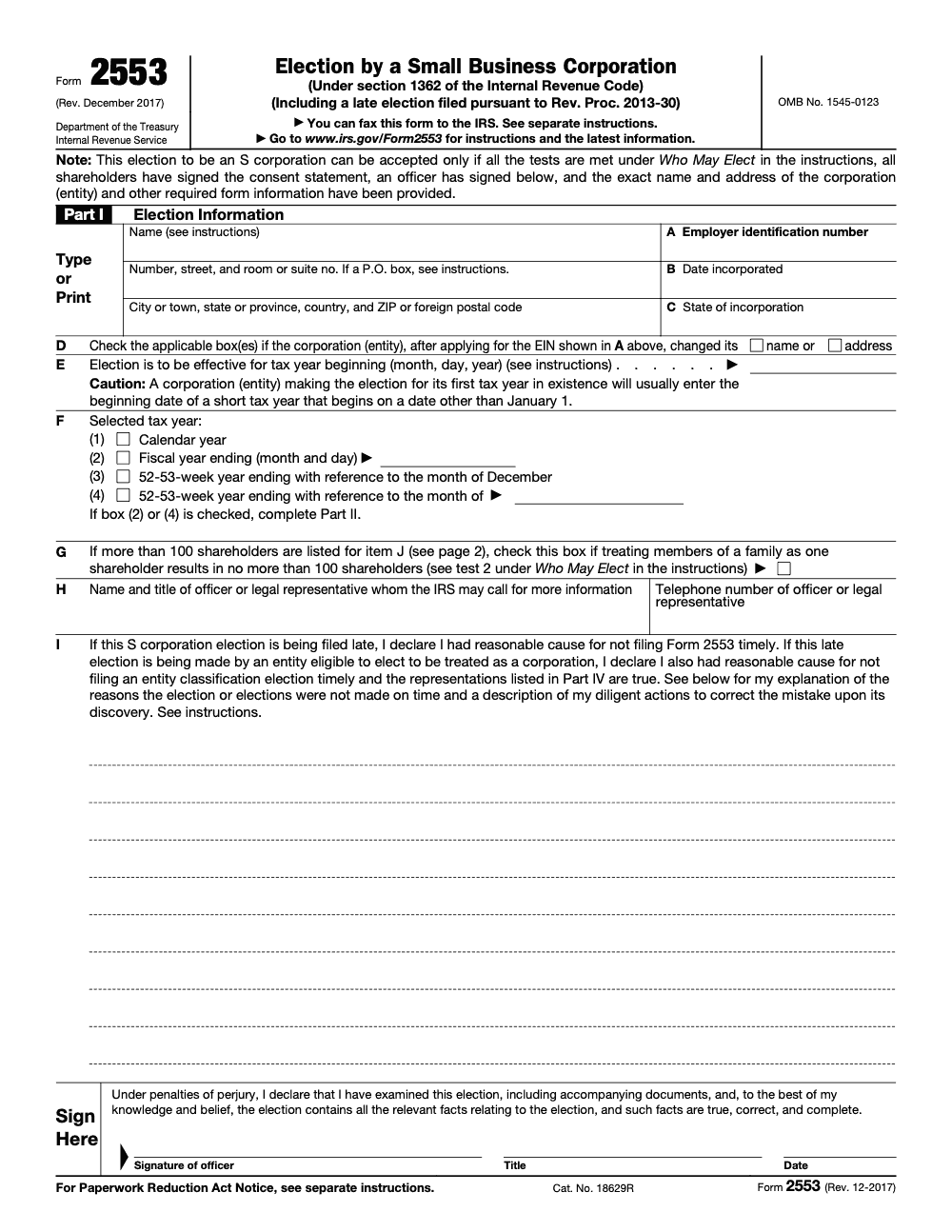
Form 2553 makes your S corporation election under section 1362. You provide the legal name, EIN, state and date of incorporation, the intended effective date, your tax year, and each shareholder’s details and signature. You cannot file the election online. You must mail or fax it to the service center that corresponds to your principal business location, then keep the original with your corporate records.
Why choose S corporation status
You are usually aiming for three things. First, pass‑through taxation, the corporation generally does not pay federal income tax at the entity level, items flow to owners’ returns. Second, payroll tax control via reasonable compensation for owner‑employees, with the IRS expecting a true W‑2 wage before distributions. Third, a clean operating framework with clear deadlines and shareholder documentation. The IRS can reclassify distributions as wages if compensation is unreasonably low, so treat reasonable compensation as a requirement, not a suggestion.
Eligibility requirements
Your election stands on three legs, entity type, shareholder limits, and one class of stock.
Eligible entity types
You must be a domestic corporation, or an eligible domestic entity that is treated as a corporation for federal purposes, then you make the S election on Form 2553. Many LLCs first elect corporate treatment or rely on the automatic treatment described in the instructions, then file Form 2553.
Shareholder limitations
Stay at or below 100 shareholders, apply family aggregation when allowed, and restrict owners to eligible types, individuals, estates, certain trusts, and some exempt organizations. No nonresident alien shareholders. Unanimous shareholder consent is required for a valid election.
One class of stock
Economic rights must be identical, distribution and liquidation rights cannot differ among shares, voting‑only differences are fine. Watch for side agreements that quietly create a second class of stock, they can terminate S status unless you obtain relief.
Information you need before you file
Confirm you are eligible, confirm your timing window, and gather precise data. Enter your legal name exactly as it appears in IRS records, verify the EIN, and be consistent with the state and date of incorporation across all filings. Prepare the shareholder grid with names, addresses, TINs, shares, acquisition dates, tax year‑end, and original signatures.
Eligibility and timing
- Eligibility, domestic corporation or eligible entity, one class of stock, not more than 100 eligible shareholders, no nonresident alien owners, all consents in place.
- Timing, file within 2 months and 15 days after the start of the tax year you want. If the due date lands on a Saturday, Sunday, or legal holiday, you get the next business day under Section 7503. For calendar‑year elections beginning January 1, 2025, the window ran through Monday, March 17, 2025.
- If you discover you are late, consider Rev. Proc. 2013‑30 relief and document reasonable cause.
Required business details
You will list the corporation’s legal name, address, EIN, state and date of incorporation, the intended effective date of the S election, and your tax year. If you need a fiscal year, complete Part II and expect scrutiny, most S corporations default to calendar year absent approval or a qualifying natural business year.
Shareholder consents
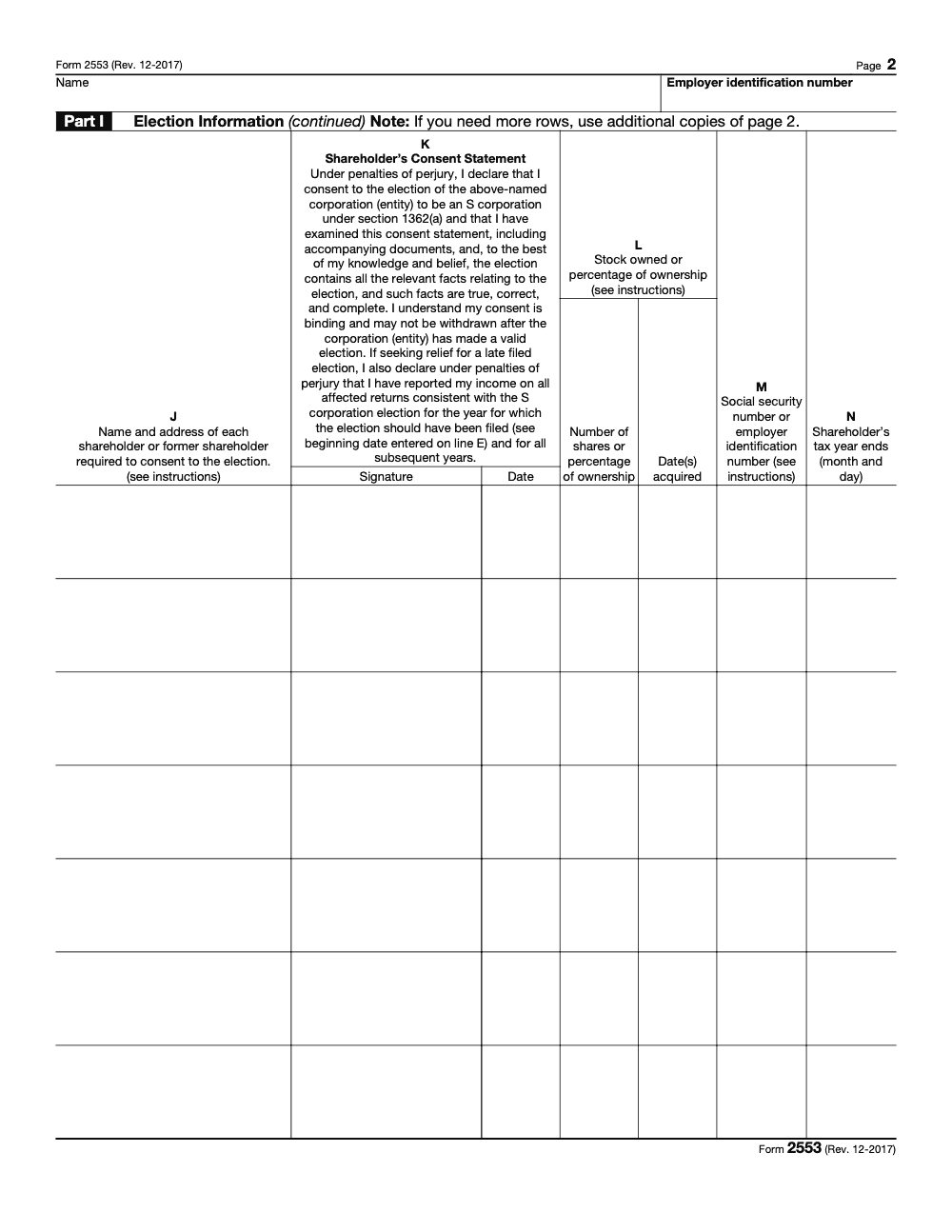
A valid election needs unanimous consent from all shareholders on the date you file, and once the corporation has made a valid election that consent is binding and may not be withdrawn. Obtain original signatures or compliant consent statements with each owner’s name, address, TIN, shares, and acquisition date. Keep originals in your records.
Step‑by‑step Form 2553 instructions
- Complete Part I with your entity information, EIN, state and date of incorporation, effective date, and tax year. A corporate officer signs and dates the form.
- On page 2, collect every shareholder’s consent with the complete grid and original signatures.
- Mail or fax the form to the correct service center based on your state. Keep a copy and proof of mailing or fax confirmation.
- If you are late, include the Rev. Proc. 2013‑30 statement and representations, either on the form or as an attachment, using the wording the revenue procedure expects.
Proof matters. If the IRS questions whether you filed, acceptable proof includes a certified or registered mail receipt, a stamped copy showing the IRS received date, or an IRS acceptance letter. Follow up if you have no acknowledgment within about two months, or five months if you requested a fiscal year.
Choosing your tax year
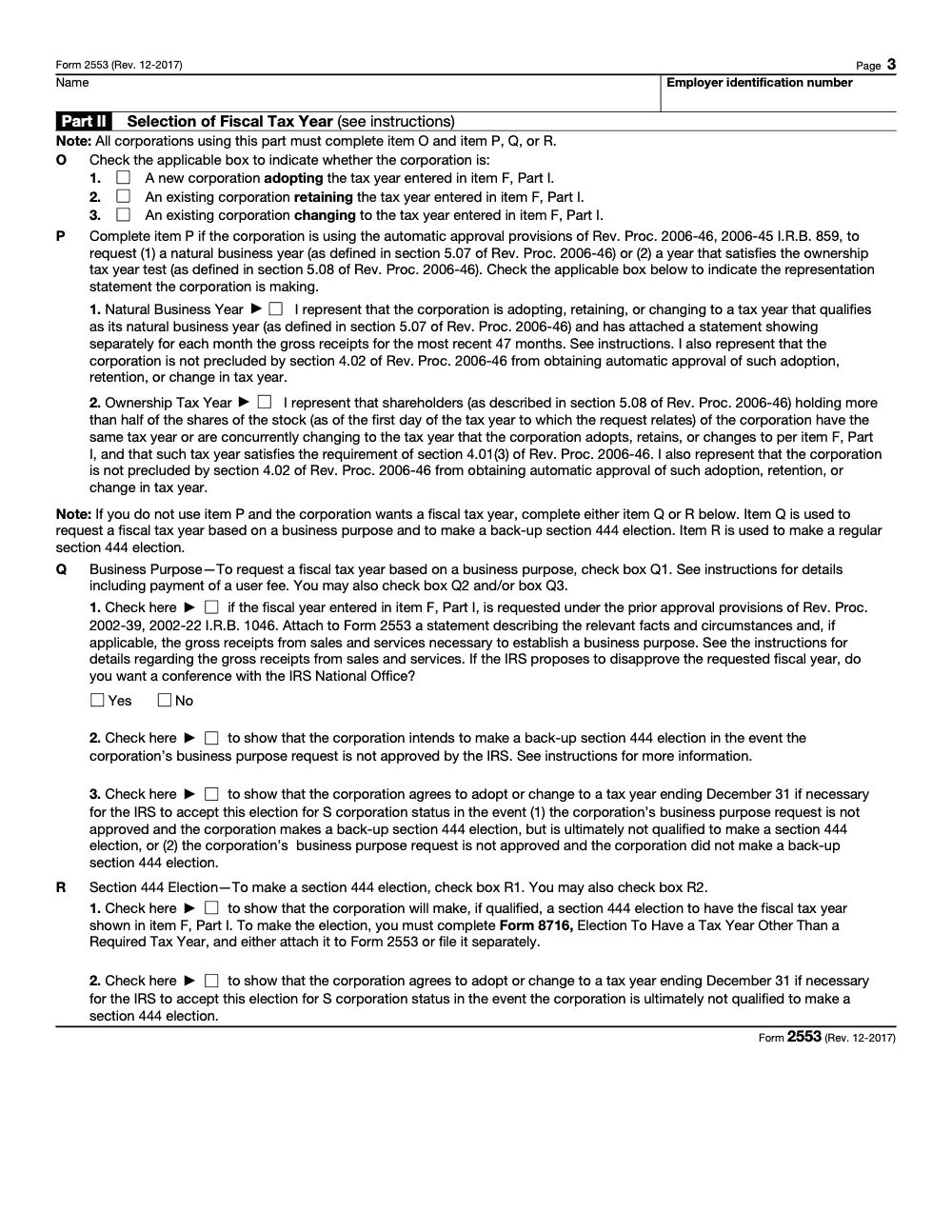
Most S corporations use a calendar year. If you request a fiscal year, you need a valid business purpose or you must qualify under a natural business year or other narrow rules, and the corporation should agree to a December 31 fallback tax year so the S election itself survives if the fiscal year request is denied and any Section 444 election fails. The IRS often requires additional statements and may assess a user fee for certain requests. Plan for a longer processing time if you check the fiscal year box.
Practical tip on fiscal years
If your receipts are strongly seasonal and support a natural business year, assemble a 47‑month receipts schedule before you file, since the IRS may ask for it. That prep shortens back and forth and reduces the risk of a denial.
Special rules for trust shareholders, QSST basics
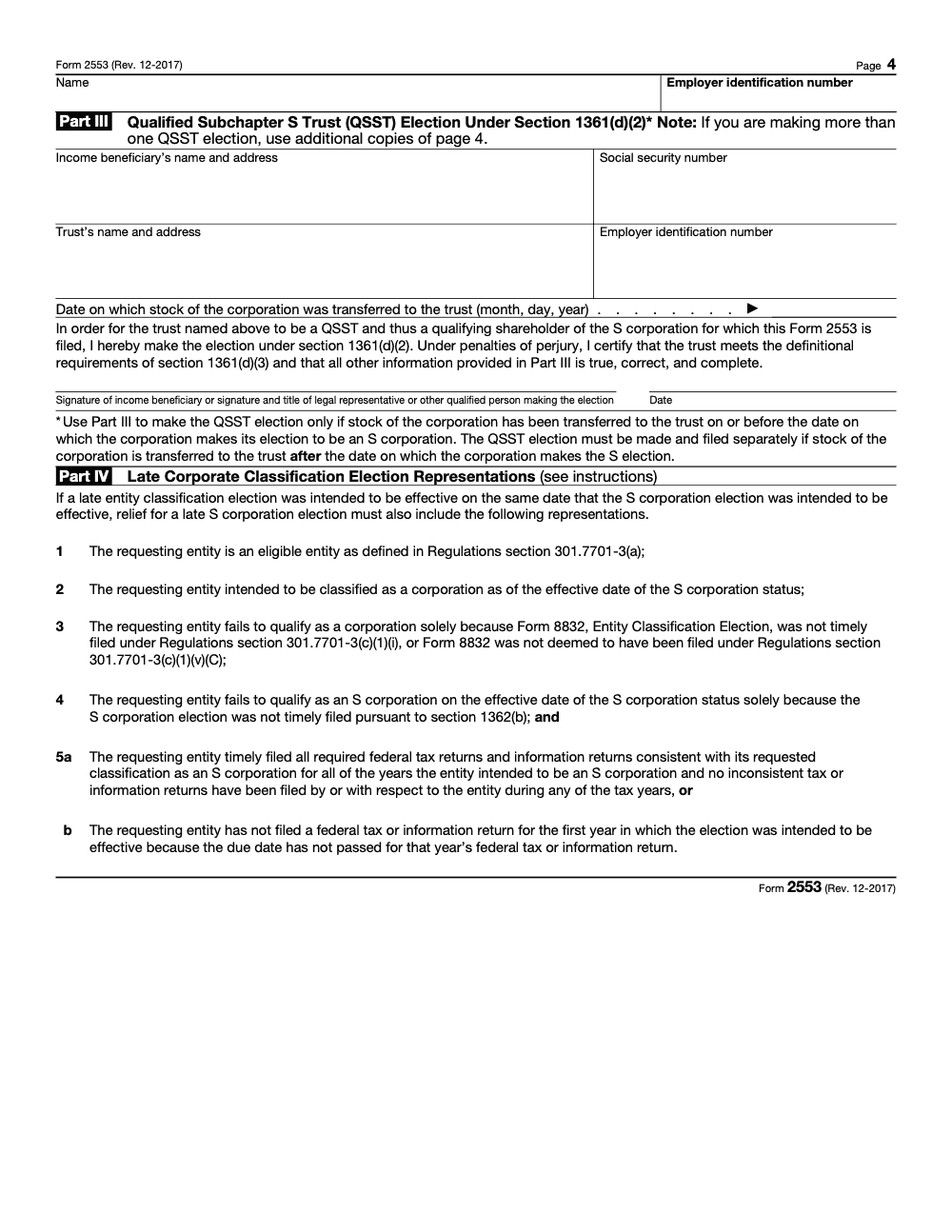
S corporations generally have individual owners, but a Qualified Subchapter S Trust is a permitted shareholder if it follows strict conditions. A QSST must have one current income beneficiary who is a U.S. person, must distribute all trust accounting income annually, and the beneficiary reports S corporation items on the individual return. The income beneficiary (or that beneficiary's legal representative) files the QSST election under IRC §1361(d)(2) and certifies under penalties of perjury that the trust meets the definitional requirements of §1361(d)(3). If the trust no longer meets the one‑beneficiary or distribution conditions, the S election can fail.
Making the QSST election with Form 2553
Form 2553 Part III can be used to make a QSST election when stock transfers into the trust on or before the corporation’s S election date. If a QSST election is late, Rev. Proc. 2013‑30 includes relief provisions and flowcharts that explain eligibility.
Deadlines and timing rules you can trust
The core timing rule is simple. File during the year before the tax year you want, or no later than two months and 15 days after that tax year starts. If your deadline hits a weekend or federal holiday in Washington, D.C., Section 7503 gives you the next business day. This rule applies broadly to IRS acts with a prescribed date, which is why the March 2025 weekend shifted the practical deadline to Monday, March 17.
- Mail or fax only for the election itself. If a return is being e‑filed, some filers must also attach a PDF copy named Form2553.pdf, which does not replace mailing or faxing the election.
- Expect about 60 days for processing. If you checked the fiscal year box, expect roughly 90 additional days. Call the Business and Specialty Tax Line if you do not receive a letter in time.
Late election relief and how to write reasonable cause
If you missed the window, you may still secure the election using the streamlined relief in Rev. Proc. 2013‑30. In general, you show that you intended to be an S corporation, you were otherwise eligible, you and the shareholders reported consistent with S status, and you file within 3 years and 75 days of the intended effective date. There is also an exception that can extend beyond 3 years and 75 days for certain corporations that filed and received no IRS status notice within six months, details are in the procedure and IRS guidance.
Your reasonable‑cause statement should be specific and factual. Explain what went wrong, when you discovered the issue, and the steps you took to fix it promptly. Attach the shareholder statements confirming that each owner reported income consistent with S status for all affected years. Use the “Filed pursuant to Rev. Proc. 2013‑30” legend at the top of the form or statement.
If you truly do not qualify under Rev. Proc. 2013‑30, the remaining path is a private letter ruling. The instructions point you to the current procedural revenue procedure for user fees and steps.
Where to send Form 2553, mailing addresses and fax numbers
Always verify the current “Where to File” page, since service center details and fax lines can change. As of September 18, 2025, the IRS lists two processing centers with state‑based routing and dedicated fax numbers.
Current routing summary
| Principal place of business | Mail to this IRS center | Fax number |
| CT, DE, DC, GA, IL, IN, KY, ME, MD, MA, MI, NH, NJ, NY, NC, OH, PA, RI, SC, TN, VT, VA, WV, WI | Department of the Treasury, Internal Revenue Service, Kansas City, MO 64999 | 855‑887‑7734 |
| AL, AK, AZ, AR, CA, CO, FL, HI, ID, IA, KS, LA, MN, MS, MO, MT, NE, NV, NM, ND, OK, OR, SD, TX, UT, WA, WY | Department of the Treasury, Internal Revenue Service, Ogden, UT 84201 | 855‑214‑7520 |
| Source, IRS “Where to File Your Taxes for Form 2553,” last reviewed September 18, 2025. |
Fax tips, proof of filing, and follow‑up
- Use a brief cover sheet with your callback number and total pages.
- Keep the transmission confirmation with date and time.
- If no acknowledgment arrives in about 60 days, call 800‑829‑4933 with the transmission details. The instructions also list acceptable proof, including certified mail receipts and stamped copies.
Reasonable compensation, payroll, and owner benefits
S corporations must pay shareholder‑employees reasonable compensation before making non‑wage distributions. The IRS can reclassify distributions as wages if compensation is too low. When setting pay, consider duties, time, training, comparable salaries, and how the business generates receipts. Keep support in your files each year.
For health insurance, premiums paid for more‑than‑2% shareholder‑employees are includible in Box 1 wages and generally excluded from FICA and FUTA if provided under a qualifying plan, and may be eligible for the self‑employed health insurance deduction when properly structured. Review Publication 15‑B and the IRS S corporation page for details and exceptions.
A quick checklist you can reuse
- Run W‑2 payroll for any shareholder who provides services.
- Document reasonable compensation annually with data, keep it with workpapers.
- Report more‑than‑2% shareholder medical premiums correctly on W‑2.
- Use an accountable plan for reimbursements, with receipts and timely submissions.
After you file, processing times and next steps
Typical processing is about 60 days from IRS receipt. If you requested a fiscal year, plan on additional time. Do not file Form 1120‑S for a year before your election is effective. If you do not see an acceptance or a problem notice within two months, follow up by phone. Keep your stamped acceptance letter with your corporate records for future due diligence, lenders, and state registrations.
If the IRS rejects or questions your election
Read the notice carefully. Many rejections are fixable, missing consents, name or EIN mismatches, or timing issues that qualify for Rev. Proc. 2013‑30 relief. Reply on time with the documents requested and add a clean, specific reasonable‑cause narrative if you are seeking late relief.
Late election relief, two common paths
- Streamlined late S election, you file within 3 years and 75 days after the intended effective date, you were otherwise eligible, and everyone reported income consistent with S status.
- Special exception for some corporations outside the 3 years and 75 days window, if specific conditions are met and the corporation and shareholders filed consistently as an S corporation with no notice of issues within six months.
If neither path fits, consider a private letter ruling. It is more expensive and slower, but it is sometimes the only solution. The IRS page on late election relief points you to the current procedural revenue procedure for user fees.
Address and fax details, verify before sending
The IRS “Where to File” page consolidates both addresses and the two fax numbers. It is the authoritative source to confirm routing when you are ready to send. The page was last reviewed September 18, 2025. Use tracked mail for paper submissions, and keep your receipts.
For busy firm teams, a short internal SOP beats rework. Name files consistently, store signed consents with the 2553 packet, and keep a one‑page checklist for reviewers. Small habits prevent spring‑season bottlenecks.
A small note on scaling firm operations
If your firm prepares a high volume of S elections alongside 1040s and entity returns, the real choke point is usually delivery, not demand. Standardized workpapers, SOP‑driven reviewer notes, and predictable turnaround keep you out of the scramble. This is where a disciplined offshore delivery partner can help with documentation and workpaper prep inside your systems, while you keep review control. On Accountably’s platform, U.S.‑led offshore teams work in your templates with layered QC and SLAs, which is useful during March and April when internal capacity is tight. Mentioned here for context only, the rest of this article remains purely educational.
Quick reference checklists
Pre‑filing checklist
- Confirm entity eligibility and shareholder count.
- Verify one class of stock in governing documents and any side agreements.
- Gather EIN, state and date of incorporation, effective date, tax year.
- Prepare shareholder grid with TINs, shares, acquisition dates, tax year‑ends.
- Obtain original signatures or compliant consent statements from every owner.
Filing checklist
- Complete Part I and officer signature.
- Complete shareholder consent page, confirm no omissions.
- Mail or fax to the correct service center, keep proof.
- If late, attach Rev. Proc. 2013‑30 language and reasonable‑cause statement.
Post‑filing checklist
- Watch for the IRS acceptance letter within about 60 days, longer if fiscal year requested.
- Store acceptance with corporate records.
- Update payroll, accounting, and state registrations for S status as needed.
Glossary, plain English
- Reasonable compensation, the W‑2 salary an owner‑employee must take for the work performed before taking distributions. The IRS can reclassify distributions if pay is too low.
- QSST, a permitted S corporation shareholder trust with one current income beneficiary and mandatory income distribution, with a separate election.
- Late election relief, the IRS path to validate a late S election when you meet specific conditions and represent facts under Rev. Proc. 2013‑30.
Final word and compliance note
You can file Form 2553 with confidence once you lock the timing, signatures, and routing. Put everything in writing, keep proof of filing, and do not start filing as an S corporation until you have a timely effective date or a written IRS acceptance. This guide reflects IRS pages last reviewed in 2025, including addresses, fax numbers, and late‑relief guidance. Always re‑check the current IRS instructions and where‑to‑file page before you submit. This article is educational, it is not legal or tax advice for your specific situation.
Common Mistakes We See Every Season
Form 2553 mistakes cluster around three pressure points: signatures, effective dates, and late-relief documentation. The form has not been revised since December 2017, so the rules below have stayed constant for the 2025 election cycle – the errors we keep seeing are pure execution slips.
Reusable Checklists
These checklists are written to drop into a firm SOP, a tax-prep workpaper, or a client-onboarding folder. Each item maps to a specific Form 2553 line, column, attachment, or follow-up, so a reviewer can sign off without re-reading the instructions.
Pre-election readiness packet
- Confirm the entity is eligible under IRC §1361: domestic, single class of stock, 100 or fewer shareholders after IRC §1361(c)(1) family aggregation, no ineligible shareholders (partnerships, most trusts, nonresident aliens).
- Capture the EIN, date of incorporation, and state of incorporation for lines A, B, and C.
- Verify whether the corporation changed name or address after the EIN was issued, and tick line D as needed.
- Decide the effective date for line E: incorporation date for a first-year corporation, or the first day of the next eligible tax year for an existing corporation.
- Pick the tax year on line F: calendar, fiscal ending on a stated month and day, 52-53-week ending December, or 52-53-week ending another month.
- Pull every current shareholder's legal name, address, SSN or EIN, stock count, acquisition dates, and tax year end for columns J, L, M, and N.
- Identify the officer for line H with title and phone number.
Election day filing checklist
- Collect signed column K consents from every shareholder during the consent period. Missing signatures void the election.
- Have an officer sign the Sign Here block under penalties of perjury.
- If line F is option 2 or option 4 (fiscal or off-December 52-53-week), complete Part II with item O plus exactly one of items P, Q, or R.
- If item P1 is checked, attach the 47-month gross receipts statement required by Rev. Proc. 2006-46 section 5.07.
- If item Q is checked, attach the business-purpose facts statement and the user fee required by Rev. Proc. 2002-39.
- If box R1 is checked, complete Form 8716 for the Section 444 election and decide whether to attach it or file it separately.
- Confirm the fallback agreement on box Q3 or R2 is checked so the S election survives a fiscal-year denial.
- For a late election, write the line I reasonable-cause narrative and the diligent-action paragraph, and collect the shareholder consistency declarations required by Rev. Proc. 2013-30.
- If QSST stock was transferred to the trust on or before the S election date, complete Part III; otherwise file the QSST election separately under IRC §1361(d)(2).
- Choose the filing method: mail to the IRS service center listed in the separate instructions, or fax to the number listed for the corporation's state.
- Save the certified mail receipt or fax confirmation in the client file.
Post-filing follow-up
- Diary the file 60 days out to confirm receipt of CP261 (S election acceptance notice).
- If CP261 has not arrived by day 75, call the IRS Business and Specialty Tax Line to confirm status.
- Do not file Form 1120-S until written acceptance or a verified timely effective date is in the file.
- For a combined late entity election under Part IV, confirm no Form 1120 has been filed for any intended S year, since that disqualifies representation 5a.
- Update the engagement letter, payroll setup, and shareholder distribution policy to match the new S corp tax year and effective date.
- If the IRS proposes to disapprove a business-purpose fiscal year under item Q, decide whether to request the National Office conference indicated on the form.
Keep 2553 Season From Stalling
Form 2553 traffic clusters into two narrow windows each year. The first window runs January through mid-March, when calendar-year corporations push to land an S election within the 2-month-and-15-day deadline set by IRC §1362(b). The second window opens in late summer and early fall, when late-relief filings under Rev. Proc. 2013-30 stack up alongside year-end planning. The form has not been revised since December 2017, so the rules are stable. It is the volume and the signature wrangling that strain capacity.
The fix is not faster typing. It is moving the chokepoints – column K signatures, line E effective dates, Part II attachments, and late-relief narratives – out of the partner queue and into a documented workflow that a senior preparer can run end to end.
- Build the column J/K/L/M/N shareholder matrix at engagement intake, not the day before filing. Every shareholder's name, address, signed consent, share count, acquisition date, SSN or EIN, and tax year end belongs in one tracked sheet.
- Standardize the line E effective date logic. First-year corporations get the incorporation date from line B; existing corporations get the first day of the next eligible tax year. The reviewer signs off on this before the officer signs the Sign Here block.
- Pre-template the line I reasonable-cause narrative for the late-relief queue. Each template has two slots: factual reasonable cause and diligent-action paragraph dated to the day the miss was caught.
- Flag every Part II Q or R election for an attachment review. Item Q needs the business-purpose statement and user fee required by Rev. Proc. 2002-39; box R1 needs Form 8716; both need a Q3 or R2 fallback box so the S election survives a denial.
- Diary CP261 follow-up at day 60 from filing. Do not let the file close until written acceptance lands in the client folder, or the file is escalated through the IRS Business and Specialty Tax Line.
Accountably runs this workflow for clients that hit the S election crunch every year. Our trained U.S.-led offshore preparers build the shareholder matrix, draft the line I narratives, manage the Part II and Part IV attachments, and chase the CP261 acceptance – under a senior-CPA review layer that signs off before anything reaches the client. See our taxation services for how the engagement runs.
FAQs
Yes. You need the required level of shareholder consent and a written revocation to the IRS. Coordinate the effective date, allocations, and payroll changes with your preparer before you file the revocation. The IRS website hosts a dedicated revocation page with steps and references.
States vary widely. Some honor the federal S election automatically, some require a separate state election, and some impose entity‑level taxes or fees. Confirm the rules in each state where you operate before your first S year. The federal election is not a guarantee of state treatment.
Usually no. You keep your EIN unless the underlying entity changes in a way that triggers new EIN rules. Update banks, payroll, and vendors to reflect your S election and filing posture once you receive your IRS acknowledgment.
The election itself is not e‑filed, you mail or fax it to the service center. If you e‑file a return related to a filing‑status change, the IRS requires a PDF attachment of Form 2553 named Form2553.pdf, but you still must mail or fax the original election.
Other forms this guide names
- Form 8716: Election To Have a Tax Year Other Than a Required Tax Year
- Form W‑2: Deadlines, E‑File Rules, Boxes, and W‑2c Corrections
- Form 1120: Corporation Tax Return Guide
- Form 1120-S: Guide for S‑Corp Filing, K‑1, K‑2/K‑3, Deadlines
Summarize this article with AI
About this guide
Accountably helps US CPA, EA, and accounting firms hire trained accountants and tax preparers in India.
About us Reviewed byJugal Thacker, CPAFounder and CEO at Accountably
A US-licensed CPA with 7+ years inside US firms – PwC, a real-estate tax practice, then a full-service firm, rising from reviewer to manager to advisory. This article was reviewed against current IRS guidance for the 2025 tax year and updated for filers preparing late returns, amendments, and 2026 estimates.
View profile →How we research, review, and update this guide
Every Accountably guide is researched against primary IRS sources, reviewed by a U.S. CPA, and refreshed as guidance evolves. Read our Editorial Guidelines to see how we source, fact-check, and update our content.