
Summarize this article with AI
In Brief
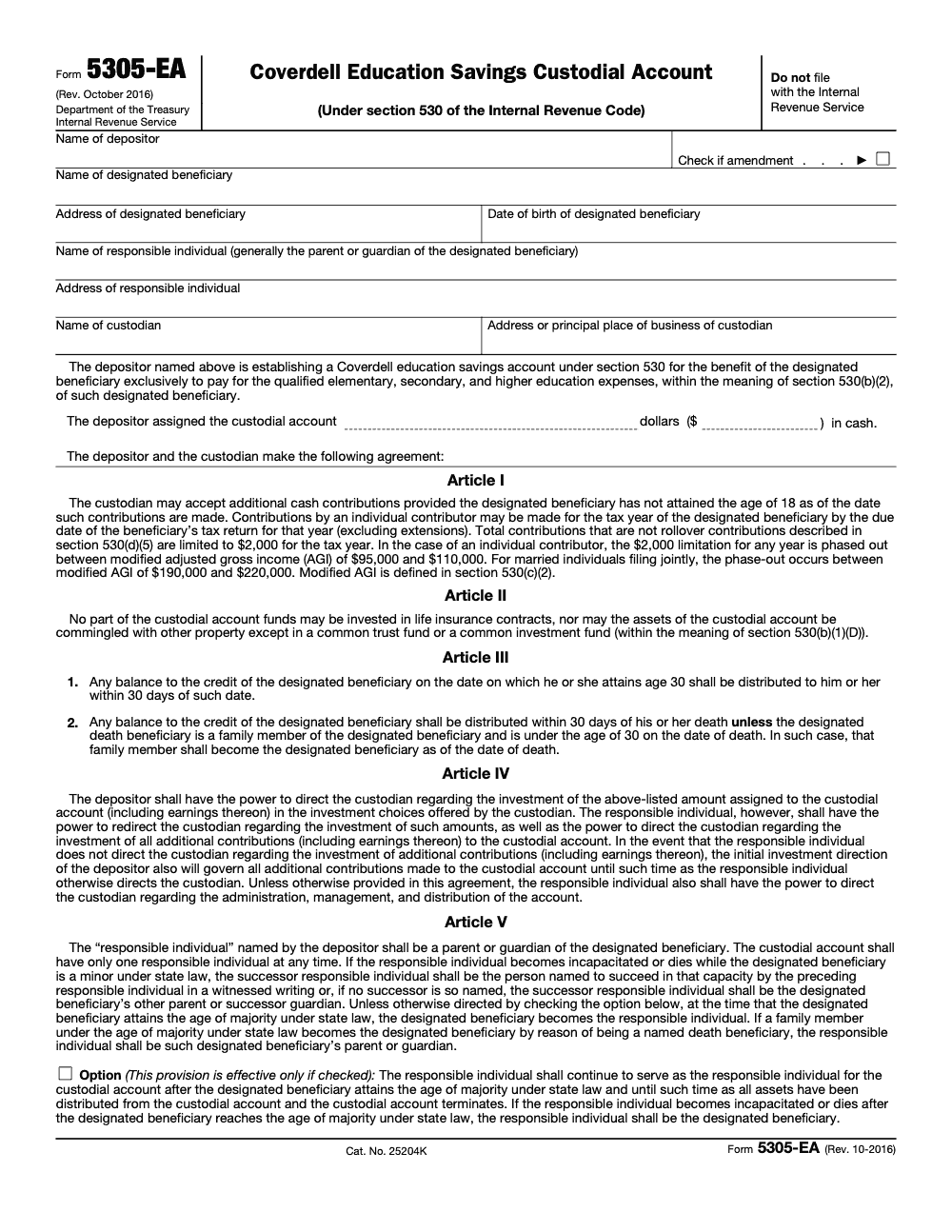
Form 5305-EA is the IRS model custodial account agreement that establishes a Coverdell Education Savings Account under IRC §530 (per the Form 5305-EA instructions, October 2016 revision). The depositor and custodian sign it and retain it in their own records – they do NOT file it with the IRS. Aggregate contributions are capped at $2,000 per beneficiary per year across all ESAs, must be made in cash, must stop before the beneficiary turns 18 (waived for a designated beneficiary with special needs), and phase out between $95,000 and $110,000 modified AGI for single filers ($190,000 to $220,000 MFJ). For tax year 2025 the contribution deadline is April 15, 2026, and a Form 4868 extension does NOT extend it.
A parent or grandparent walks in proud of the $2,000 check they want to write for a niece or grandchild, only to find out that an aunt already wrote one earlier the same tax year. The ceiling sits at the beneficiary, not at the donor, and once it is breached the excess contribution excise tax meter starts running each year until the excess and its allocable earnings come out.
Nothing on Form 5305-EA goes to the IRS: it is the model custodial account agreement under IRC §530 (October 2016 revision) that sets up a Coverdell Education Savings Account, and the depositor and custodian keep it in their own records. The age rules catch practitioners every season: contributions generally stop before the beneficiary turns 18 and remaining funds must be distributed by age 30, again with special-needs exceptions. The custodian reports contributions on Form 5498-ESA, and distributions show up on Form 1099-Q.
Key Takeaways
- Form 5305‑EA is the IRS model custodial agreement for a Coverdell Education Savings Account, not a SIMPLE IRA document. The custodian keeps it, it is not filed with the IRS.
- Coverdell ESA contributions are capped at $2,000 per beneficiary per year, subject to contributor income phaseouts, and must meet the rules in Publication 970.
- ESAs have age rules. Generally, contributions stop at 18 and remaining funds must be distributed when the beneficiary reaches age 30, with exceptions for special needs beneficiaries.
- Distributions are reported on Form 1099‑Q and contributions are reported on Form 5498‑ESA by the custodian. Keep these with your records.
- If you actually need a SIMPLE IRA plan, adopt it with Form 5304‑SIMPLE or Form 5305‑SIMPLE, and follow current limits, including Roth SIMPLE options created by SECURE 2.0.
What Form 5305‑EA Is, And Who Uses It
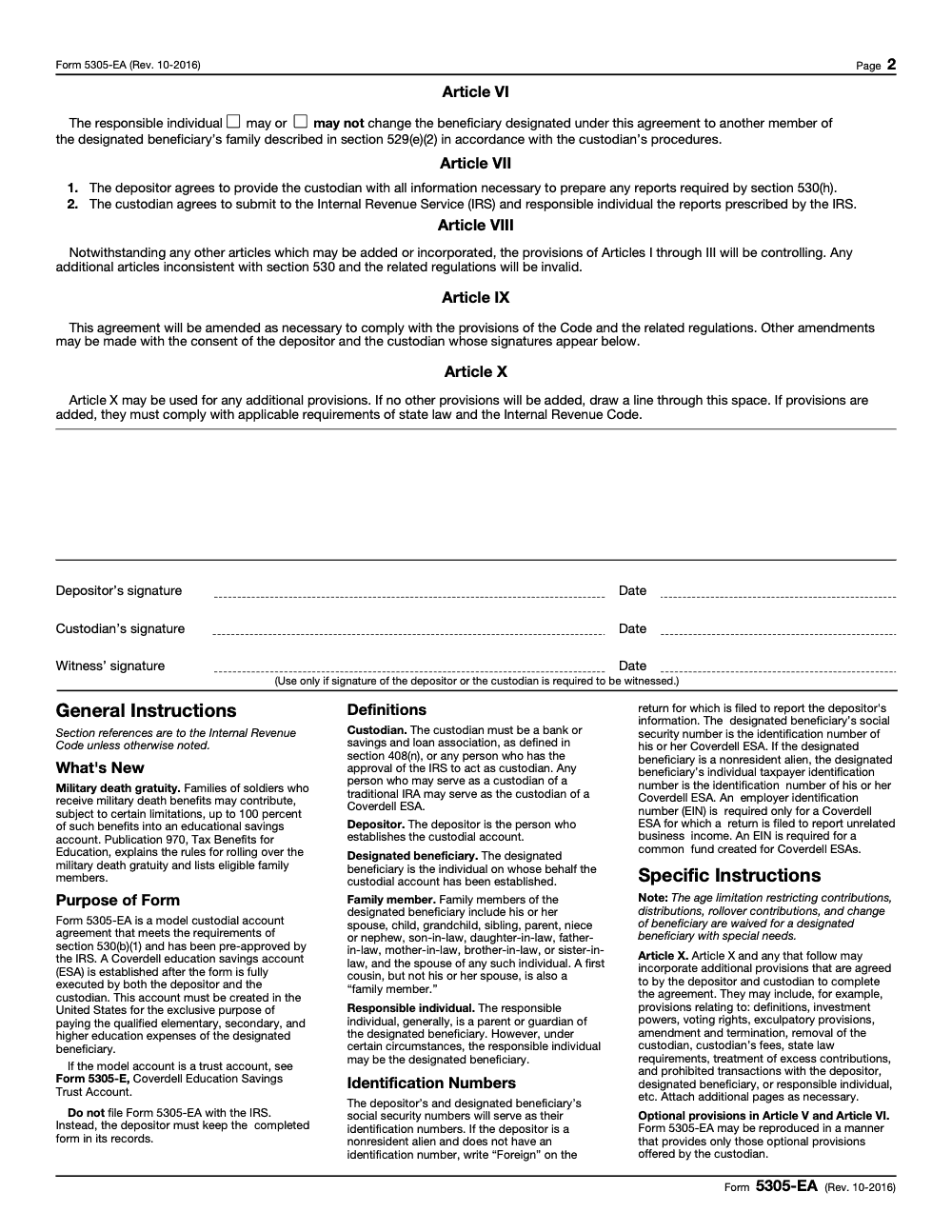
Form 5305‑EA is a model custodial agreement that a bank or approved custodian uses to establish a Coverdell Education Savings Account for a designated beneficiary (if the ESA is structured as a trust account instead of a custodial account, the institution uses Form 5305‑E rather than 5305‑EA). Once executed by the depositor and custodian, the account exists to pay qualified education expenses for that beneficiary. You keep the fully executed document in your records, you do not mail it to the IRS.
In practical terms, here is how it shows up in your day to day work:
- A parent, grandparent, or other eligible contributor opens the ESA with a financial institution that uses the 5305‑EA template.
- The child is named as the designated beneficiary, and a responsible individual is identified to manage the account until the designated beneficiary reaches the state-law age of majority, at which point the beneficiary becomes the responsible individual unless the Article V continuance option was elected on the executed form.
- The custodian will handle year‑end information reporting, including Form 5498‑ESA for contributions and Form 1099‑Q for distributions.
The Big Confusion, SIMPLE vs. 5305‑EA
If you are trying to set up a SIMPLE or Roth SIMPLE IRA at your firm, stop reaching for 5305‑EA. You want Form 5304‑SIMPLE if employees pick their own financial institution or Form 5305‑SIMPLE if you designate one. Those are the IRS model plan documents for SIMPLE, and they stay on file with the employer and institution, not with the IRS.
For context on current SIMPLE limits that your clients will ask about, the employee deferral cap is 16,000 for 2024 with a 3,500 catch‑up. IRS guidance for 2026 increases the general SIMPLE limit to 17,000, with higher amounts available in certain small‑employer situations under SECURE 2.0. If you are designing a Roth SIMPLE, it uses the same dollar caps, the tax treatment changes.
Coverdell ESA Contribution Rules, Plain English
Coverdell ESA contributions top out at $2,000 per beneficiary, per year, across all ESAs for that child (a fixed statutory cap under IRC §530 that has not changed since 2002 and is not inflation-adjusted). It does not matter who contributes, the total cannot exceed $2,000. The contributor’s income can phase out or eliminate the ability to contribute directly, see the MAGI bands in Publication 970 (the statutory phase-out ranges – $95,000 to $110,000 single and $190,000 to $220,000 joint – are fixed in IRC §530(c)(1) and are not inflation-adjusted). Contributions must be in cash, and they must be completed by the due date of the designated beneficiary’s tax return for that year (generally April 15), excluding extensions – a Form 4868 extension does NOT extend the ESA contribution window.
- If several family members want to contribute, coordinate the totals so you do not run past the limit. Excess amounts that sit in the account past the correction window can trigger a 6 percent excise tax each year until fixed.
- Organizations can also contribute, regardless of income, but the combined cap for the child still applies.
Age Limits And Special Needs
Coverdell rules are tighter than 529 plans on age. Generally, you stop contributing after the beneficiary turns 18, and any funds left must be distributed within 30 days after age 30. For a designated beneficiary with special needs, all four age limitations are waived – the age-18 contribution cutoff, the age-30 mandatory distribution, the rollover age limit, and the change-of-beneficiary age limit. If the beneficiary no longer needs the funds, a tax‑favored transfer to another §529(e)(2) family member may be available – but only if the custodian elected the 'may' option in Article VI of the executed 5305-EA. Many custodians elect 'may not', so check the executed form before promising the change.
How To Set Up An ESA With 5305‑EA, Step By Step
You can set up a compliant Coverdell quickly if you follow a disciplined checklist. In our own implementations for clients, we use the following flow.
- Pick a custodian that uses the IRS 5305‑EA model agreement and can support electronic signatures and timely tax reporting. Confirm they issue Form 5498‑ESA and 1099‑Q on schedule.
- Complete the 5305‑EA with the depositor, beneficiary, and responsible individual information, then get the custodian acceptance. Keep executed copies in your records.
- Document contribution control, who can contribute, target amounts, and a coordination plan so total deposits do not exceed 2,000 for the year.
- Establish a simple naming convention for statements and confirmations so basis and earnings are easy to track at tax time.
- Calendar a year‑end review, check contributions, verify beneficiary age, and prepare for any distributions for upcoming qualified expenses.
Documents To Gather
| Document | Why You Need It | Notes |
| Executed 5305‑EA | Governs the custodial account | Custodian keeps the original, you keep a copy. |
| Beneficiary and responsible individual IDs | CIP and reporting | Follow custodian KYC rules. |
| Contribution confirmations | Basis tracking | Prevents accidental excess across family givers. |
| 5498‑ESA, 1099‑Q | Annual reporting and tax prep | Custodian reports contributions and distributions. |
A Note On Delivery Discipline For Firms
If you run a busy accounting practice, the errors we see are rarely technical, they are operational. Standardize the checklist, pick one naming convention, and keep an exceptions log for excess contributions so nothing slips. If you prefer a controlled offshore workflow for repetitive documentation and QC, a partner like Accountably can slot into your SOPs without changing your templates or your review process. Use this only if it meaningfully reduces review time and protects quality.
Qualified Education Expenses And Distribution Rules
A Coverdell ESA pays qualified education expenses for elementary, secondary, and higher education. Distributions are tax free to the extent they do not exceed qualified expenses for the year. If a withdrawal is larger than the expenses, part of the earnings portion becomes taxable to the beneficiary. Your custodian reports distributions on Form 1099‑Q, you will use that to calculate any taxable amount.
- Time tuition payments and withdrawals in the same calendar year whenever possible.
- Keep receipts for tuition, required fees, books, supplies, and eligible technology.
- If you mix 529 plan and ESA funds in the same year, coordinate carefully to avoid double counting the same expense.
Reporting, Forms, And Recordkeeping
- Form 5498‑ESA reports contributions and rollovers for the beneficiary. The custodian files it with the IRS and furnishes a copy to the recipient.
- Form 1099‑Q reports distributions from the ESA. Boxes show gross distribution, earnings, and basis if available. The custodian files it and furnishes a statement to the recipient.
- If contributions exceed the limit and are not corrected, the beneficiary may owe an annual 6 percent excise tax, reported on Form 5329.
Pro tip from our reviews, confirm that late winter contributions are clearly designated for the correct tax year, especially contributions made in January through the April deadline, otherwise they may default to the current year and push you over the cap.
Common Compliance Pitfalls And How To Avoid Them
- Confusing 5305‑EA with SIMPLE plan forms, use 5304‑SIMPLE or 5305‑SIMPLE to adopt a SIMPLE plan, not 5305‑EA. Create a one‑page cheat sheet for your staff.
- Overfunding beyond $2,000 across multiple relatives, maintain a shared contribution tracker and reconcile by December so there is time to correct before June 1 excise exposure.
- Missing the age rules, set reminders for the beneficiary’s 18th and 30th birthdays and plan successor beneficiary actions in advance.
- Poor documentation of distributions, keep receipts and link each 1099‑Q to specific expenses. If earnings are not reported on the 1099‑Q, follow the IRS methods to compute the earnings and basis split.
Not This Form? Here Are The Right SIMPLE Plan Documents And Limits
If your actual goal is to set up a SIMPLE IRA for employees, adopt one of the IRS model forms below.
- Use Form 5304‑SIMPLE when employees choose their IRA provider.
- Use Form 5305‑SIMPLE when you designate the institution.
- Keep the completed form on file, do not send it to the IRS.
SIMPLE Contribution Limits You Will Get Asked About
- 2024 employee deferral limit, 16,000, with a 3,500 catch‑up if age 50 or older.
- 2026 general SIMPLE limit, 17,000, with higher amounts for certain small employers and adjusted catch‑ups under SECURE 2.0. Always verify the current year when you update plan notices.
Roth SIMPLE contributions are allowed under SECURE 2.0. The plan uses the same contribution dollar limits, the employee chooses Roth treatment for salary reductions, and employer contributions remain pre‑tax. Follow your custodian’s Roth SIMPLE procedures and keep your annual notices in sync with the design.
Quick Comparison Table
| Purpose | Correct Form | Filed With IRS | Key Limit |
| Coverdell ESA custodial account | 5305‑EA | No, custodian keeps it | 2,000 per beneficiary per year, contributor MAGI limits apply. |
| SIMPLE IRA, employees pick provider | 5304‑SIMPLE | No | Employee deferral per IRS annual limits, employer match or 2 percent nonelective. |
| SIMPLE IRA, employer designates provider | 5305‑SIMPLE | No | Same limits and formulas as above. |
Real‑World Workflow Tips From The Trenches
In my experience reviewing year‑end workpapers for CPA firms, the biggest time drains are avoidable. Use short, consistent templates, then teach your team to close the loop.
- One‑page ESA setup checklist with 5305‑EA reference, beneficiary DOB, and a contribution tracker.
- A shared spreadsheet for families that are co‑funding ESAs, totals highlighted in yellow at 1,500 and red at 2,000.
- A quarterly tickler to confirm the custodian will issue 5498‑ESA by their deadline and that every distribution will generate a 1099‑Q with the right basis and earnings presentation.
If your internal capacity is stretched, you can assign the routine document chase and file standardization to a tightly managed offshore delivery team so your seniors and managers spend less time chasing forms and more time reviewing the tax work. That is the kind of production support Accountably is designed to handle inside your existing systems and templates, with layered QC so partner review time goes down, not up.
When 5305‑EA Is Not A Fit, Practical Alternatives
If your priority is larger education funding, a 529 plan may fit better, since it allows far higher contributions, state‑set aggregate limits, and five‑year gift tax averaging. Keep in mind, 529s and ESAs can both exist for the same student, you just need clean expense coordination.
If your goal is payroll deferrals for employees, that is a retirement plan design, not an ESA. Use the SIMPLE model forms, decide whether to enable Roth SIMPLE contributions under SECURE 2.0 guidelines, and update your annual employee notices accordingly.
Compliance Snapshot You Can Paste Into Your SOP
- Verify the form, 5305‑EA equals ESA, 5304 or 5305‑SIMPLE equals SIMPLE plan.
- Cap ESA contributions at $2,000 per beneficiary, coordinate donors, and calendar the correction window.
- Watch age rules, contributions generally stop at 18, remaining funds distributed by 30 unless special needs applies.
- Tie every ESA distribution to documented qualified expenses in the same year, retain the 1099‑Q.
- Retain 5498‑ESA for your workpapers, confirm it matches your contribution tracker.
Final Word
If you came here to set up an ESA, you now have the right form, the right limits, and a clean checklist. If you came here to set up a SIMPLE or Roth SIMPLE plan, you now have the right forms and current numbers. Either way, your clients will feel the difference when your process is clear and your documentation is tight. If you want help standardizing the repeatable steps, our team at Accountably can slot into your workflow, maintain your templates, and protect your review time so you ship on time without sacrificing quality.
Common Mistakes We See Every Season
The same handful of errors show up every season. Most are not technical complexity – they are coordination gaps between family donors, custodians, and the practitioner who only sees the file at filing time.
Reusable Checklists
Two reusable checklists below – copy them into your firm SOP, swap in the client name, and run them once at ESA setup and once at year-end close.
ESA setup intake (one-time)
- Confirm the account structure is CUSTODIAL (use 5305-EA) and not TRUST (which uses 5305-E).
- Verify the designated beneficiary is under age 18 at execution, or document special-needs status.
- Capture the depositor's modified AGI and confirm it falls below the $110,000 single or $220,000 MFJ full-phaseout ceiling.
- Name one responsible individual (parent or guardian) and complete the Article V successor designation in a witnessed writing.
- Decide whether to elect the Article V continuance option (responsible individual continues past majority) and document the choice on the form.
- Confirm the Article VI beneficiary-change election ('may' or 'may not') with the custodian.
- Confirm the depositor's investment direction for the initial contribution.
- File the fully executed form in the client's permanent records – do NOT mail it to the IRS.
Annual contribution and year-end close
- Coordinate all donors before any check is written – $2,000 is the aggregate cap per beneficiary, not per donor.
- Confirm every contribution was made in cash, not securities or in-kind property.
- Recheck the depositor's modified AGI against the $95,000 to $110,000 single or $190,000 to $220,000 MFJ phaseout ranges.
- Calendar the contribution deadline as April 15 of the following year, regardless of Form 4868 extension status.
- Match every distribution to documented qualified elementary, secondary, or higher education expenses in the same tax year.
- Tie 1099-Q distributions back to expense receipts in the workpaper – any unmatched amount is taxable to the beneficiary.
- Reconcile 5498-ESA contributions against the firm's contribution tracker.
- If the beneficiary turned 30 this year (and is not special-needs), trigger the mandatory distribution within 30 days.
Keep 5305-EA Season From Stalling
ESA work tends to slip because it is low-volume, high-coordination work, and its deadlines hit on the same April 15 calendar that already owns the 1040 production schedule. The $2,000 per-beneficiary cap has not moved since EGTRRA raised it from $500 in 2002 (per IRC §530(b)(1)(A)(iii)), so families coordinate poorly and excess contributions snowball – the excise tax compounds annually until corrected.
The fix is not more hours in April. It is process discipline that catches coordination gaps in November, runs the cleanup in February, and leaves the spring spike clean.
- Build a per-beneficiary contribution tracker that aggregates across every donor before any check clears – treat the $2,000 as a hard stop at the household level, not the donor level.
- Run a special-needs review every year so the age-18, age-30, rollover, and beneficiary-change waivers travel with the file (Form 5305-EA, Article II).
- Standardize the 5498-ESA-in and 1099-Q-out reconciliation as a two-step workpaper – every distribution must match documented qualified expenses in the same tax year.
- Confirm the Article V continuance election and Article VI beneficiary-change election on the executed form before any change-of-beneficiary or post-majority distribution request lands.
- Flag every 5305-EA on intake as 'do not file with IRS' so a junior preparer never mails it in alongside the 1040.
That discipline is the work Accountably's offshore tax delivery is built around – documented SOPs, structured workpapers, and a multi-layer review that catches coordination errors before they become excise tax exposure.
FAQs
No. Form 5305‑EA is a model custodial agreement. The custodian keeps it and you keep a copy with your records. It is not submitted to the IRS.
The combined annual limit is $2,000 per beneficiary across all ESAs for that child. Individuals are subject to MAGI phaseouts, and organizations can contribute without income limits. Coordinate across family members to avoid excess.
The custodian reports ESA contributions on Form 5498‑ESA and distributions on Form 1099‑Q. You do not attach these to your tax return, but you should use them to prepare the return and keep them with your files.
Excess amounts can trigger a 6 percent excise tax each year until corrected. The beneficiary may need to file Form 5329. Fixes usually involve withdrawing the excess and allocable earnings by the correction deadline.
Yes, with limits. You can generally change to a qualifying family member or transfer funds trustee to trustee, but only if the custodian elected the 'may' option in Article VI of your executed 5305‑EA – many custodians elect 'may not', so check the executed form before promising the change. Watch the age rules for receiving beneficiaries. The custodian must follow 1099‑Q reporting rules.
Use 5304‑SIMPLE or 5305‑SIMPLE to adopt the plan. For 2024, the employee deferral limit is 16,000 with a 3,500 catch‑up. IRS guidance sets the general SIMPLE limit at 17,000 for 2026, with special higher amounts available for certain small employers.
Other forms this guide names
- Form 1099-Q: 529 Plan & Coverdell Distribution Guide
- Form 5498-ESA: Coverdell ESA Contribution Reporting Guide
- Form 4868: IRS Tax Extension 2025 Guide to Filing
- Form 970: LIFO Election Guide, Requirements, and Checklist
- Form 1040: Filing Guide for 2025 Returns (AGI, Deductions, Deadlines)
Summarize this article with AI
About this guide
Accountably helps US CPA, EA, and accounting firms hire trained accountants and tax preparers in India.
About us Reviewed byJugal Thacker, CPAFounder and CEO at Accountably
A US-licensed CPA with 7+ years inside US firms – PwC, a real-estate tax practice, then a full-service firm, rising from reviewer to manager to advisory. This article was reviewed against current IRS guidance for the 2025 tax year and updated for filers preparing late returns, amendments, and 2026 estimates.
View profile →How we research, review, and update this guide
Every Accountably guide is researched against primary IRS sources, reviewed by a U.S. CPA, and refreshed as guidance evolves. Read our Editorial Guidelines to see how we source, fact-check, and update our content.




