
Summarize this article with AI
In Brief
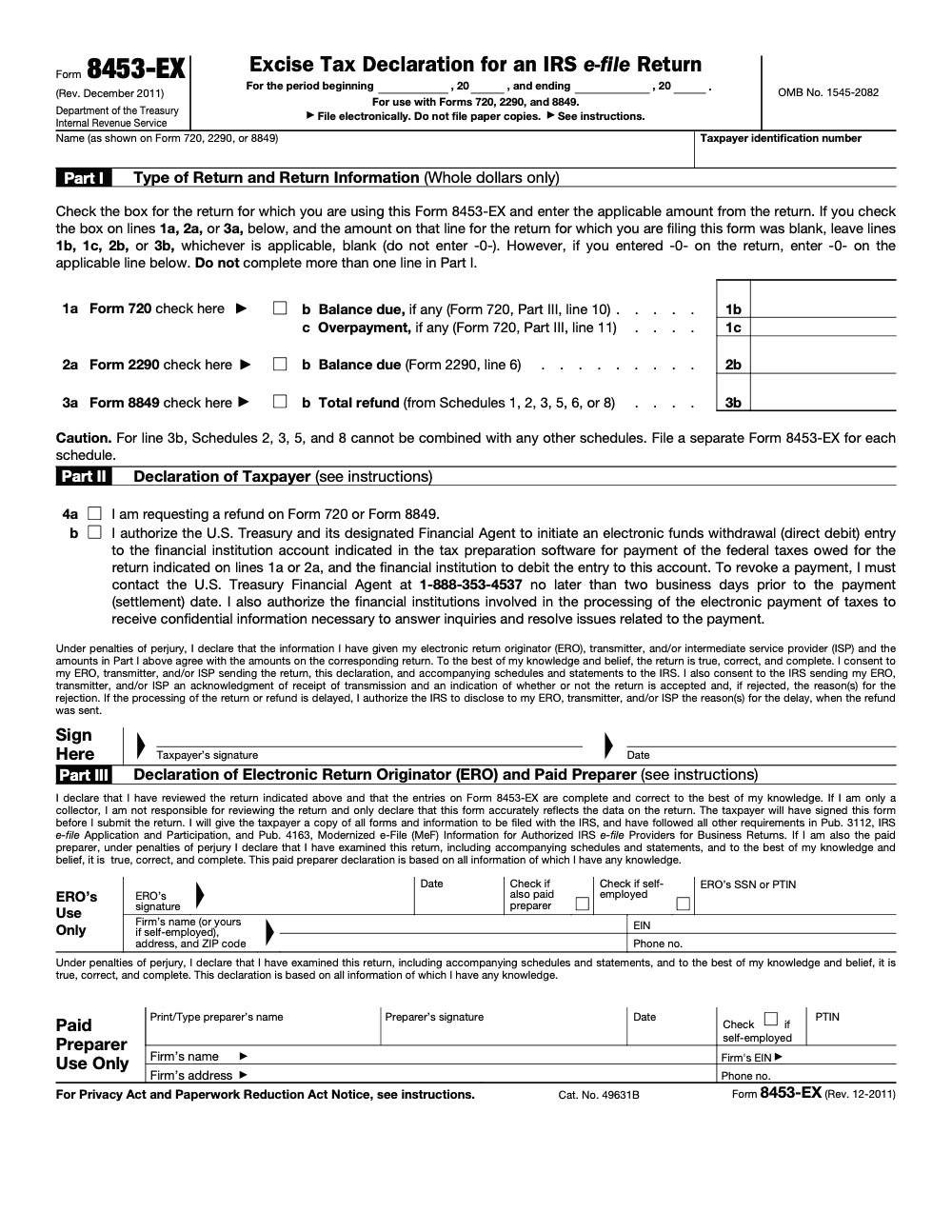
Form 8453-EX is the IRS Excise Tax Declaration for e-filed Form 720, Form 2290, and Form 8849 – it is a signature and authorization document, not the excise tax return itself (per IRS Form 8453-EX instructions, Rev. December 2011). Self-filers using an ISP or transmitter without an ERO must file it; Form 8879-EX (PIN-based) is the alternative when an ERO is involved, and checking line 4b authorizes a one-time electronic funds withdrawal that can only be revoked by calling the U.S. Treasury Financial Agent at 1-888-353-4537 at least two business days before settlement.
Filers think the e-file authorization and the excise return are the same document. They are not. Form 8453-EX is the signature and authorization piece for an e-filed Form 720, Form 2290, or Form 8849, not the return itself. A self-filer using an ISP or transmitter without an ERO has to complete it, while the PIN-based Form 8879-EX is the alternative when an ERO is in the picture.
The optional payment consent lives in one box. Checking line 4b authorizes a single one-time electronic funds withdrawal for the tax shown, and once it is set you can only revoke it by calling the U.S. Treasury Financial Agent. Most rejects on this form trace back to a wrong or missing EIN, a missing signature, or transmitter details that do not match, so a short pre-check clears the usual delays.
Key Takeaways
- You sign Form 8453-EX to authorize a third party to e-file Forms 2290, 720, or 8849 on your behalf, and you can optionally consent to one electronic funds withdrawal for the tax shown.
- If you file your own return directly with the IRS through an authorized platform using a PIN method, you usually do not need 8453-EX attached, but you must follow the platform’s signature rules.
- When a preparer or transmitter submits your return, a properly completed 8453-EX with the correct EIN and dated signature must be obtained and retained, and if a PIN is not used, the signed 8453-EX is attached to the e-file as a PDF. Do not mail paper copies – Form 8453-EX must be transmitted electronically as a PDF with the return; paper filing is not permitted (per IRS Form 8453-EX instructions, Rev. December 2011).
- For Form 720 and Form 8849, if a PIN signature is not used, the signed 8453-EX must be attached as a PDF with the transmission or the ERO must follow the 8879 process.
- Incorrect or missing EINs, missing signatures, or mismatched transmitter details are frequent reject triggers. A quick pre-check prevents most issues.
What Is Form 8453-EX and Why It Matters
Think of Form 8453-EX as your formal “yes.” You use it to authenticate an electronic excise return and, if you choose, to authorize a one-time direct debit for the exact amount shown. It covers three excise areas that trip up many operators and tax teams each year, the quarterly excise return on Form 720, the Heavy Highway Vehicle Use Tax on Form 2290, and claims for refund on Form 8849. The IRS page for Form 8453-EX spells out these purposes and confirms its role in authorizing an ERO or ISP to transmit via a third-party transmitter.
If you are using an IRS-authorized e-file provider yourself and signing with a PIN option, the provider’s process may remove the need to attach the 8453-EX. If you are using a preparer or transmitter, they must secure your signed authorization and follow IRS e-file signature rules. In either case, the easiest way to avoid rejects is to double-check that your legal name matches IRS records and that your EIN is correct before anyone presses submit.
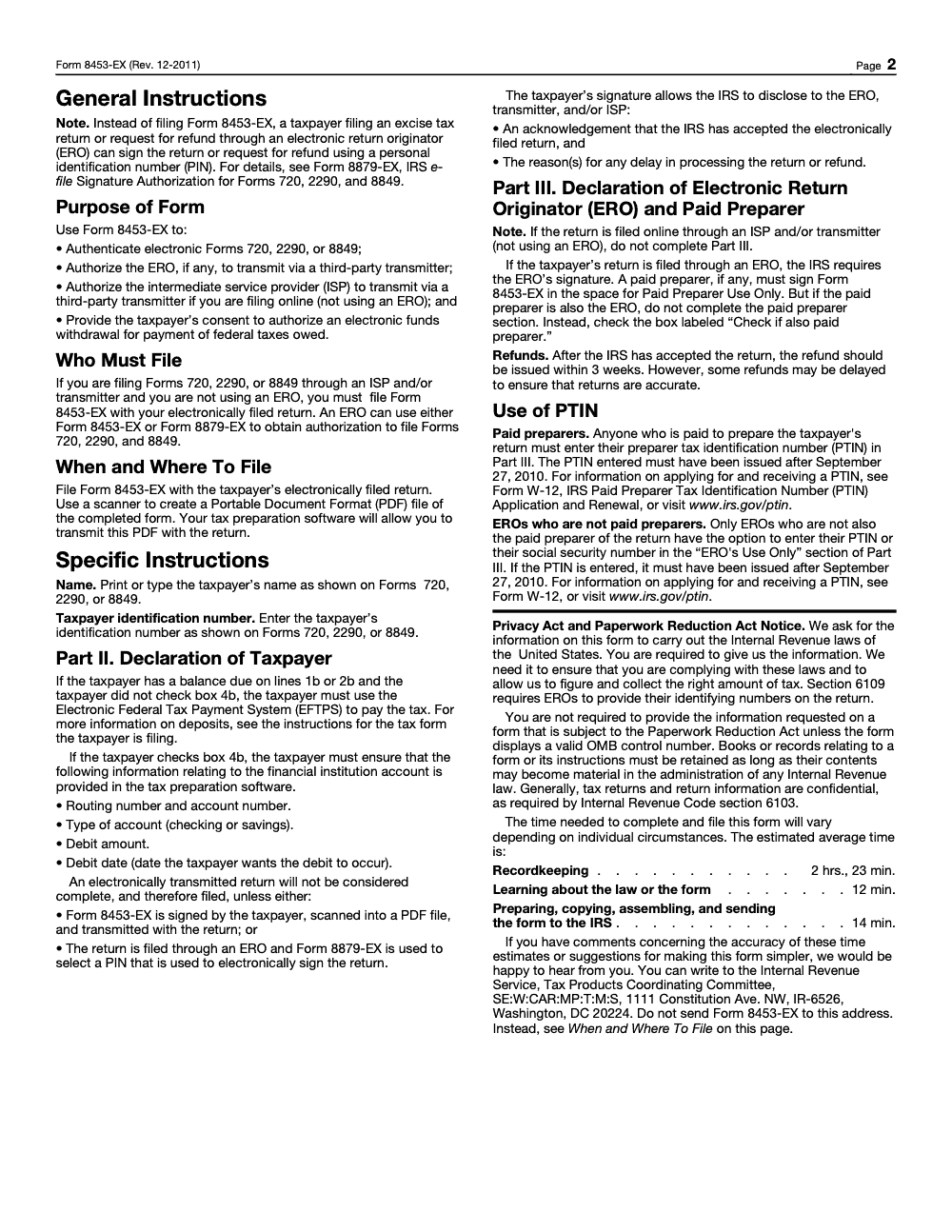
Form 8453-EX itself must be scanned into a PDF and transmitted electronically with the underlying Form 720, 2290, or 8849 – paper filing is not permitted (per IRS Form 8453-EX instructions, Rev. December 2011). The signed PDF is retained by the taxpayer or ERO in their records.
Who Must Complete Form 8453-EX and When It Is Required
You must complete and sign Form 8453-EX when filing Forms 720, 2290, or 8849 through an ISP and/or transmitter without using an ERO. If an ERO is involved, the ERO has a choice between Form 8453-EX (scanned signature) and Form 8879-EX (PIN-based authorization), per the IRS Form 8453-EX instructions. That third party could be a CPA, your internal tax team acting as transmitter, an Electronic Return Originator, or an Intermediate Service Provider. Your signed form gives them authority to transmit your Form 2290, 720, or 8849, and, if you choose, to initiate a one-time electronic funds withdrawal for the amount on that return. The IRS confirms these authorization scopes for the 8453-EX.
When do you not need it? If you directly e-file using IRS-approved software and you sign with a permitted PIN method, the 8453-EX PDF attachment is typically not required. For Form 720 and Form 8849, if a PIN is not used, the signed 8453-EX must be attached as a PDF with the transmission, or the ERO can use the 8879 route. For Form 2290, there is a PIN exception for certain authenticated online filings as outlined in the IRS Internal Revenue Manual.
What Returns Form 8453-EX Covers
Form 8453-EX supports electronic filing for three excise return types, and it can pair your signature with an optional payment authorization:
- Form 2290, Heavy Highway Vehicle Use Tax
- Form 720, Quarterly Federal Excise Tax Return
- Form 8849, Claim for Refund of Excise Taxes
The IRS “About” page confirms these specific forms and the role of the 8453-EX in authorizing transmission and, when selected, electronic funds withdrawal.
Form 2290 Authorization
If a third party will transmit your 2290, your signed 8453-EX authorizes that transmission and, if elected, a one-time ACH debit for the tax due. The IRM also notes signature alternatives for 2290 filers, including PIN options with proper authentication. Always confirm your EIN and legal name match IRS records, since mismatches are a common reason 2290 filings bounce.
Form 720 Coverage
For quarterly excise filers, sign 8453-EX when a third party e-files your Form 720 and, if you opt in, authorizes a single electronic funds withdrawal for the quarter’s liability. If a PIN signature is not used, the signed 8453-EX must be attached as a PDF with the transmission or handled through the 8879 process.
Form 8849 Refund Claims
When a third party submits your 8849 claim, the signed 8453-EX is your authorization to file and, if you elect, to debit or settle related amounts (Form 8849 Schedules 2, 3, 5, and 8 cannot be combined with any other schedules, so each of those schedules requires its own separate Form 8453-EX, per the line 3b caution on the form). As with Form 720, if a PIN is not used, attach the signed 8453-EX PDF to the transmission or follow the 8879 route. Verify your EIN before signing to avoid avoidable rejects.
Information Required On Form 8453-EX
Form 8453-EX is short, but every field matters:
- Correct Employer Identification Number, matching IRS records for the entity on the return
- Taxpayer’s dated signature, handwritten or compliant e-signature under IRS rules
- Explicit consent for an electronic funds withdrawal, only if you choose to pay by direct debit
If a preparer transmits your return, they must secure and retain your signed Form 8453-EX. If a PIN signature is not used, they attach the signed 8453-EX as a PDF to the e-file transmission. Do not mail paper copies – Form 8453-EX must be transmitted electronically as a PDF with the return (per IRS Form 8453-EX instructions, Rev. December 2011).
How Form 8453-EX Authorizes E-Filing And Payment
Your signature on 8453-EX does two things. First, it gives a designated transmitter permission to e-file your excise return. Second, if you opt in, it authorizes a one-time electronic funds withdrawal for the amount, date, and bank account you specify. It does not grant broad account access or representation authority beyond those items. The IRS describes these uses directly on the 8453-EX page and in the business e-file guidance.
Authorization Scope
- Who is authorized: only the named ERO, ISP, or transmitter you work with
- What is authorized: transmission of Form 2290, 720, or 8849, plus optional one-time EFW
- What is not authorized: broader representation or unrelated account actions
The IRM reinforces that acceptable business e-file signature documents must either be attached as a PDF when a PIN is not used or handled through permitted PIN methods, and that the entity information on the signature document must match the return.
Electronic Filing Consent
When you sign, you consent to the electronic transmission of the specified return. For Form 720 and Form 8849, if a PIN signature is not used, the signed 8453-EX must be included as a PDF with the e-file or the preparer follows the 8879 process. For Form 2290, the IRM provides a PIN exception in certain authenticated online filing scenarios.
Payment Withdrawal Approval
If you choose electronic funds withdrawal, your signature authorizes a single ACH debit for the tax shown on the return. That debit is limited to the amount and banking details you provide, and it is tied to the specified return. This is not an ongoing authorization.
Quick Reference Table
| What it does | When it is required | Key data you must include |
| Authorizes e-file of Forms 2290, 720, 8849 | When a third party transmits your return | Entity legal name and correct EIN |
| Allows one-time electronic funds withdrawal | Only if you opt in to EFW | Dated signature, bank info, debit date and amount |
| Serves as your signed authorization record | Retain for IRS requests, do not mail unless asked | Transmitter details, return type, tax period |
Sources: IRS “About Form 8453-EX,” and IRS IRM 3.42.4, Business e-file signature rules, scanned signature method, and attachment requirements.
Filing Scenarios, Made Practical
- You self-file Form 2290 using approved software and sign with a supported PIN. You likely do not need to attach 8453-EX. Keep your confirmation and any consent pages the software produces.
- Your CPA e-files Form 720. They either use an 8879 process or, if a PIN is not used, they attach your signed 8453-EX PDF to the transmission. You keep a copy, they keep a copy.
- You submit a Form 8849 claim through a transmitter. Same rule, PIN or attach the signed 8453-EX PDF.
Tip from the trenches: run an EIN match before anyone requests your signature. It is faster to fix a mismatch before you sign than to unwind a reject later. The IRS rejects many filings for incorrect entity identifiers, and the fix often starts with revalidating the EIN against IRS records.
Step-by-Step, Completing Form 8453-EX In Your E-File Workflow
Use this simple path so you do not lose time to preventable rejects:
- Confirm the return details
- For 2290, verify VINs, first used month, and computed tax. For 720 or 8849, confirm line items and schedules. Small input errors cause big rework late in the cycle.
- Validate entity information
- Match the business legal name and EIN to IRS records. Many platforms prompt you here, but do not skip your own check.
- Generate the 8453-EX
- If you are using a preparer or third-party transmitter, create the form in your software workflow. Confirm it is set to the correct form type, 2290, 720, or 8849.
- Capture the taxpayer’s signature
- Use a compliant PIN method if available, or obtain a signed 8453-EX and keep it with your e-file package. If a PIN is not used for 720 or 8849, attach the signed 8453-EX PDF to the transmission.
- Decide on payment
- If you want a one-time direct debit, enter the exact amount, date, and bank info. Your signature authorizes only that withdrawal.
- Transmit and retain
- Submit the return. Retain the signed 8453-EX or 8879, along with acknowledgments. Do not mail the 8453-EX – it must be transmitted electronically as a PDF with the return; paper filing is not permitted (per IRS Form 8453-EX instructions, Rev. December 2011).
What Tax Pros And Transmitters Must Do To Comply
If you are the preparer or transmitter, your checklist is straightforward and strict:
- Obtain the taxpayer’s authorization before you transmit, via PIN or a signed 8453-EX.
- If a PIN is not used for Forms 720 or 8849, scan and attach the signed 8453-EX PDF to the MeF transmission, and make sure the attachment box is correctly marked.
- Retain the original signature document in your files, and be prepared to provide it if the IRS requests it. Do not mail Form 8453-EX – it must be scanned into a PDF and transmitted electronically with the return; paper filing is not permitted (per IRS Form 8453-EX instructions, Rev. December 2011).
- Validate that the entity on the signature document matches the entity on the return and that signatures are acceptable under IRS rules.
Per the IRS Form 8453-EX instructions (Rev. December 2011): “File electronically. Do not file paper copies.” The signed form is scanned into a PDF and transmitted with the underlying return; the original is retained by the taxpayer or ERO in their records.
Common 8453-EX Mistakes And How To Avoid Them
These are the issues I see most often, and how to stop them before they slow you down:
- Missing signature Consequence: authorization failure and possible reject. Fix: use PIN methods where allowed or capture a compliant e-signature and date.
- Wrong or missing EIN Consequence: authentication failure. Fix: verify the EIN against IRS records before preparing the form.
- Mismatched entity or transmitter details Consequence: reject at transmission or later follow-up. Fix: make sure the entity on 8453-EX matches the return, and confirm transmitter details.
- Not attaching the 8453-EX when required Consequence: e-file critical diagnostic or reject. Fix: for 720 and 8849, attach the signed 8453-EX PDF when PIN signature is not used, or use Form 8879 per the IRM guidance.
- Mailing the 8453-EX to the IRS Consequence: paper filing is not accepted – Form 8453-EX must be scanned into a PDF and transmitted electronically with the return (per IRS Form 8453-EX instructions, Rev. December 2011). Fix: build the PDF scan and electronic attachment into the e-file workflow; retain the signed copy in your records, never mail it.
A Simple Pre-Flight Checklist
- Entity name and EIN match IRS records
- Correct return type and tax period on the 8453-EX
- Dated taxpayer signature or allowed PIN method documented
- EFW box completed only if you intend to debit, with correct amount and date
- For 720 or 8849, attach the signed 8453-EX PDF if PIN is not used, and mark the attachment box correctly in the transmission package
A brief note for firm owners and controllers: if you are building a standardized process for busy seasons, this is where SOPs, naming standards, and reviewer checklists shine. A two-minute EIN and signature check will save you hours of back-and-forth later.
Common Mistakes We See Every Season
The pattern we see most often: practitioners and self-filers treat Form 8453-EX as administrative paperwork and miss small rules that delay the underlying excise return.
Reusable Checklists
These are copy-paste ready for firm SOPs. Pull what you need into your client packets, e-file queue, or post-acceptance review.
Pre-transmission packet review
- Confirm only one of Part I lines 1a, 2a, or 3a is checked on this 8453-EX.
- Verify taxpayer name and TIN match the underlying Form 720, 2290, or 8849 exactly.
- Confirm the period beginning and ending dates on 8453-EX match the underlying return.
- Mirror each Part I amount (1b, 1c, 2b, 3b) to the underlying return: blank stays blank, -0- stays -0-, whole dollars only.
- If line 4a (refund) is used, confirm Form 720 or Form 8849 supports it.
- If line 4b (EFW) is used, confirm routing number, account number, account type, debit amount, and debit date are entered in the e-file software.
- If Form 8849 Schedules 2, 3, 5, or 8 are involved, generate a separate Form 8453-EX for each.
- Capture taxpayer signature, title, and date before the file leaves the desk.
ERO and paid-preparer sign-off
- If filing through an ERO: ERO signs Part III before transmission.
- If ERO is also the paid preparer: ERO signs once and checks the "Check if also paid preparer" box; Paid Preparer Use Only stays blank.
- If ERO is only a collector: confirm the taxpayer signed 8453-EX before the ERO submits the return.
- Paid preparer (not the ERO) enters a PTIN issued after September 27, 2010 – never an SSN.
- ERO (not also the paid preparer) enters either a post-September-27-2010 PTIN or an SSN.
- Provide the taxpayer a copy of all forms and information transmitted to the IRS, per Pub. 3112 and Pub. 4163.
Post-acceptance and refund tracking
- Log the IRS e-file acknowledgment for the underlying return and the 8453-EX PDF attachment.
- If line 4b was checked, log the debit date and confirm settlement on the bank statement.
- If a refund is expected on line 3b, mark the file for the 3-week window and track for delays (per the IRS Form 8453-EX instructions, refunds are typical but not guaranteed).
- If balance due was paid via EFTPS (line 4b not checked), log the EFTPS confirmation against the underlying return.
- Retain the signed PDF and supporting records as long as they may be material under any Internal Revenue law (IRC §6103 confidentiality applies).
Keep 8453-EX Season From Stalling
Excise filings are unforgiving. Form 720 runs on a quarterly clock, Form 2290 spikes in July for the heavy-highway use tax cycle, and Form 8849 refund claims sit in a queue the IRS itself only commits to clearing "generally" within 3 weeks of acceptance (per the Form 8453-EX instructions, Rev. December 2011). When the 8453-EX declaration is wrong, none of those returns are considered filed, and the refund clock does not start.
The fix is to treat 8453-EX as a controlled artifact in the e-file workflow, not a last-minute signature page. A five-minute packet review against the underlying Form 720, 2290, or 8849 prevents almost every rejection we see in practice.
- Lock Part I to exactly one return type per declaration: one 1a (720), one 2a (2290), or one 3a (8849), with a separate 8453-EX for each non-combinable Form 8849 schedule (2, 3, 5, 8).
- Build a "mirror the return" reviewer step: lines 1b, 1c, 2b, and 3b on 8453-EX must mirror the underlying form's balance due, overpayment, or refund line, in whole dollars only.
- Standardize the line 4b workflow: when EFW is authorized, capture routing, account, type, amount, and debit date in the software, log the debit date, and flag the two-business-day Treasury Financial Agent cutoff (1-888-353-4537) if anything changes.
- Track PTIN status before paid preparers sign Part III: only PTINs issued after September 27, 2010 are valid, and the SSN option exists only for EROs who are not also the paid preparer.
- If filing through an ERO, decide upfront between Form 8453-EX (scanned signature) and Form 8879-EX (PIN): never both, never neither.
Accountably builds this control directly into the e-file workflow. Our U.S.-led offshore tax delivery handles the packet review, ERO and paid-preparer routing, and post-acceptance log so the underlying excise return is actually filed, not just transmitted, before the deadline lands.
FAQs
Form 8453-EX is the IRS Excise Tax Declaration that lets a third party e-file your Form 2290, 720, or 8849 and, if you choose, it captures your consent for a one-time electronic funds withdrawal. It also authorizes an ERO or ISP to transmit through a third-party transmitter.
If you directly e-file using IRS-approved software and sign using an allowed PIN method, you generally do not need to attach 8453-EX. Follow your software’s signature instructions and keep your records.
For Form 720 and Form 8849, if a PIN signature is not used, attach the signed 8453-EX PDF with the transmission, or the ERO can follow the Form 8879 process. For Form 2290, there is a PIN exception for certain authenticated online filings.
No. Form 8453-EX must be scanned into a PDF and transmitted electronically with the underlying excise return – paper copies are not permitted (per IRS Form 8453-EX instructions, Rev. December 2011). Retain the signed PDF in your records.
The return can be rejected. Always verify the legal name and EIN before anyone signs or transmits.
No. Your authorization is narrow. It covers e-filing the specified excise return and, if you opt in, a one-time electronic funds withdrawal tied to that return.
Other forms this guide names
- Form 720: Deadlines, Deposits, and PCORI, 2025 Guide
- Form 2290: Heavy Highway Vehicle Use Tax Guide with Deadlines, E‑File, and Schedule 1
- Form 8879: IRS e-file Signature Authorization Explained
- Form 8879‑EX: E‑File Signature for Forms 720, 2290, 8849
About this guide
Accountably helps US CPA, EA, and accounting firms hire trained accountants and tax preparers in India.
About us Reviewed byJugal Thacker, CPAFounder and CEO at Accountably
A Washington-licensed CPA with 7+ years inside US firms – PwC, a real-estate tax practice, then a full-service firm, rising from reviewer to manager to advisory. This article was reviewed against current IRS guidance for the 2025 tax year and updated for filers preparing late returns, amendments, and 2026 estimates.
View profile →How we research, review, and update this guide
Every Accountably guide is researched against primary IRS sources, reviewed by a U.S. CPA, and refreshed as guidance evolves. Read our Editorial Guidelines to see how we source, fact-check, and update our content.




