
Summarize this article with AI
In Brief
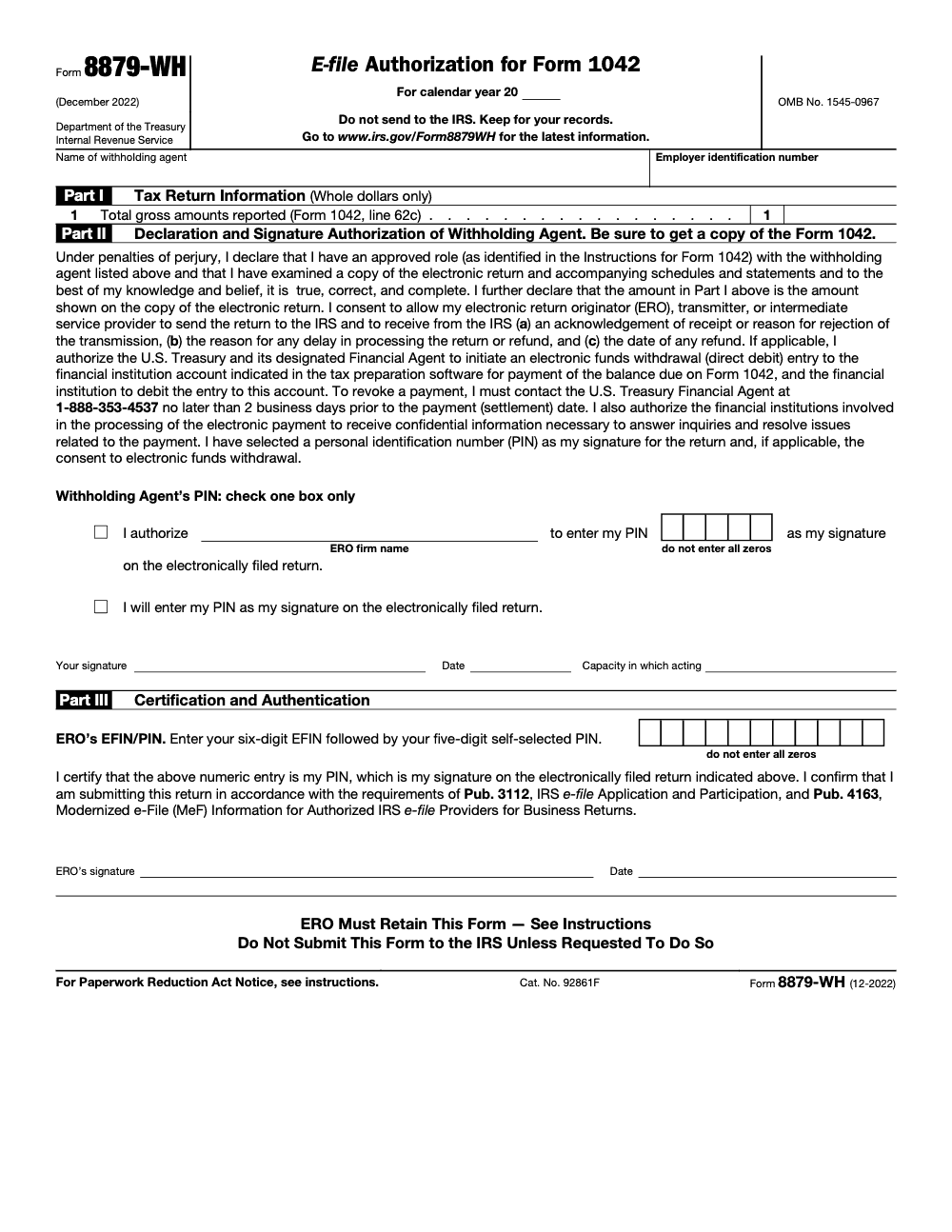
Form 8879-WH is the IRS e-file authorization that lets a withholding agent sign Form 1042 with a five-digit PIN. Form 1042 is the annual withholding tax return for U.S. source income paid to foreign persons (per the Form 8879-WH instructions, December 2022 revision). Part I, line 1 carries the total gross amounts reported from Form 1042 line 62c in whole dollars; the Electronic Return Originator must hold the signed authorization before transmitting, retain it for three years, and never mail it to the IRS. When you are not using a PIN, file Form 8453-WH instead, and route 1042 preparation through our tax outsourcing service if review capacity is tight.
The 1042 returns that miss their transmission window rarely fail on the tax math, they stall on the signature. Form 8879-WH lets a withholding agent sign Form 1042, the annual withholding tax return for U.S. source income paid to foreign persons, with a five digit PIN. The number that catches people is on Part I, line 1, which carries the total gross amounts from Form 1042 line 62c in whole dollars, and if that figure does not tie out, you cannot transmit until a corrected, re-signed form comes back.
Finish the Form 1042 numbers first, then complete the authorization, never the other way around. The ERO must hold the signed form before transmitting and retain it for three years, and it is never mailed to the IRS. The current revision is still the December 2022 edition, so confirm the latest form before you prepare signatures.
Key Takeaways
- Form 8879-WH authorizes an ERO to e-file Form 1042 using a PIN signature. You and the ERO keep the signed authorization for your records. You do not mail it to the IRS. Retain it for three years from the return due date or IRS received date, whichever is later.
- Form 8453-WH is the alternative signature declaration when you are not using a PIN. It is scanned and attached as a PDF to the MeF submission, and it is not mailed to the IRS for MeF business filings.
- Complete 8879-WH only after you finalize Form 1042 numbers, especially Section 1 monthly liabilities and year-end totals. The 2025 Instructions for Form 1042 explain how liabilities must reconcile across the return.
- E-file requirements apply to many withholding agents. Financial institutions and filers meeting electronic filing thresholds must e-file. For 2025 filings of tax year 2024, foreign withholding agents had an administrative exemption noted in Publication 515. Check the 2025 Instructions for Form 1042 for your status.
- Current 8879-WH revision remains the December 2022 edition as listed by the IRS. Always confirm the latest form before you prepare signatures.
What Form 8879-WH Is and Why It Matters
Form 8879-WH, E-file Authorization for Form 1042, lets a withholding agent and an ERO use a PIN as the electronic signature for a 1042 return (the annual Form 1042 itself, not the per-payee Form 1042-S, which has its own separate filing process). This is the cleanest way to authorize e-file, since the signed 8879-WH stays in your records and is not part of the transmitted return. In practice, it is your signed consent to e-file and, if selected, to authorize electronic funds withdrawal.
Using the PIN method helps you avoid chasing paper or routing wet signatures during crunch time. It also aligns with how the IRS expects EROs to manage signature authorizations across business returns. The IRS Internal Revenue Manual, which governs e-file program operations, directs EROs to retain Form 8879 for three years and to provide it only if requested. That framework applies here too.
Who Must Use Form 8879-WH
If you are a withholding agent using an ERO and you want to sign Form 1042 via a PIN, you complete Form 8879-WH. The ERO uses this authorization to apply the electronic signature and transmit your return. If you are not using a PIN signature path, you would use Form 8453-WH instead, scan it, and attach it to the electronic submission as a PDF.
A quick note on e-file applicability. Many withholding agents are required to e-file. The 2025 Instructions for Form 1042 and Publication 515 explain that certain filers, including financial institutions and those meeting return-count thresholds, must e-file. Publication 515 also notes the administrative exemption for foreign withholding agents for 2025 filings of 2024 returns, so if you are a foreign person acting as a withholding agent, review those details before you choose a signature method.
Where 8879-WH Fits in Your 1042 E-file Workflow
Think of 8879-WH as a checkpoint between finishing your 1042 and hitting transmit.
- Prepare and review Form 1042. Confirm Section 1 monthly liabilities reconcile to your year-end totals and to lines 64b and 64c.
- Generate Form 8879-WH from your software once the numbers are final.
- Identify and verify the signer’s authority, then sign and date the 8879-WH.
- The ERO applies the PIN and transmits the 1042 return through Modernized e-File.
- Retain the signed 8879-WH for three years. Do not mail it to the IRS.
If you need or prefer the non-PIN route, use 8453-WH. Scan the signed 8453-WH and attach it as a PDF to the MeF return using the attachment naming guidance your software provides. The IRS specifies that binary attachments should be PDFs and offers recommended names and descriptions for consistency.
Timing That Prevents Rework
- Finalize your 1042 data first, then capture signatures.
- Do not rush 8879-WH before Section 1 is locked. Corrections after transmission can mean additional steps and, in some cases, amended filings. The cleanest path is verify totals, authorize, then transmit.
Step-by-Step, How To Complete and Sign Form 8879-WH
Here is a simple, reliable sequence you can run every time.
- Confirm signing authority
- Identify who will sign for the withholding agent. This is typically an officer or another authorized individual. If someone signs under power of attorney, keep Form 2848 on file with your e-file records. Your ERO must verify identity under e-file program rules before using the PIN method.
- Match the entity fields to Form 1042
- Enter the legal name, EIN, and tax year exactly as they appear on Form 1042 (the period is always a calendar year, since Form 1042 is filed on a calendar-year basis, not a fiscal year). Do not abbreviate or change formats. Consistency prevents rejects and keeps your record trail clean.
- Reconcile Section 1 totals
- Pull the monthly liability totals directly from Form 1042 and confirm they reconcile to lines 64b and 64c by chapter. If they do not reconcile, fix the 1042 first, then proceed with 8879-WH.
- Complete the ERO details
- List the ERO name, firm, EFIN, and contact information as your software requests. The ERO’s 11‑digit PIN consists of the 6‑digit EFIN followed by 5 digits they choose.
- Sign, date, and retain
- The withholding agent signs, dates, and enters the capacity in which they are acting (for example, officer, partner, or fiduciary) on 8879-WH; signature and date alone leave the form incomplete. The ERO applies their PIN during transmission (and must not transmit the return until the signed 8879-WH is in hand). Retain the signed 8879-WH for three years from the return due date or IRS received date, whichever is later. Do not mail it to the IRS unless specifically requested.
Signature Options, Side by Side
| Option | What it is | When to use | How it is stored or sent |
| Form 8879-WH | PIN-based e-file signature authorization for 1042 | You are using an ERO and want a PIN signature | Retain the signed form for 3 years. Not mailed to the IRS. |
| Form 8453-WH | Scanned signature declaration for 1042 | You are not using a PIN signature path | Scan and attach as a PDF to the MeF submission. Not mailed for MeF business filings. |
Attachments, File Names, and Where They Go
If you use 8453-WH, attach it as a PDF within your software’s attachment or documents panel. The IRS recommends specific names and descriptions for business return PDFs. Following those conventions helps processing and reduces avoidable rejects tied to business rules. Your software should map to the MeF naming list.
Record Retention and Do‑Not‑Mail Rules
Three points keep you out of trouble:
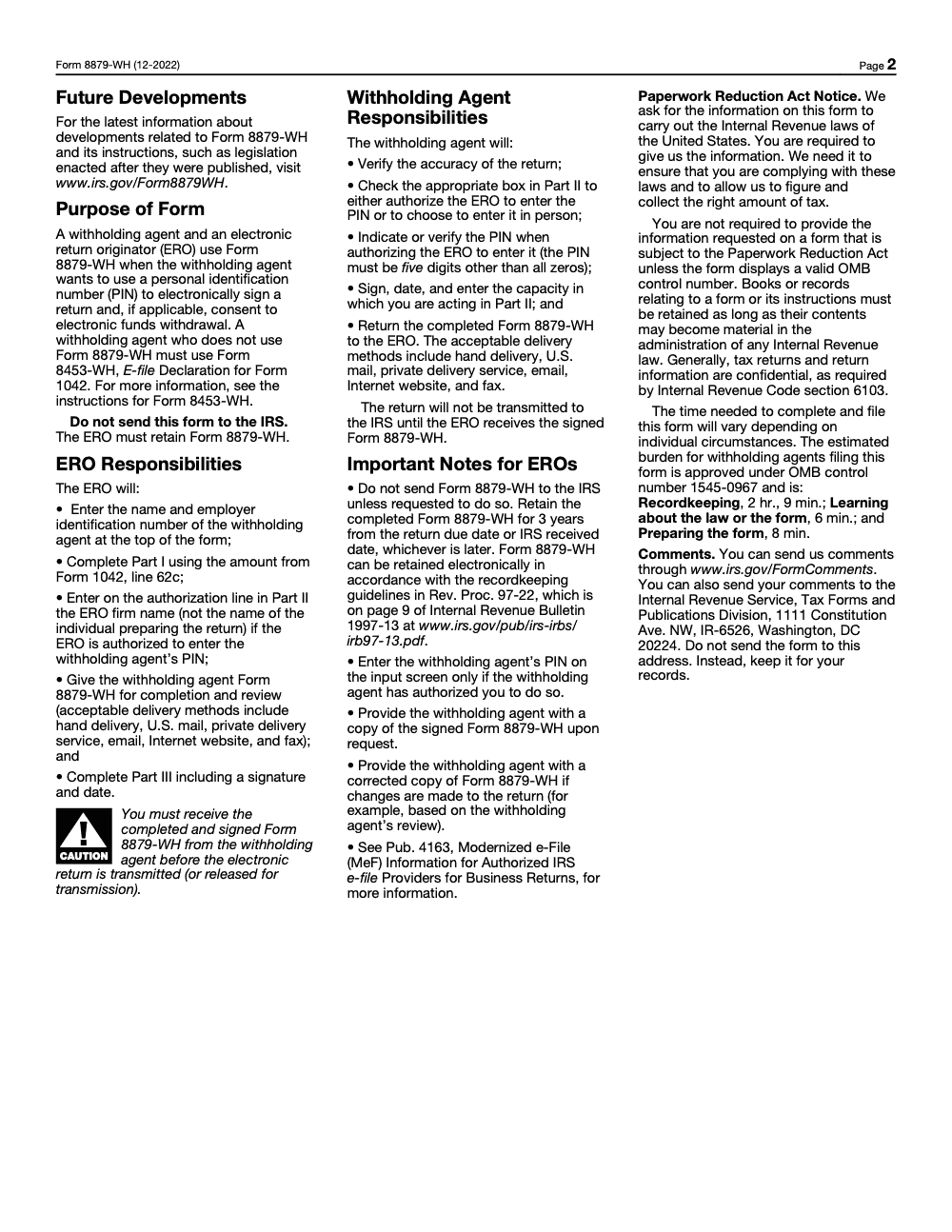
- Keep Form 8879‑WH for three years from the return due date or IRS received date. The ERO must retain it and produce it if the IRS asks.
- Do not mail 8879‑WH to the IRS. It is a retained authorization, not a filing document.
- If you do not use a PIN and rely on 8453‑WH, scan the signed form and attach it as a PDF to the MeF return. The business e‑file program eliminates separate paper 8453 mailings.
“Binary attachments can be submitted in PDF and the MeF program eliminates separate paper Form 8453 mailings for business returns.” Keep that one line in your SOP so your team never prints and ships a form that should have been a PDF.
Common Mistakes That Slow Filing, And How To Fix Them
Across the 1042 e-files my team reviews, the same handful of 8879-WH errors resurface every season, and almost all of them are process gaps rather than judgment calls.
8879-WH vs. 8453-WH, A Practical Comparison
Both forms relate to the 1042 e-file, but they solve different problems.
- Use 8879‑WH if you want the simplest signature path. Your ERO applies the Practitioner PIN, you keep a signed authorization, and nothing extra rides with the XML.
- Use 8453‑WH if you are not using PIN. Scan, attach, and transmit the PDF with your 1042 submission. Do not mail it for MeF business returns.
If you are unsure which path fits your facts, review your e-file software’s 1042 signature options and the IRS MeF notes for Form 1042. The IRS maintains a current page for MeF 1042 that links schemas, status, and resources.
E-file Requirement Snapshot, 2025 Season
- Many withholding agents must e-file Form 1042, including financial institutions and filers over specified thresholds. See the 2025 Instructions for Form 1042 and Publication 515.
- Foreign withholding agents had an administrative exemption for 2025 filings of 2024 returns. If that is you, verify your position before setting up signatures.
Pre‑Transmission Checklist
- Section 1 monthly liabilities on 1042 reconcile to your totals and to lines 64b and 64c by chapter.
- Signer authority verified and identity checked per e‑file program rules.
- 8879‑WH signed and dated, retained for three years, not mailed.
- If not using PIN, 8453‑WH scanned and attached as a PDF with the recommended description.
- Acknowledgement and signature authorization stored together in your e‑file archive.
Practical Tips From the Field
- Standardize your file names. Use your software’s default naming for 8879‑WH and 8453‑WH so every reviewer finds the same document in the same place. The IRS publishes recommended names and descriptions for PDFs on MeF, which your software usually adopts.
- Train one reviewer to spot Section 1 issues quickly. Most late scrambles come from reconciliation gaps, not signature forms. The 2025 instructions are your best training outline.
- Keep your forms current. The IRS lists the current 8879‑WH as the December 2022 edition. Verify you are generating the current revision each season.
A Note On Delivery Discipline
If your team is buried in production during 1042 season, signature forms can become a bottleneck. The fix is structure. At Accountably, we help firms build SOP‑driven checklists, standardized workpapers, and clean attachment workflows so EROs can transmit on schedule without quality tradeoffs. If you run high volumes or operate across multiple entities, consider a brief systems review before filing season so your 8879‑WH and 8453‑WH steps run on rails.
Conclusion
You now have the essentials. Use 8879‑WH when you want a fast, clean PIN signature path. Use 8453‑WH when you are not using PIN, scan it, attach it as a PDF, and keep everything together with your acknowledgements. Finalize your 1042 numbers first, then capture signatures and transmit. Keep your signed authorization for three years. When you build this into your SOP, filing season feels calmer, reviews run faster, and your audit trail is airtight.
Reusable Checklists
These checklists are copy-paste ready for your 1042 e-file SOP. Drop them into your workpaper template so every preparer and reviewer runs the same steps in the same order.
8879-WH Signature Readiness
- Confirm the withholding agent is the correct signer with an approved role per the Form 1042 instructions.
- Enter the withholding agent name and EIN at the top of the form; the ERO completes this.
- Transcribe Form 1042 line 62c into Part I, line 1 in whole dollars and reconcile to the final return.
- Have the withholding agent examine the electronic 1042 copy before signing.
- Confirm one Part II box is checked, never both.
- Verify the five-digit PIN is not all zeros.
- Capture signature, date, and the capacity in which acting.
- ERO completes the EFIN and PIN, eleven digits combined, and signs Part III.
Pre-Transmission Gate
- Signed 8879-WH received and in hand before releasing the return.
- Part I, line 1 matches the final Form 1042 figure from line 62c.
- If the return changed after signing, a corrected 8879-WH was re-signed.
- Do-not-mail confirmed; the authorization goes to the e-file archive only.
- If no PIN was used, Form 8453-WH was scanned and attached as a PDF instead.
Retention and Audit Trail
- Store the signed 8879-WH for three years from the later of the return due date or IRS received date.
- Keep paper or electronic copies that comply with Rev. Proc. 97-22 for electronic storage.
- File the IRS acknowledgement alongside the authorization so they stay together.
- Be ready to produce the form if the IRS requests it.
- Provide the withholding agent a copy on request, including any corrected version.
Keep 8879-WH Season From Stalling
Form 8879-WH never looks like the bottleneck until the 1042 deadline is days away and the signed authorization still is not back. Because Form 1042 is a calendar-year return and the Electronic Return Originator cannot transmit until the signed form is in hand, one late signature can hold an entire engagement. The IRS pegs the paperwork burden for this one-page form at roughly two hours and twenty-three minutes per filer (OMB control number 1545-0967), and that estimate assumes the numbers already reconcile.
The teams that stay calm in 1042 season do not work the form harder; they sequence it. They finalize the return, reconcile Part I, then collect the signature last, so nothing has to be re-signed at the worst possible moment.
- Lock Form 1042 line 62c before requesting a signature, so Part I, line 1 ties on the first pass.
- Stage the five-digit, not-all-zeros PIN check at intake to catch rejects before transmission day.
- Default the Part II authorization line to your ERO firm name and require the capacity field.
- Route 8453-WH PDFs through the same MeF attachment step you use for every binary, so non-PIN filers never get a separate paper path.
- Tag each signed 8879-WH with its three-year retention date the moment it lands in the archive.
When 1042 volume outpaces review capacity, structure beats overtime. Our tax outsourcing and offshoring teams run these signature and reconciliation steps inside documented SOPs with multi-layer review, so authorizations are signed, retained, and ready to transmit without the late-season scramble.
FAQs
No. The ERO retains the signed 8879‑WH for three years and provides it only upon request. It is not mailed with the return.
Use 8453‑WH when you are not using a PIN signature method. Scan the signed 8453‑WH and attach it as a PDF to the MeF return. Do not mail it for MeF business filings.
Three years from the return due date or the IRS received date, whichever is later. This mirrors the retention rule the IRS sets for 8879 in the e‑file program.
Yes. The IRS e‑file program uses PIN signatures for 8879 series authorizations, and MeF accepts scanned PDFs for 8453. Follow your software’s e‑signature workflow and keep a clear audit trail.
Replace it with a correct, newly signed 8879‑WH before transmission. If the return was already accepted and changes are needed, follow the correction or amended return process for 1042, as applicable. Always reconcile Section 1 and year‑end totals first.
Other forms this guide names
- Form 1042: Annual Withholding Tax Return for Foreign Persons 2025
- Form 8453‑WH: Complete 2025 Guide for Form 1042 E‑File
- Form 8453: What to Mail, Address, and 3-Day Deadline
- Form 8879: IRS e-file Signature Authorization Explained
Summarize this article with AI
About this guide
Accountably helps US CPA, EA, and accounting firms hire trained accountants and tax preparers in India.
About us Reviewed byJugal Thacker, CPAFounder and CEO at Accountably
A US-licensed CPA with 7+ years inside US firms – PwC, a real-estate tax practice, then a full-service firm, rising from reviewer to manager to advisory. This article was reviewed against current IRS guidance for the 2025 tax year and updated for filers preparing late returns, amendments, and 2026 estimates.
View profile →How we research, review, and update this guide
Every Accountably guide is researched against primary IRS sources, reviewed by a U.S. CPA, and refreshed as guidance evolves. Read our Editorial Guidelines to see how we source, fact-check, and update our content.




