
Summarize this article with AI
In Brief
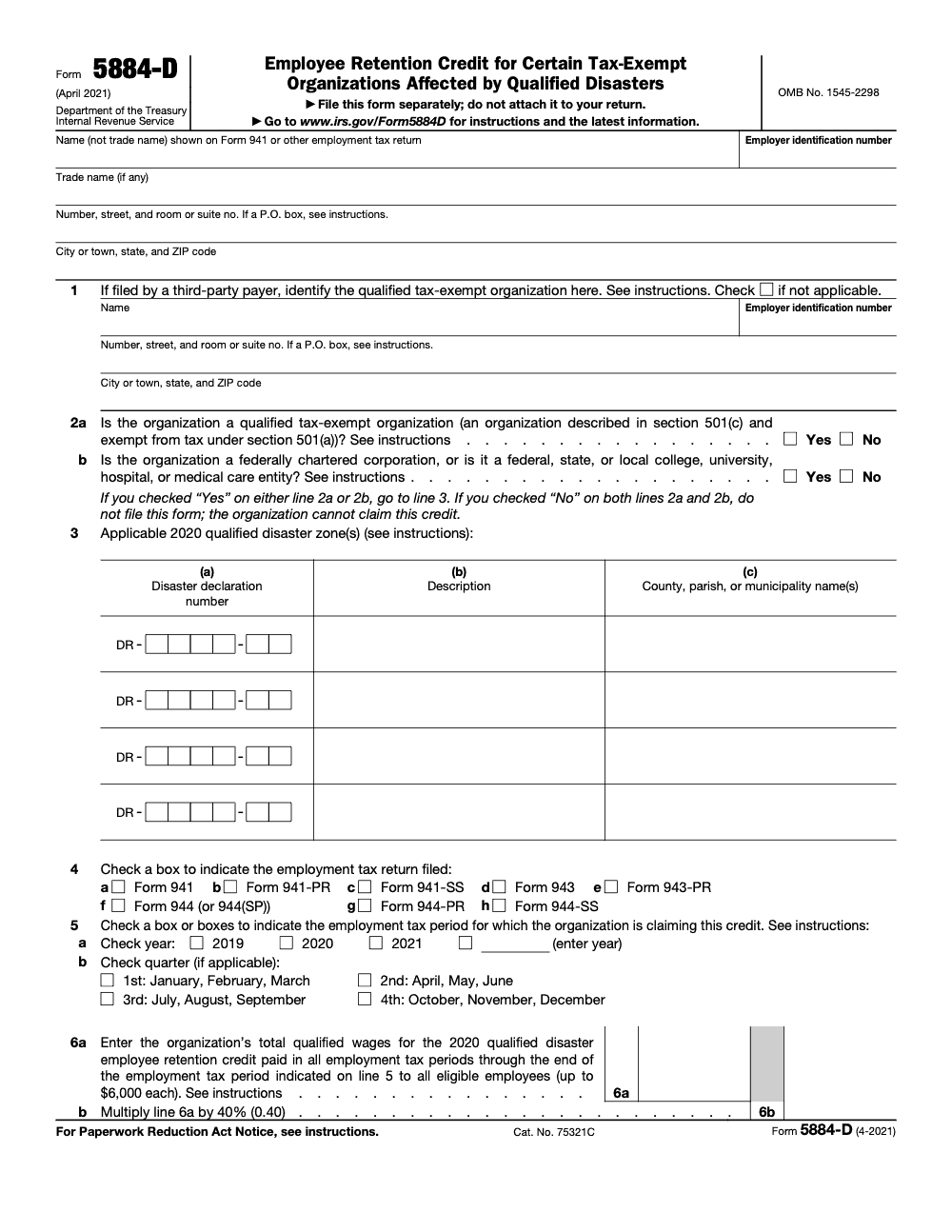
Form 5884-D is the Employee Retention Credit for Certain Tax-Exempt Organizations Affected by Qualified Disasters – a 40% credit on up to $6,000 in qualified wages per eligible employee (a maximum of $2,400 per employee), claimed by 501(c) organizations exempt under 501(a) and other qualified tax-exempt entities for 2020-declared qualified disasters excluding COVID-19 (per IRS Form 5884-D, April 2021 revision). File a separate Form 5884-D for each employment tax period by paper to Department of the Treasury, Internal Revenue Service, Ogden, UT 84201 – it is never attached to Form 941 or any other employment tax return.
Form 5884-D is no longer a seasonal job; it is a cleanup job. The credit covers only 2020-declared qualified disasters, the form has been frozen at the April 2021 revision, and the claims still moving are retroactive refund requests tied to employment tax periods that remain open under the statute of limitations. Each one is a small reconciliation rather than a quick fill.
The credit equals 40% of up to $6,000 in qualified wages per eligible employee, a maximum of $2,400 each, and the steps have to stay in order. Pull the right period's social security wages, fold in any prior 5884-D credit on line 8, run both the wage calculation and the 6.2 percent employer social security tax cap on line 11, then write the refund on line 12. Miss a step and the package bounces, or the organization owes the excess back on line 13.
Key Takeaways
- The 2020 qualified disaster employee retention credit equals 40% of up to $6,000 in qualified wages per eligible employee, maximum $2,400 per employee.
- You must be a qualifying tax‑exempt organization that became inoperable due to a 2020 federally declared disaster in a designated disaster zone, not COVID-only declarations.
- File Form 5884‑D for each employment tax period in which your cumulative credit changes, and you file it after the related employment tax return is filed.
- The amount you properly claim is treated as a credit on the first day of that employment tax period, so you may reduce deposits for that period, although the IRS may send a temporary balance‑due notice that is later abated when the credit applies.
- Keep the DR number, incident period, affected jurisdictions, and a clear employee‑level wage schedule. Do not double count wages used for the COVID‑19 ERC or other overlapping credits.
What Form 5884‑D Is, And Why It Exists
Form 5884‑D lets a qualified tax‑exempt organization claim a payroll tax credit for paying or incurring wages after its activities became inoperable because of a 2020 qualified disaster. Think hurricanes, wildfires, floods, earthquakes, and similar events declared by FEMA and the President during calendar year 2020, not COVID‑only declarations and not disasters declared in 2024 or 2025 (the statutory scope is limited to 2020 declarations under Section 303 of the Taxpayer Certainty and Disaster Tax Relief Act of 2020). The credit is refundable, and the IRS issues the refund shown on line 12 unless it corrects the filing or applies offsets for other balances.
Here is the simple math. For each eligible employee, total qualified wages paid during the eligible window, cap wages at 6,000, then take 40%. That is 2,400 max per person. You then report the cumulative total each employment tax period, net of what you have already claimed.
Who Qualifies, In Plain English
You qualify if you are:
- A tax‑exempt organization described in section 501(c) and exempt under 501(a), and
- Your activities in a 2020 qualified disaster zone became inoperable during the incident period and on or before December 27, 2020.
Certain governmental entities do qualify, including federally chartered corporations under 501(c)(1), public colleges or universities, and entities whose principal purpose is providing medical or hospital care. If that is you, you still need to meet the same inoperability and location rules.
Eligible employees are those whose principal place of employment with your organization was in the qualified disaster zone immediately before the incident period began. The wage window starts when your activities first became inoperable at that location and ends at the earlier of significant resumption or 150 days after the incident period ends.
The “Qualified Disaster” And The Paper Trail You Need
For this credit, a “qualified disaster” is a federally declared 2020 disaster in a specific disaster zone. You must tie your claim to the exact FEMA/Presidential declaration:
- The DR number for the disaster,
- A brief description of the event, for example wildfire, hurricane, tornado, and
- The local jurisdictions where your activities became inoperable, for example county, parish, municipality.
If more than four disasters apply, you list “See attached” on the fourth line and include a separate schedule with all DR numbers and jurisdictions. The IRS instructions include a list of 2020 qualified disaster zones right in the appendix, which saves you hunting down counties and parishes.
One more important distinction, the Internal Revenue Manual makes clear that this credit is for non‑COVID disasters and cannot be claimed for areas declared solely because of COVID‑19. That line matters, especially if your organization went remote in 2020 for pandemic reasons.
What Counts As “Qualified Wages” For The Credit
Qualified wages generally follow the definition of wages subject to Social Security and Medicare taxes. They include pay when the employee performed no services, worked at another location, or even worked at the principal location before significant activities resumed. They do not include any amount over $6,000 per employee in aggregate across all employment tax periods, and they cannot be the same wages you used for the coronavirus‑related ERC.
A timing nuance trips people up. Because the disaster window can spill into late 2019 or early 2021, the IRS notes that qualified wages can exist in 2019 Q4 and in 2021 Q1 and Q2, depending on incident periods and your resumption date. That is why Form 5884‑D asks you to recompute a cumulative number each period and then back out any amounts already claimed.
How The Credit Is Calculated, Step By Step
You only need one formula, then you repeat it by employee and keep a running total each period.
- Identify eligible employees, those whose principal workplace was in the 2020 qualified disaster zone right before the incident period.
- Total qualified wages paid after your activities became inoperable and before the earlier of significant resumption or 150 days after the incident period ended, cap each person at $6,000.
- Multiply the capped amount by 40%. Your per employee maximum is $2,400 (the actual refund for any single employment tax period is further capped at the employer's 6.2% Social Security tax for that period, reduced by any Form 5884-C credit and any qualified small business payroll tax credit for increasing research activities claimed for the same period).
- Exclude wages you used for the coronavirus‑related ERC or any overlapping credits.
Simple Example
Assume your shelter had three employees in the wildfire zone:
| Employee | Qualified wages during your inoperable window | Wage cap used | Credit at 40% |
| A | 7,200 | 6,000 | 2,400 |
| B | 5,000 | 5,000 | 2,000 |
| C | 3,200 | 3,200 | 1,280 |
Running total for the period, 5,680. In your next period, you recompute the cumulative credit using all qualified wages to date, then subtract prior claims, more on that below.
Pro tip, build an employee‑level tab that shows start of inoperability, resumption date, capped wages, and a column that flags any wages already used for ERC. You will thank yourself when you reconcile lines 6a, 8, 10, 12, and 13.
Cumulative Filing Rules And Prior Claims, Without The Headaches
Form 5884‑D is cumulative by design. Each time your cumulative credit changes, you file for that employment tax period, after you have filed the related employment tax return for that period. You cannot claim this credit on your original Form 941, 943, or 944, the IRS treats 5884‑D as a separate claim.
The amount you properly claim on Form 5884‑D is treated as available on the first day of that employment tax period. This allows you to reduce deposits from day one, then true up on filing. The IRS may send a short‑term balance‑due notice before it applies the credit, the instructions note that such notices are abated once the credit posts.
Recalculate The Cumulative Credit Each Period
Here is the rhythm that keeps you out of trouble:
- Recompute total qualified wages through the end of the current period, still capped at $6,000 per employee, then apply the 40% rate. That gives you the cumulative credit to date.
- If you filed a Form 941‑X that corrected Social Security wages or tips, use the corrected figures in your recalculation.
- On line 8, enter credits you already claimed on earlier Forms 5884‑D line 12, minus any amounts you repaid on prior line 13. Do not put carryforwards on line 8, carryforwards belong in the cumulative math, not the prior‑claim adjustment.
Adjust For Prior Claims, With A Quick Illustration
Say your cumulative credit through Q2 is 9,200 and you already claimed 5,680 in Q1. Your Q2 Form 5884‑D shows:
- Line 6b tentative cumulative credit to date, 9,200
- Line 8 prior credits claimed, 5,680
- Line 12 current period claim (smaller of line 9 or line 11d), 3,520
If you later correct a Q1 employment tax return with Form 941‑X, you recalc the cumulative number using the corrected Social Security wages and tips, then file a new 5884‑D for the first impacted period and any later period that changes.
Keep a one‑page reconciliation that ties every line on the current form to the prior period filing, including 941‑X corrections. Reviewers, and future you, will spot errors in minutes.
What To Put On The Form, Line By Line
You will list the disaster details on line 3, the DR number, a brief description, and the counties, parishes, or municipalities where your activities became inoperable. If more than four disasters apply, enter “See attached” on the fourth row and attach a full list.
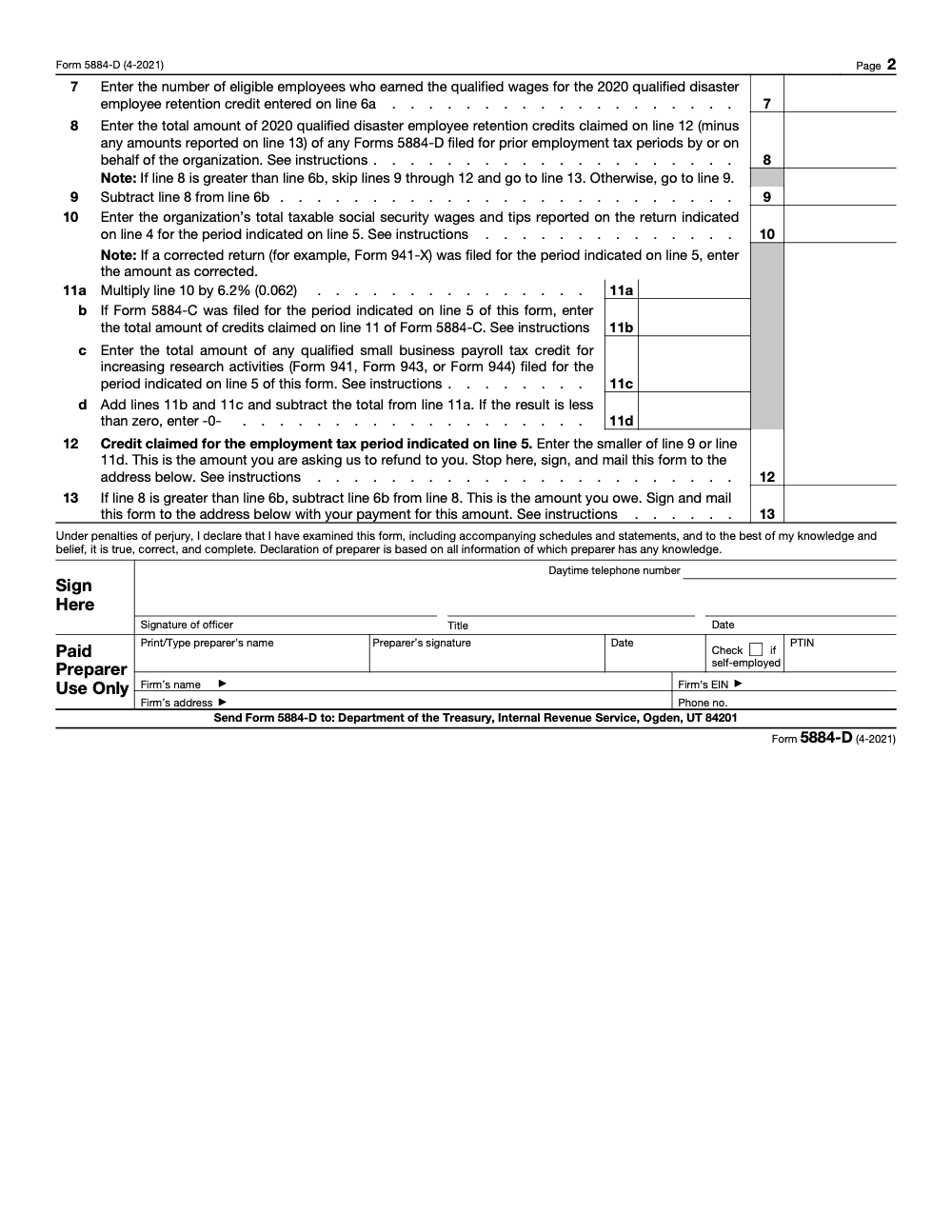
On line 6a, show cumulative qualified wages. On line 10, show taxable Social Security wages and tips for the period indicated on line 5, use corrected amounts if you filed a 941‑X. On line 8, show prior credits claimed minus any credits repaid. Line 12 is the current period credit after your adjustments, computed as the smaller of line 9 or line 11d. Sign, date, and file after the related employment tax return for that period.
Prevent Double Counting With A Short Checklist
- Tag ERC wages in your payroll export so they are excluded from the disaster credit tab.
- Freeze the employee wage cap at $6,000 for the period and show a running cap balance per person.
- Track deposit reductions by date and amount, keep those confirmations with your 5884‑D packet.
If your nonprofit works across multiple states, align your inoperability narrative with the FEMA declaration for each county. That narrative, plus the DR number list, often decides whether a reviewer can follow your story in ten minutes or ends up asking for more information.
Step By Step Filing Instructions That Actually Work
You do not need fancy software to get this right. You need clean payroll data, a clear story for inoperability, and a simple worksheet that mirrors the form.
Step 1, Gather The Right Records
Build one folder for Form 5884‑D, then add these subfolders so anyone on your team can audit the file later.
- Payroll exports by pay period for the affected quarters, include Social Security wages and tips so your line 10 tie out is easy.
- An employee level schedule that shows principal workplace, inoperability start and resumption dates, and qualified wages capped at $6,000 per person.
- Disaster proof, the DR number list, a short description of each event, maps or addresses for where operations became inoperable, any closure orders, board minutes, insurance claims, photos, or vendor reports.
- Prior Forms 5884‑D and any repayments, plus deposit reduction confirmations and notices.
- Any Form 941‑X you filed, since corrected Social Security wages and tips can change your cumulative math.
Pro tip, keep a one page cover sheet that lists each file in the packet and the line on the form it supports. That alone cuts review time in half.
Step 2, Confirm Eligibility Before You Touch The Form
Walk through these checks out loud with your team.
- Are you a section 501(c) organization exempt under 501(a)?
- Did your activities become inoperable in a 2020 qualified disaster zone on or before December 27, 2020?
- Do you have the DR number and the exact jurisdictions for where you were inoperable?
- Can you identify employees whose principal workplace was in that zone right before the incident period began?
- Do you have qualified wages paid after inoperability started and before the earlier of significant resumption or 150 days after the incident period ended?
- Have you removed wages that were used for the coronavirus ERC or any overlapping credits?
If any answer is no, press pause and fix the gap before you prepare the form.
Step 3, Do The Math In A Cumulative Worksheet
Set up a tab with these columns, Employee, principal workplace, inoperability start, resumption date, gross wages in window, wage cap used up to $6,000, credit at 40%, cumulative credit to date. Freeze the header row. Lock any formulas. Put a bold warning next to the ERC exclusion column so you do not recycle those wages by mistake.
When the cumulative credit changes for a later employment tax period, duplicate the prior tab, add the new period data, and recalc the totals. That copy forward pattern preserves an audit trail.
Step 4, Complete The Form Cleanly
- Top section, legal name, EIN, and the employment tax period you are claiming for.
- Line 3, list each DR number, short event description, and each county, parish, or municipality where you were inoperable. If you have more than four, write “See attached” on the fourth row and attach a list.
- Line 6a, enter the cumulative qualified wages amount to date (capped at $6,000 per eligible employee aggregate) based on your worksheet.
- Line 8, enter prior credits you already claimed on earlier Forms 5884‑D line 12, minus any amounts you repaid on line 13.
- Line 10, enter taxable Social Security wages and tips for the period indicated on line 5 as shown on your employment tax return, use corrected figures if you filed a 941‑X.
- Line 12, this period’s credit after your adjustments, computed as the smaller of line 9 or line 11d.
- Sign, date, and file after you have filed the related employment tax return for that period.
Filing Methods And Timing, What Matters Most
You file one Form 5884‑D for the first employment tax period where you have qualified wages, then you file another form for each later period where your cumulative credit changes. The credit you properly claim is treated as available on the first day of that employment tax period. That means you may reduce deposits for that period once you have done the math and retained support. The IRS sometimes sends a short balance due notice before it processes the credit, do not panic if that happens, keep your deposit reduction proof and your filed form together.
Form 5884-D must be filed on paper – e-filing is not available. If you must mail, send the packet to the current address in the instructions, include your disaster list and any extra schedules, and use a trackable method so you have proof of delivery. If you need an extension for the related return, request one on time using the correct extension form, remember that filing extensions never extend the time to pay.
Simple rule, reduce deposits only when your worksheet is complete and the binder is audit ready. If your documentation would not persuade a new reviewer in ten minutes, hold the deposit reduction until it does.
Common Errors You Can Avoid Today
You can avoid nearly all adjustment notices with better line level discipline. Here are the slips we see most often.
- Using the wrong DR number or listing the wrong county name for line 3. Match the declaration exactly and include the full jurisdiction list.
- Claiming wages for employees whose principal workplace was not in the zone immediately before the incident period.
- Forgetting to stop qualified wages at significant resumption or at 150 days after the incident period ended, whichever is earlier.
- Double counting wages already used for the coronavirus ERC or another credit.
- Missing prior claim reconciliation on line 8, or mistakenly adding carryforwards to line 8.
- Not using corrected Social Security wages and tips after filing a 941‑X.
- Reducing deposits without having a finished cumulative worksheet and disaster packet in hand.
A five minute self review against this list prevents weeks of back and forth later.
Records To Keep, And For How Long
Keep everything tied to your Form 5884‑D claim for as long as the IRS can question the period, many organizations keep this file for at least four years after the date the related employment tax return was filed or paid, whichever is later. At minimum, keep:
- Payroll registers showing qualified wages by employee, with pay dates, amounts per period, and a clear tag for wages treated as qualified.
- Disaster declarations and DR numbers, your inoperability narrative, and any proof of closure or damage.
- The employee level worksheet, period by period.
- Form 941s, any 941‑X corrections, deposit reduction evidence, and IRS correspondence.
- A short memo that explains your method for deciding resumption dates and how you handled multi county operations.
If you are a multi entity nonprofit with different EINs, repeat the packet for each EIN. Consistency across entities makes state inquiries much easier to handle.
Special Situations, Multi Disasters, And Multi Entity Operations
Real life is messy. If your nonprofit operates across counties or had more than one disaster in 2020, keep your story clean and linear.
If You Faced Multiple Disasters
- Create one line on your worksheet for each disaster, include the DR number, the incident period window, and the specific jurisdictions.
- Track inoperability dates by site, not by organization. Do not assume one location’s shutdown applies everywhere.
- If more than four disasters apply, write “See attached” on the fourth line of the form and attach a list with every DR number and jurisdiction.
- Cap wages at $6,000 per employee across the cumulative window for that period. If an employee worked in two zones, make sure you do not exceed the per employee cap.
If You Have Multiple EINs
- Prepare a standalone packet per EIN.
- Keep cross references, for example a shared inoperability memo and a separate payroll export for each EIN.
- File a separate Form 5884‑D for each EIN when its cumulative credit changes, because the credit applies to the EIN that paid the wages.
If You Filed Corrections With Form 941‑X
Use the corrected Social Security wages and tips in your cumulative math, then file a new 5884‑D for the first period affected and any later period that changes. Keep a short reconciliation memo that explains what changed and why.
Audit Ready From Day One, The Binder That Saves You
You will never regret being over prepared. Build a one binder packet that proves three things in ten minutes, eligibility, the math, and the period tie out.
- Cover sheet, a one page index that lists each file and the line it supports.
- Eligibility tab, your section 501(c) status, a short inoperability narrative per site, and copies of DR numbers with jurisdictions.
- Payroll tabs, exports by pay period with Social Security wages, and an employee level schedule that shows principal workplace, inoperability start, resumption date, qualified wages, the $6,000 cap, and the 40% credit.
- ERC exclusion proof, the column that flags any wages used for the COVID ERC and the totals that were removed from the disaster credit.
- Prior filings tab, copies of earlier Forms 5884‑D, any repayments, deposit reduction evidence, and IRS notices.
- Corrections tab, any Form 941‑X filings and a one page math bridge that shows the effect on your cumulative credit.
- Final tab, a signed copy of each 5884‑D you filed for the periods involved.
Think like a reviewer, could a new person rebuild your numbers in ten minutes using only what is in the binder, without emailing you a single question, that is the goal.
Eligibility Quick Check, Make It A Two Minute Meeting
Use this table to close eligibility gaps before you claim anything.
| Question | What to confirm or fix |
| Are you a 501(c) organization exempt under 501(a)? | Confirm status or pause the claim. |
| Was your activity in a 2020 qualified disaster zone inoperable on or before December 27, 2020? | Confirm incident period and inoperability dates. |
| Do you have the DR number and exact jurisdictions where you were inoperable? | Pull FEMA or IRS references and list counties or parishes. |
| Can you identify employees whose principal workplace was in that zone right before the incident period began? | Verify addresses and job locations. |
| Have you capped wages at 6,000 per employee and applied 40% correctly? | Fix the worksheet formulas. |
| Have you removed wages used for the COVID ERC or other credits? | Tag and exclude those amounts. |
| Do your Social Security wages and tips tie to filed returns or corrected returns? | Align with Form 941 and any 941‑X. |
A Worked Scenario, End To End
Imagine a community clinic with EIN 12‑3456789 in a hurricane zone. The clinic’s main site closed on September 10, 2020, and significant activities resumed December 5, 2020. Three employees worked at that site before the incident period began.
- Employee J, 7,800 in wages during the window, cap at 6,000, credit 2,400.
- Employee K, 4,750 in wages, credit 1,900.
- Employee L, 2,500 in wages, credit 1,000.
Your cumulative credit through Q4 2020 is 5,300. You file Form 5884‑D for that employment tax period. In Q1 2021, you discover 1,000 of Employee J’s wages were also used for the COVID ERC in 2020. You correct your worksheet, reduce J’s qualified wages to 6,000 less 1,000, now 5,000, credit 2,000. Your recomputed cumulative credit becomes 4,900. You file a new Form 5884‑D for Q1 2021, line 6a shows 4,900, line 8 shows 5,300 previously claimed, and line 13 shows 400 owed, which you mail with the form as payment to the IRS. Your binder shows the ERC overlap fix, the corrected cumulative math, and the deposit reconciliation.
How Accountably Can Help, Briefly
If you are short on hands or your team is buried in reviews, this is where a disciplined delivery partner is useful. Accountably integrates trained staff into your workflow, standardizes workpapers, builds the employee level schedule correctly, and protects reviewers with layered checks so partners are not stuck in endless rework. We work inside QuickBooks, Xero, and the payroll and tax systems you already use, and we follow your templates. Use us when you want the credit packet built right the first time, without risking quality or security.
Your Ready To File Toolkit
Employee Level Worksheet, Fields To Include
| Field | Why it matters |
| Employee name and ID | Ties wages to payroll and prevents duplicate counting |
| Principal workplace address | Confirms the employee was in the disaster zone |
| Disaster DR number and event | Connects the claim to the declaration |
| Inoperability start and resumption dates | Opens and closes the qualified wage window |
| Wages in the window | Establishes the base for the credit |
| Wage cap remaining to 6,000 | Enforces the per employee cap |
| Credit at 40% | Calculates the per employee amount |
| ERC overlap flag and amount | Prevents double counting |
| Cumulative period total | Feeds lines 6a and 12 on the form |
The Ten Minute Binder Index
- Cover sheet that maps each document to a form line.
- Your 501(c) and 501(a) status proof.
- DR number list with jurisdictions and a short event description.
- Inoperability narratives by location, with evidence.
- Payroll exports, Social Security wages, and the employee worksheet.
- Prior Forms 5884‑D and any repayments or deposit reductions.
- Any Form 941‑X and the math bridge that shows the impact.
- A signed copy of each Form 5884‑D you filed.
Final Pre‑Filing Checklist
- You confirmed you are a qualifying tax‑exempt organization.
- You tied every claim to a 2020 disaster DR number, incident period, and specific jurisdictions.
- You identified employees whose principal workplace was in the zone immediately before the incident period.
- You captured qualified wages only in the eligible window and capped each employee at $6,000.
- You applied the 40% rate and excluded all wages used for the COVID ERC or other credits.
- You reconciled prior claims on line 8 and used corrected Social Security wages and tips, if applicable.
- Your deposit reductions, if any, are supported and easy to trace.
- Your binder can be understood by a new reviewer in ten minutes.
Conclusion, Turn Disruption Into Relief
Form 5884‑D rewards the hard decision you made to take care of your people while your site was down. When you match your facts to the declaration, set clean wage caps, exclude ERC wages, and file each time your cumulative credit changes, the process is straightforward. If your team is stretched thin or your reviews keep getting stuck, a delivery‑driven partner like Accountably can help you build the worksheet, standardize the packet, and protect review time without giving up control of your workflow.
Common Mistakes We See Every Season
Form 5884-D rewards organizations that read it carefully and punishes those who treat it like a routine payroll adjustment. Here are the recurring traps my team flags whenever a tax-exempt client brings us a 2020 disaster claim.
Reusable Checklists
These three checklists are copy-paste ready for your firm SOP. Each item maps to a specific Form 5884-D line or rule, so a reviewer can sign off in one pass.
Eligibility pre-screen for Form 5884-D
- Confirm the organization is described in IRC section 501(c) and exempt under 501(a) (line 2a Yes), or is a federally chartered corporation or federal, state, or local college, university, hospital, or medical care entity (line 2b Yes).
- Confirm the underlying employment tax return is Form 941, 941-PR, 941-SS, 943, 943-PR, 944, 944(SP), 944-PR, or 944-SS. Form 945 filers are out of scope.
- Confirm at least one applicable 2020 qualified disaster zone is identified by FEMA declaration number (DR-XXXX-XX) for line 3, excluding COVID-19.
- Confirm the line 5 employment tax period (year and, where applicable, quarter) is still open under the statute of limitations on the underlying return.
- Confirm no Form 5884-A claim was made for the same wages by the same employer for the same period.
- If a third-party payer is filing, confirm the qualified tax-exempt organization's name and EIN are captured for line 1 and the third-party payer's identifying information sits in the main header.
Wage and disaster-zone documentation packet
- FEMA disaster declaration numbers in DR-XXXX-XX format, with description and affected county, parish, or municipality for each row of line 3.
- Payroll register tagged by employee with wages paid during the disaster period, ready to roll into the line 6a cap test.
- Per-employee cumulative wage ledger that caps qualified wages at $6,000 per employee in aggregate across every prior Form 5884-D filed for the same disaster.
- Eligible-employee count workpaper supporting line 7.
- Form 941 (or other line 4 return) as originally filed, plus any Form 941-X for the same period. If a 941-X was filed, use the corrected social security wages and tips on line 10.
- Schedule of prior Forms 5884-D filed for the same disaster, with line 12 amounts and any line 13 paybacks, ready for line 8.
- Form 5884-C credit and any qualified small business R&D payroll credit already claimed for the same period, sourced and tied for lines 11b and 11c.
Line-by-line review before the officer signs
- Line 5 ties to a single year and, where applicable, a single quarter. No multi-period claims on one form.
- Line 6a equals qualified wages capped at $6,000 per eligible employee aggregate, not per quarter.
- Line 6b equals line 6a multiplied by 40%.
- Line 8 equals the cumulative line 12 (less line 13) from every prior Form 5884-D filed by or for the organization for the same disaster.
- Line 9 equals line 6b minus line 8. If line 8 exceeds line 6b, complete line 13 and remit the excess with the form.
- Line 10 uses taxable social security wages and tips from the line 4 employment tax return as filed or corrected by Form 941-X.
- Line 11a equals line 10 multiplied by 6.2%. Line 11d subtracts the Form 5884-C credit (line 11b) and the qualified small business R&D payroll credit (line 11c); not less than zero.
- Line 12 equals the smaller of line 9 and line 11d. Document the lesser-of choice on the workpaper.
- Officer signature, title, daytime phone, and date in place; paid-preparer PTIN, firm name, EIN, address, and phone in place where applicable.
- Form mailed by itself to Department of the Treasury, Internal Revenue Service, Ogden, UT 84201; certified-mail receipt logged in the workpaper file.
Keep 5884-D Season From Stalling
Form 5884-D is a retroactive refund claim, not a current-year filing. Its sole purpose is to recover the 40% credit on up to $6,000 of qualified wages per eligible employee for 2020 disasters declared under Section 303 of the Taxpayer Certainty and Disaster Tax Relief Act of 2020, for tax-exempt employers that could not monetize the credit through their employment tax return at the time. The form has not been revised since April 2021 (OMB control 1545-2298), per IRS Form 5884-D, so every claim sitting open in 2025 is a paper filing against a five-year-old payroll, mailed to Ogden under a closing statute window.
That timing is the source of the stall. Reconstructing 2020 payroll, tying it to a FEMA disaster declaration, reconciling original Form 941 wages to any Form 941-X corrections, and running both the 40% cap and the 6.2% social security tax cap demands a clean production process. The fix is to treat each open employment tax period as its own mini-engagement with a documented workpaper trail.
- Open one Form 5884-D worksheet per employment tax period on line 5, not one form for the full disaster window.
- Build a single per-employee cumulative wage ledger that enforces the $6,000 aggregate cap on line 6a and feeds line 8 across every period filed.
- Pair line 10 with the employment tax return as filed (or as corrected by Form 941-X), so taxable social security wages flow from the same source the IRS sees.
- Compute both line 9 (line 6b minus line 8) and line 11d (line 11a minus the Form 5884-C credit and the qualified small business R&D payroll credit) on the same workpaper, and document line 12 as the lesser-of choice.
- Stage each Form 5884-D in its own envelope for mailing to Department of the Treasury, Internal Revenue Service, Ogden, UT 84201, with a certified-mail log inside the workpaper file.
This is the production discipline our team applies to every retroactive 2020 disaster ERC claim. If your organization has open employment tax periods touched by a 2020 qualified disaster zone and wants the workpapers, line tests, and Ogden submission packet handled by a structured offshore team, see Accountably's tax services.
FAQs
Form 5884‑D is the claim form tax‑exempt employers use to request the 2020 qualified disaster employee retention credit. It calculates a refundable credit equal to 40% of up to $6,000 in qualified wages per eligible employee, maximum $2,400.
No, they are different. Form 5884 is generally used by taxable employers for a worker hiring credit, while Form 5884‑D is only for tax‑exempt employers claiming the 2020 qualified disaster employee retention credit. Taxable employers claim the same 40% / $6,000 disaster credit on Form 5884‑A as part of the general business credit on Form 3800, not on Form 5884 itself. When in doubt, read the current IRS title at the top of the form and use the correct instructions.
No. You cannot double count wages. If wages were used for the coronavirus ERC or another overlapping credit, do not include those same wages as qualified wages for the 2020 disaster credit.
You file Form 5884‑D separately. File it for each employment tax period after you have filed the related employment tax return for that period. The properly computed credit is treated as available on the first day of that period, so you may reduce deposits once your support is complete.
Use a short narrative and evidence that ties directly to the declaration, for example closure orders, board minutes, photos, vendor reports, insurance claims, and staff communications that show when activities at the site stopped and when significant activities resumed.
List each disaster by DR number, describe the event, and list every affected jurisdiction. Track inoperability by location, not just by organization, and attach an extra page if you have more than four disasters.
Use taxable Social Security wages and tips from your employment tax returns when the form asks, and if you filed a corrected return, use the corrected figures. This keeps your cumulative math aligned with the IRS records.
You recalculate, then file a new Form 5884‑D for the first period affected and any later period that changes. The form will show the reduction and you either repay or allow the IRS to offset against other liabilities; if line 8 exceeds line 6b, the form must be mailed with payment for the line 13 amount owed.
Keep the full packet for at least several years after the related employment tax return was filed or paid. Many organizations keep four years or more. Store the binder where payroll and tax files are archived.
Other forms this guide names
- Form 941‑X: Correct Payroll Tax Errors and Claim Refunds
- Form 941: Employer's Quarterly Tax Return Guide 2025
- Form 5884-C: WOTC for Tax-Exempt Employers Hiring Veterans
- Form 944: Eligibility & Due Dates
- Form 5884: WOTC, Complete 2025 Filing Guide
- Form 5884‑A: Disaster Employee Retention Credit Guide 2018–2020
Summarize this article with AI
About this guide
Accountably helps US CPA, EA, and accounting firms hire trained accountants and tax preparers in India.
About us Reviewed byJugal Thacker, CPAFounder and CEO at Accountably
A US-licensed CPA with 7+ years inside US firms – PwC, a real-estate tax practice, then a full-service firm, rising from reviewer to manager to advisory. This article was reviewed against current IRS guidance for the 2025 tax year and updated for filers preparing late returns, amendments, and 2026 estimates.
View profile →How we research, review, and update this guide
Every Accountably guide is researched against primary IRS sources, reviewed by a U.S. CPA, and refreshed as guidance evolves. Read our Editorial Guidelines to see how we source, fact-check, and update our content.




