
Summarize this article with AI
In Brief
Form 6112 (Rev. May 2025), “Order for Prior Year Tax Products,” is the IRS paper order form (Catalog Number 24412C) used to request blank prior-year IRS tax forms and instructions by mail. It is limited to the five most recent prior tax years - on the May 2025 revision, tax years 2019 through 2023. Completed forms are mailed to the IRS distribution center at 2525 Revenue Drive, Bloomington, IL 61705-2500. Prior-year products are also available online at the IRS prior-year forms portal.
An examiner asks for a return that was never filed, or an amendment needs the exact form for an older year, and that version is long gone from this season's software. That is the moment Form 6112 earns its keep: the IRS paper order form, revised May 2025, for blank prior-year tax products by mail.
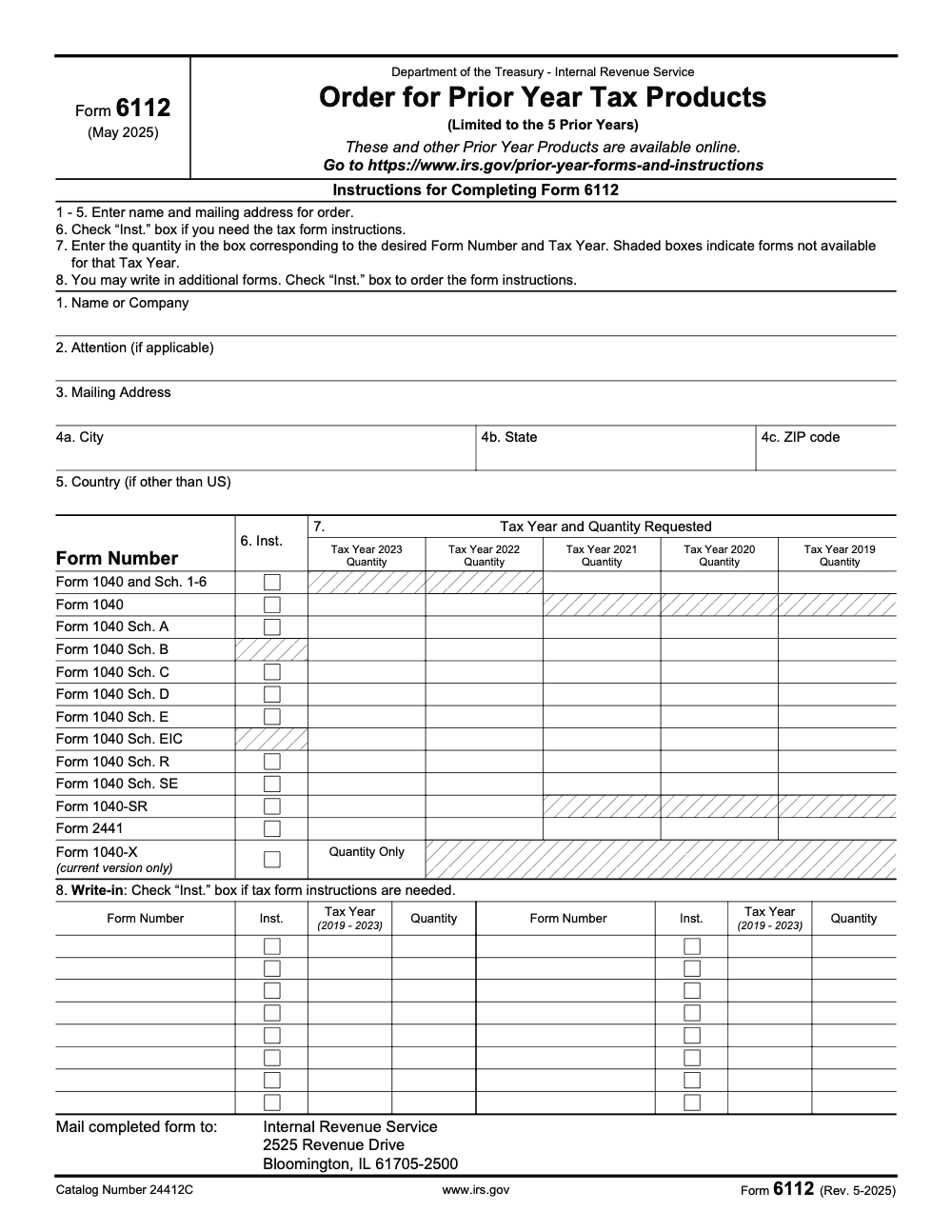
It reaches back to the five most recent prior years, which on this revision means tax years 2019 through 2023. The order grid pre-prints 13 common forms led by Form 1040 and its schedules, you complete lines 1 through 6 with name and address, enter quantities on line 7, and mail it to the IRS distribution center in Bloomington, IL. There is no fee and no deadline, and the same products are available online when you only need a single item.
Key Takeaways
- Form 6112 (Rev. May 2025), “Order for Prior Year Tax Products,” is a real IRS paper order form (Catalog Number 24412C) used to order blank prior-year IRS tax forms and their instructions by mail, limited to the five most recent prior tax years - on the May 2025 revision, tax years 2019 through 2023.
- The order grid pre-prints 13 common forms, led by Form 1040 and its Schedules 1-6, Schedules A through SE, Form 1040-SR, Form 2441, and the current Form 1040-X. Shaded boxes mark a form that is not available for a given tax year, so check the grid before you mark a quantity.
- Complete lines 1 through 6 with the requester name or company, attention line, mailing address, and the “Inst.” checkbox when you also need the instructions, then enter quantities on line 7 and write in any extra forms on line 8.
- Mail the completed form to Internal Revenue Service, 2525 Revenue Drive, Bloomington, IL 61705-2500. There is no fee and no filing deadline; this is an order form, not a tax return.
- The same prior-year products are available online at the IRS prior-year forms and instructions portal, which is faster than mail when you only need a single form for an amendment or a late return.
What Form 6112 Is and When You Use It
Form 6112 is a real, standalone IRS form. Its full title is “Order for Prior Year Tax Products” (Rev. May 2025, Catalog Number 24412C), and it is used to order blank prior-year IRS tax forms and instructions by mail, limited to the five most recent prior tax years - on the May 2025 revision, tax years 2019 through 2023.
It is an order form, not a return. You are not reporting income or claiming anything. You are simply asking the IRS distribution center to mail you blank copies of forms and instructions for an earlier year, so you can prepare or amend a return for that year.
Reach for Form 6112 when:
- You need to file a late original return for a prior year and want the correct vintage of the form.
- You are amending a prior year return and need the version that matches the year you are correcting.
- An examiner or client asks for a specific prior-year form or its instructions, and your current software only carries the latest revision.
The five-year limit is the rule that matters most here. On the May 2025 revision, the grid covers tax years 2019 through 2023. For anything outside that window, you confirm availability through the IRS prior-year forms portal rather than this order form.
Who Orders Prior Year Products, and Why
If you are filing or amending an older return
If you need to file a late return for a prior year, or amend one you already filed, you want the form that matches that tax year. Line items, schedules, and instructions change from year to year, so using the current-year form for an older year invites rejected filings and rework. Form 6112 lets you order the right vintage by mail.
If a client or examiner needs a specific prior-year form
Practitioners use Form 6112 when a client surfaces an unfiled year or when an examiner requests a particular prior-year form or its instructions. Your tax software usually carries only the latest revision, so an order, or a quick pull from the IRS prior-year portal, gets you the exact document the year requires. Confirm the year falls inside the five-year window on the current revision before you order.
Which Tax Years and Forms You Can Order
The five-year window
Form 6112 is limited to the five prior tax years. On the May 2025 revision, that means tax years 2019 through 2023. The order grid prints a column for each of those five years, and you enter a quantity in the box for the form and year you need.
The pre-printed forms
The grid pre-prints 13 of the most-requested forms so you do not have to write them in. They are: Form 1040 and its Schedules 1-6, the standalone Form 1040, Schedule A, Schedule B, Schedule C, Schedule D, Schedule E, Schedule EIC, Schedule R, Schedule SE, Form 1040-SR, Form 2441, and Form 1040-X.
Two of those rows carry their own limits. Form 1040-X is current version only, with a single quantity box and no per-year columns. The standalone Form 1040 row is available for tax years 2019 through 2021, while the “Form 1040 and Sch. 1-6” combined row is available for 2021 through 2023, and Form 1040-SR for 2022 through 2023. Anything not pre-printed goes on the line 8 write-in rows.
Completing Form 6112, Line by Line
The form is short and self-explanatory once you know what each line is for. Work top to bottom.
- Line 1, Name or Company. Enter the name the forms should be mailed to.
- Line 2, Attention. Add an attention line if applicable, for example a specific person at a firm.
- Line 3, Mailing Address. The delivery address for the order.
- Lines 4a, 4b, 4c, City, State, ZIP code. Complete the rest of the address.
- Line 5, Country. Enter a country only if it is other than the United States.
- Line 6, Inst. checkbox. Check the “Inst.” box for any form where you also want the instructions, not just the blank form.
- Line 7, quantity grid. Enter the quantity in the box for the form number and tax year you want. Shaded boxes mean the form is not available for that year.
- Line 8, write-in rows. Use the eight blank write-in rows to request additional forms that are not pre-printed. Check the “Inst.” box on a write-in row if you also need its instructions.
A quick tip on quantities and instructions
Order only what you will use, and decide up front whether you need instructions alongside each form. A blank form without its instructions can stall a preparer who is working an unfamiliar prior year, so check the “Inst.” box whenever the year or the form is not one you handle routinely.
Reading the Order Grid and Shaded Boxes
The line 7 grid lists form rows down the side and five tax-year columns across the top, 2019 through 2023 on the May 2025 revision. You enter a quantity in the cell where the form you want meets the year you want.
A shaded box means that form is not available for that tax year, so do not try to order it there. The shading is the form’s way of telling you to pick a different year or a different row.
Pre-printed forms and their available years
| Form row | Available tax years (May 2025 rev.) |
| Form 1040 and Sch. 1-6 | 2021 - 2023 |
| Form 1040 (standalone) | 2019 - 2021 |
| Schedules A, B, C, D, E, EIC, R, SE | Per the grid, 2019 - 2023 |
| Form 1040-SR | 2022 - 2023 |
| Form 2441 | Per the grid, 2019 - 2023 |
| Form 1040-X | Current version only (quantity, no year) |
For anything outside the 13 pre-printed rows, use the line 8 write-in section. Write-in entries follow the same 2019 through 2023 tax-year range as the rest of the form.
Where and How to Submit Your Order
Once the form is filled in, mail the completed Form 6112 to the IRS distribution center:
- Internal Revenue Service
- 2525 Revenue Drive
- Bloomington, IL 61705-2500
There is no fee and no filing deadline. This is an order, not a return, so you are not late and you owe nothing by sending it. Mark the quantities you actually need, double-check that no box you used is shaded, and keep a copy of what you ordered so you can match it against what arrives.
Before you mail, a short pre-send check
| Step | What to confirm | Why |
| Address block | Lines 1 - 4c complete, line 5 only if non-US | So the order ships to the right place |
| Instructions | “Inst.” box checked where you need them | A blank form alone can stall a prior-year preparer |
| Year availability | No quantity entered in a shaded box | Shaded means the form is not available that year |
| Write-ins | Line 8 used for any non-printed form | Captures forms not on the grid, within 2019 - 2023 |
Order by Mail or Get It Online
Form 6112 is the mail route, and it is the right choice when you want physical copies or a batch of forms across several years. The trade-off is turnaround, since mailed orders take time to process and ship.
For a single form or instruction, the faster path is the IRS prior-year forms and instructions portal, where the same prior-year products are available to download. When a client surfaces an unfiled year on a tight deadline, I usually pull the form online first to keep moving, then order by mail only if I need clean printed sets.
Either way the content is the same official IRS product. The only difference is speed and format, so let the deadline decide which route you take.
What to Expect After You Send the Order
After you mail Form 6112, the IRS distribution center fills the order and ships the blank forms and any instructions you checked to the address on lines 1 through 4c. Plan for mail turnaround, so build the order into your timeline rather than ordering the week a return is due.
When the package arrives, check it against the copy of the order you kept. Confirm you received each form for the right tax year, and that any instructions you requested came along. If a form you expected is missing because the box was shaded for that year, switch to the online portal or adjust the year before reordering.
Recordkeeping When You Pull Prior Year Forms
- Save a copy of the completed Form 6112 so you have a record of which forms and years you ordered.
- Match arrivals to that copy, and note the tax year on each blank form before it goes into the engagement file.
- Label prior-year forms clearly so a 2021 form never gets used to prepare a 2023 return by mistake.
- If you pulled the same product online, keep the download next to the engagement workpapers so the team is not hunting for it later.
The goal is simple. When you reach for a prior-year form months from now, the right vintage should be exactly where the file says it is, with no guesswork about which year it covers.
Using Prior Year Forms for Amendments and Late Returns
The most common reason I order prior-year products is an amendment or a late original return. In both cases, the version of the form has to match the tax year you are working, because the lines, schedules, and instructions move from year to year.
A short workflow that keeps these clean:
- Pin down the exact tax year you are filing or correcting before you order anything.
- Confirm that year falls inside the five-year window on the current Form 6112 revision, 2019 through 2023 on the May 2025 version.
- Order the original-year form plus its instructions, and for an amendment, the current Form 1040-X, since the 1040-X row is current version only.
- Pull the same products from the IRS online portal if the deadline is tight and you cannot wait for mail.
My rule of thumb, prepare the prior year on the prior-year form, and amend with the current 1040-X attached to the corrected schedules. Matching the form to the year up front prevents a rejected filing and a second round of rework.
Connect Delivery Discipline to Prior Year Work
Prior-year cleanup is where disorganized files cost the most time. Unfiled years, mismatched form versions, and missing instructions all surface late, usually when a deadline is already close. Structure pays off here, with SOPs for ordering the right vintage, standardized naming so prior-year forms never get confused with the current year, and a review step that confirms the form matches the year before anything is filed.
Accountably is offshore and outsourced accounting and tax staffing for CPA, EA, and accounting firms, built by a CPA, and we build that kind of structure into delivery, with documented processes, organized workpapers, and multi-layer review. The same discipline that keeps current-season work clean also makes prior-year filings and amendments faster, because the right form for the right year is already in the file. We keep this mention brief on purpose, your process comes first.
Practical Next Steps for Firm Leaders
- Build a simple prior-year intake step so unfiled years and amendments are flagged early, not the week a return is due.
- Keep a standing list of which tax years are inside the current Form 6112 window, 2019 through 2023 on the May 2025 revision.
- Standardize how prior-year forms are ordered, labeled, and filed, so the right vintage is always easy to find.
- Decide a default route, online for single forms on tight deadlines, mail order for batches and printed sets.
- Always check the “Inst.” box when ordering a year your team does not handle routinely, so preparers are not stuck without guidance.
The teams that handle prior years well do not scramble. They flag the year early, order the right form, and file with the version that matches.
Where Accountably Helps, If You Need Reinforcements
If your team is already at capacity, prior-year cleanup and amendments are still doable without sacrificing quality. Accountably is an offshore accounting and tax staffing company built for CPA, EA, and accounting firms that builds controlled offshore delivery using SOPs, structured workpapers, multi-layer reviews, and security controls that fit your systems. That means faster prep on late and amended returns, cleaner files, and fewer last-minute reviews. We bring trained accountants and reviewers into your workflow, so you keep control of quality, deadlines, and confidentiality while you scale production.
Conclusion
Form 6112 is a small form that solves a real problem. When you need a blank prior-year IRS form, it is the clean way to order the right version, for the right year, by mail, within the five-year window the current revision allows. Confirm the year, read the grid so you avoid shaded boxes, complete lines 1 through 8, check the “Inst.” box where you need instructions, and mail it to the Bloomington, Illinois distribution center, or pull the same product online when the deadline is tight. Match the form to the year up front and the prior-year filing or amendment goes smoothly.
Common Mistakes We See Every Season
The same handful of errors come up almost every time a team orders prior-year products. Each one is easy to avoid once you know where the form trips people up.
Reusable Checklists
These checklists are copy-paste ready for SOPs. Drop them into your prior-year intake, your amendment workflow, and your tax delivery process so prior-year ordering runs the same way each time.
Form 6112 completion
- Line 1, name or company the forms should be mailed to.
- Line 2, attention line, if applicable.
- Lines 3 - 4c, full mailing address with city, state, and ZIP.
- Line 5, country only if other than the United States.
- Line 6, “Inst.” box checked for any form where you also need instructions.
- Line 7, quantity entered in the correct form-and-year box, none in a shaded cell.
- Line 8, write-in rows used for any form not pre-printed, within 2019 - 2023.
- Mail to Internal Revenue Service, 2525 Revenue Drive, Bloomington, IL 61705-2500.
Prior-year order prep
- Exact tax year you are filing or amending is identified.
- That year falls inside the five-year window (2019 - 2023 on the May 2025 revision).
- Forms needed are listed, marking which are pre-printed and which are write-ins.
- Instructions flagged for any year the team does not handle routinely.
- For an amendment, the current Form 1040-X is included (current version only).
- Decision made: mail order for printed sets, or online portal for single forms on a deadline.
Prior-year recordkeeping
- Copy of the completed Form 6112 saved to the engagement file.
- Arrivals matched against the order, with each form confirmed for the right year.
- Requested instructions received and filed alongside their forms.
- Each blank form labeled with its tax year before it enters the workpapers.
- Any online downloads stored next to the matching engagement file.
- Missing items (shaded-box surprises) reordered from a valid year or pulled online.
Keep Prior Year Orders From Stalling
Prior-year work rarely stalls because the form is hard. It stalls because the need surfaces late, the wrong vintage gets used, or the form arrives without instructions, and each of those eats days you do not have when a deadline is close.
The fix is to make prior-year ordering a standing step rather than a scramble. The same disciplines that keep current-season work clean also keep late filings and amendments moving.
- Add a prior-year flag to intake so unfiled years and amendments are caught early, not the week a return is due.
- Keep a one-line reference of the current five-year window (2019 - 2023 on the May 2025 revision) so the team knows instantly whether a year is orderable.
- Standardize how forms are ordered and labeled, so a 2021 form is never used to prepare a 2023 return.
- Default to the online portal for single forms on a deadline, and mail orders for batches and printed sets.
- Run a quick review that confirms the form version matches the tax year before any prior-year return or amendment is filed.
This is the kind of structure an offshore accounting and tax staffing company built for CPA, EA, and accounting firms is built to hold. Trained reviewers, documented SOPs, and SOC 2 aligned controls mean prior-year filings and amendments get the right form, for the right year, without pulling senior staff off current-season work.
FAQs
Yes. Form 6112 (Rev. May 2025), “Order for Prior Year Tax Products,” is a real IRS paper order form (Catalog Number 24412C). Filers use it to order blank prior-year IRS tax forms and instructions by mail, limited to the five most recent prior tax years - on the May 2025 revision, tax years 2019 through 2023. Completed orders are mailed to the IRS distribution center at 2525 Revenue Drive, Bloomington, IL 61705-2500.
Form 6112 is limited to the five most recent prior tax years. On the May 2025 revision, that means tax years 2019 through 2023. The order grid prints a column for each of those years, and a shaded box means a form is not available for that year. For years outside the window, check the IRS prior-year forms and instructions portal.
No. Form 6112 is an order form, not a tax return, so there is no fee and no filing deadline. You complete it and mail it whenever you need blank prior-year forms, then wait for the IRS distribution center to ship your order.
Mail the completed Form 6112 to the IRS distribution center at Internal Revenue Service, 2525 Revenue Drive, Bloomington, IL 61705-2500. The same prior-year products are also available to download from the IRS prior-year forms and instructions portal, which is faster when you only need one form.
No. The Form 1040-X row on the order grid is current version only, with a single quantity box and no tax-year columns. You order the current 1040-X and use it to amend, then order the original-year forms and schedules you are correcting from their own dated rows.
Other forms this guide names
- Form 1040‑X: How to Amend Your Tax Return in 2025
- Form 1040: Filing Guide for 2025 Returns (AGI, Deductions, Deadlines)
- Form 1040-SR: Standard Deduction, Schedules, E-file Tips
- Form 2441: Instructions, Claim the Child and Dependent Care Credit
Summarize this article with AI
About this guide
Accountably helps US CPA, EA, and accounting firms hire trained accountants and tax preparers in India.
About us Reviewed byJugal Thacker, CPAFounder and CEO at Accountably
A US-licensed CPA with 7+ years inside US firms – PwC, a real-estate tax practice, then a full-service firm, rising from reviewer to manager to advisory. This article was reviewed against current IRS guidance for the 2025 tax year and updated for filers preparing late returns, amendments, and 2026 estimates.
View profile →How we research, review, and update this guide
Every Accountably guide is researched against primary IRS sources, reviewed by a U.S. CPA, and refreshed as guidance evolves. Read our Editorial Guidelines to see how we source, fact-check, and update our content.




