
Summarize this article with AI
In Brief
Form 1099-QA reports distributions from an ABLE (§529A) account – Box 1 shows the gross distribution, Box 2 the earnings portion, and Box 3 the basis (per Form 1099-QA Rev. April 2025). Taxable amounts go on the Other income line of Form 1040 or Form 1040-SR, and nonqualified earnings carry a 10% additional tax computed on Form 5329. Programs furnish Copy B to recipients by January 31, file paper Copy A with the IRS by February 28, and e-file by March 31.
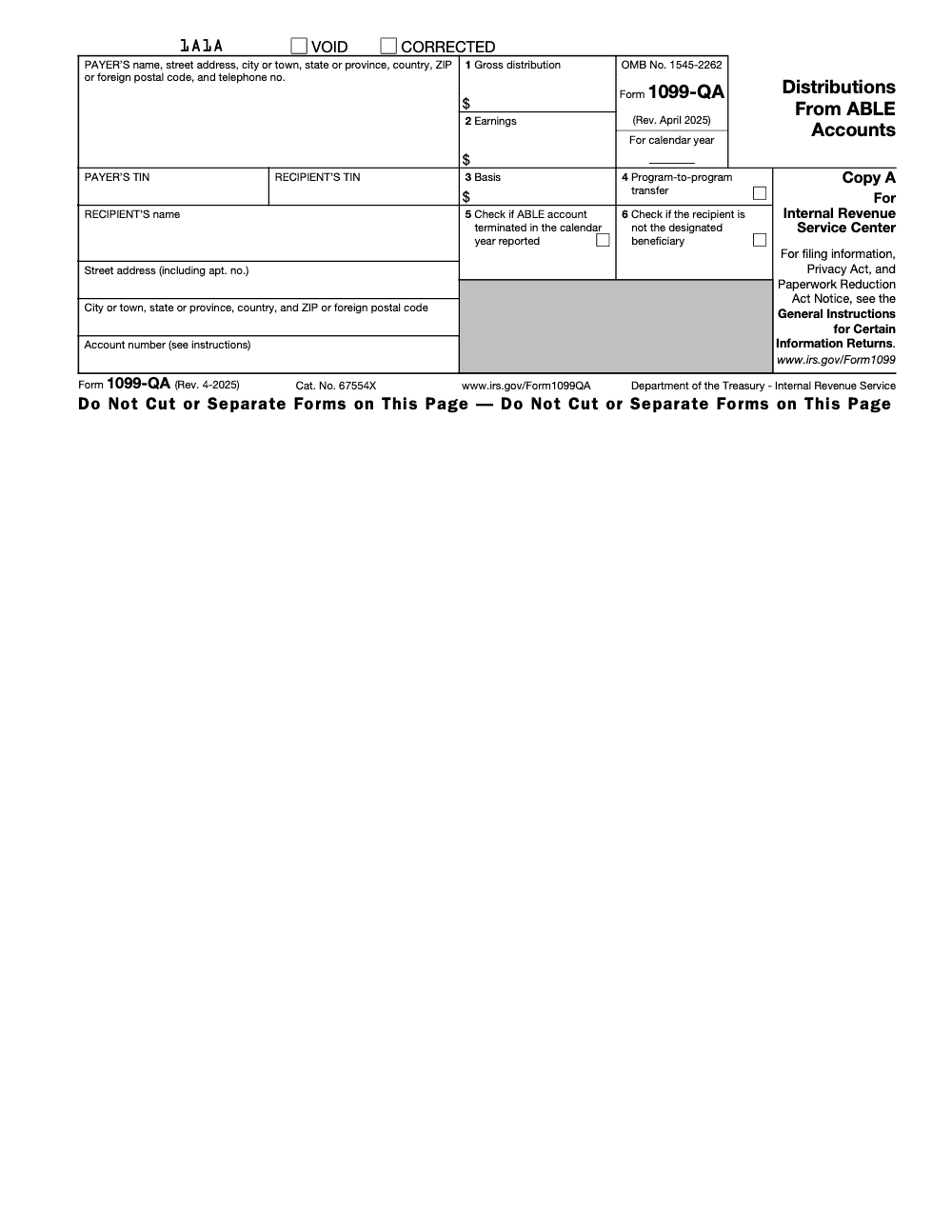
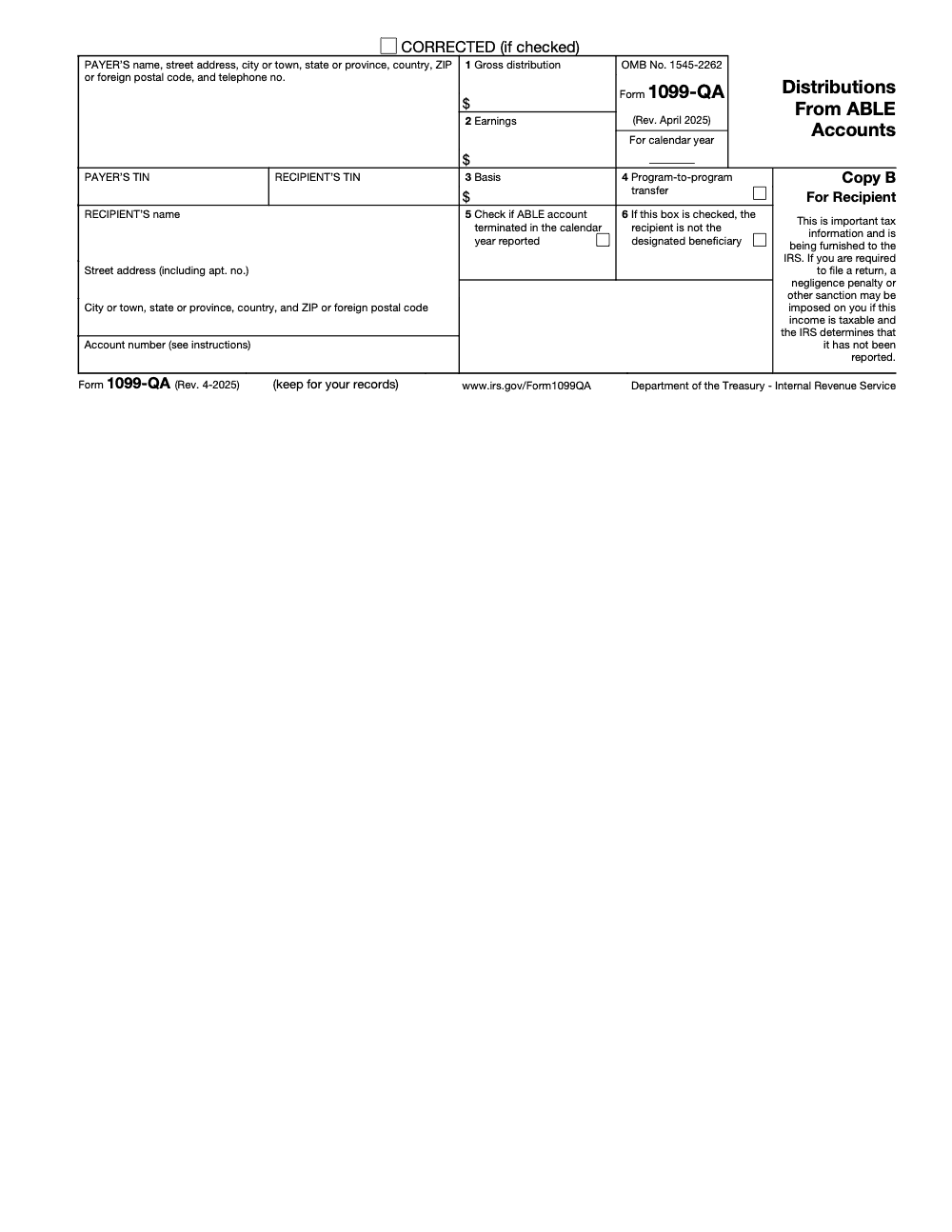
Form 1099-QA lands any year money moves out of an ABLE, or §529A, account, including the years you closed it or rolled it. Parents and guardians almost always open with the same question, whether any of it is taxable, and the honest answer is that it depends on what the money paid for. Box 1 carries the gross distribution, Box 2 the earnings, Box 3 the basis, and Box 4 flags a direct program-to-program transfer between ABLE programs.
Watch the timing on rollovers, because the 60-day window and the once-per-12-months limit decide whether a move stays clean. When a payout is nonqualified, only the Box 2 earnings are taxable, that taxable amount goes on the Other income line of Form 1040 or 1040-SR, and a 10% additional tax computed on Form 5329 rides on top unless a narrow exception applies.
Key Takeaways
- Form 1099‑QA reports ABLE, also called 529A, distributions for the calendar year. You get it any year money leaves the account, including rollovers and closures.
- Box 1 shows the gross distribution, Box 2 shows earnings, Box 3 shows basis, and Box 4 flags a direct program‑to‑program transfer between ABLE programs (a 60‑day rollover stays inside Box 1 and does not check Box 4).
- If a payout is nonqualified, only the Box 2 earnings are taxable, and a separate 10% additional tax applies to that taxable portion unless a narrow exception applies.
- 2025 deadlines, furnish recipient statements by January 31, file with the IRS by February 28 if paper or by March 31 if e‑file. Mark the date on your calendar to avoid penalties.
- Rollover timing matters, generally 60 days, and the once‑per‑12‑months limitation can apply, so document dates and destinations.
What Is Form 1099‑QA
Form 1099‑QA, Distributions from ABLE Accounts, is the information return you receive whenever an ABLE account pays out during the year. Do not confuse it with Form 1099-Q (without the A), which reports 529 college / Coverdell ESA distributions; 1099-QA covers ABLE (§529A) accounts only. It helps you split each withdrawal into basis and earnings so you can decide whether any earnings are taxable. Programs also check boxes that indicate program‑to‑program transfers, account terminations, and whether the recipient is the designated beneficiary.
- Box 1, gross distribution for the year.
- Box 2, the earnings portion of that distribution.
- Box 3, basis, also called return of investment.
- Box 4, checked only for direct program‑to‑program transfers between ABLE programs (60‑day rollovers are reported inside Box 1 and do not check Box 4).
If you spent the funds on qualified disability expenses, QDEs, earnings are excluded from income. If any amount is nonqualified, only the earnings slice becomes taxable.
Understanding ABLE Accounts, Plus a 2026 Eligibility Update
ABLE accounts, section 529A programs run by states, let an eligible individual who had a qualifying disability that began before age 26 save and invest for disability‑related expenses. Growth is tax‑deferred, and distributions are tax‑free when used for QDEs such as housing, education, transportation, health care, assistive technology, and personal support services. One ABLE account per eligible individual is the norm, with rollovers allowed under specific rules.
Two timing notes you should keep in mind:
- 2025 season rules, the age‑26 onset threshold remains in place.
- Starting January 1, 2026, eligibility expands to disabilities that began before age 46, which will bring many more families into ABLE. If you advise clients close to that cutoff, plan ahead now.
The What‑How‑Wow of 1099‑QA
- What, 1099‑QA tells you how much left the ABLE account and how much of that was earnings.
- How, match distributions to QDEs in the same tax year, keep receipts, and flag rollovers correctly.
- Wow, a little structure goes a long way. When you label documents as you go and reconcile to the boxes on the form, you avoid taxable surprises and save hours during review. In our experience supporting busy tax teams, a simple ledger plus a folder per year prevents nearly every 1099‑QA headache.
Quick Box Reference
| Box | What it shows | Why you care |
| 1 | Gross distribution | The total cash out you must reconcile |
| 2 | Earnings | The only piece that can become taxable |
| 3 | Basis | Contributions returned, not taxable |
| 4 | Program‑to‑program transfer | Direct ABLE-to-ABLE transfer only; not included in Box 1 (60-day rollovers stay in Box 1) |
Source for box meanings, see the IRS 2025 instructions for Forms 1099‑QA and 5498‑QA.
What Triggers Issuance of Form 1099‑QA
Any money leaving the ABLE account triggers a form, even if the transaction is a rollover or the account is closed. That includes partial withdrawals, final distributions at termination, and program‑to‑program transfers. The program must furnish statements to recipients, usually the beneficiary or a contributor who had an excess contribution returned.
- Expect the recipient copy by January 31 for the prior calendar year. If there was no distribution that year, there is no form.
Box‑by‑Box Details, With Practical Tips
On 1099‑QA, read the boxes as a story of the year.
- Box 1, Gross distribution. Start here and reconcile to your ledger and receipts.
- Box 2, Earnings. If any part of the withdrawal was not for QDEs, this is the number that could be taxable.
- Box 3, Basis. Box 1 minus Box 2, your contributions coming back.
- Box 4, Program‑to‑program transfer. This box flags a direct program-to-program transfer between ABLE programs, which is NOT included in the Box 1 amount; a 60-day rollover, by contrast, IS included in Box 1 and does not check Box 4. Both are generally nontaxable when the program-to-program rules or the 60-day rollover rules are met.
- Box 5, ABLE account terminated. Signals a final year, so expect a clean reconciliation.
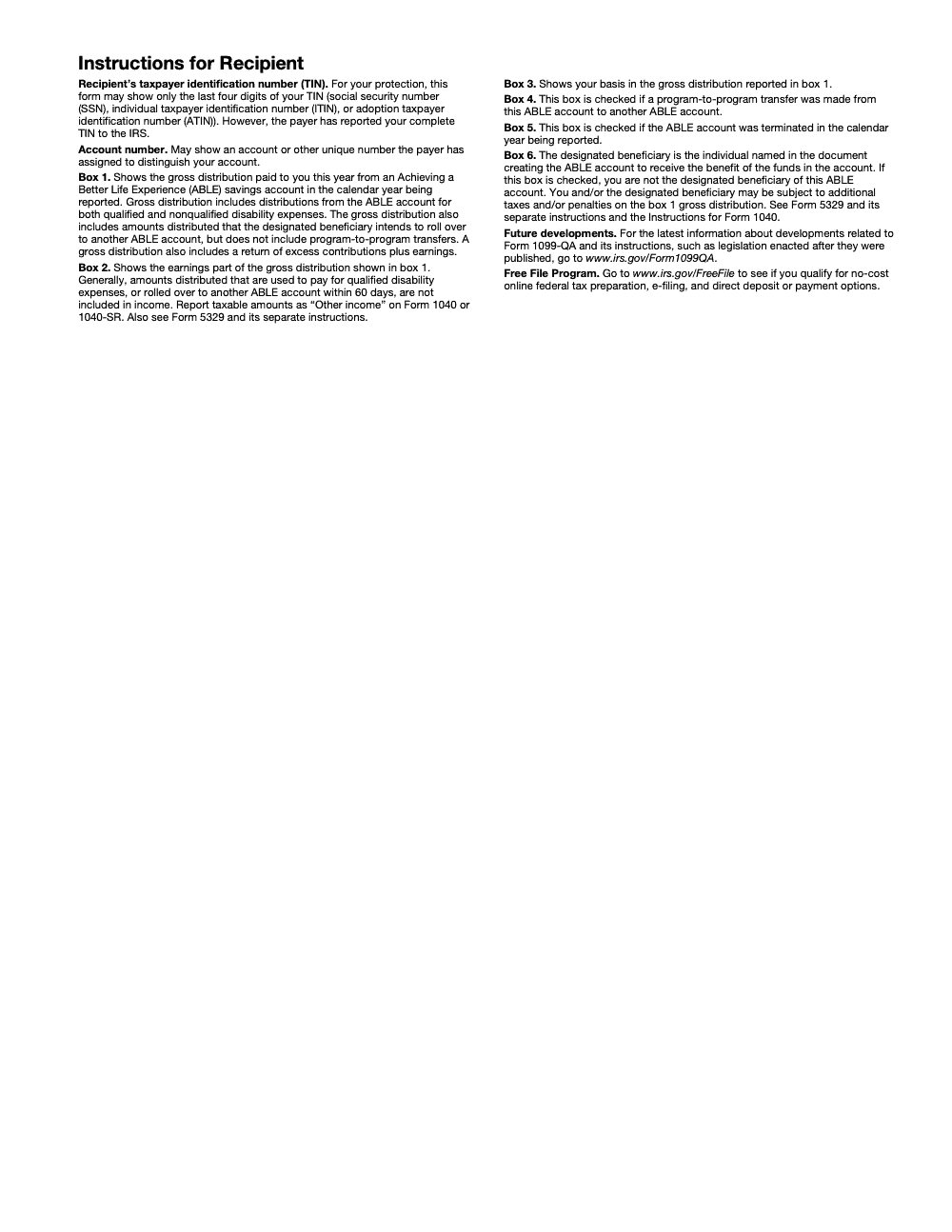
- Box 6, Other than designated beneficiary. Tells you the recipient was someone else, for example a contributor who received back an excess contribution (this is a substantive tax flag, not an administrative quirk; both the recipient and the designated beneficiary may face additional taxes or penalties on the Box 1 amount, often computed on Form 5329).
Table, What Each Box Means
| Box | What it reports | Review cue |
| 1 | Gross distribution | Tie to bank statements and your QDE log |
| 2 | Earnings | If any spending was nonqualified, this portion is taxable |
| 3 | Basis | Not taxable, even if the spend was nonqualified |
| 4 | Transfer/Rollover | Confirm the 60‑day timing and destination |
| 5 | Account terminated | Close out records and retain final statements |
| 6 | Other than beneficiary | Check who received funds and why |
Source, IRS 2025 instructions for Forms 1099‑QA and 5498‑QA.
Qualified vs. Nonqualified Distributions
Your job is to sort each dollar into qualified disability expenses, QDEs, or not. Qualified categories include housing, education, transportation, health, prevention and wellness, employment training and support, assistive technology, and personal support services. When distributions match QDEs during the same tax year, earnings stay out of income.
- If you use ABLE funds for nonqualified expenses, only the earnings in Box 2 become taxable, not your contributions in Box 3.
- Keep receipts and notes that show who, what, when, and why, then reconcile to Box 1 totals. This is what protects tax‑free treatment if the IRS asks.
What Counts as QDEs, With Examples
Pay attention to whether the expense relates to the beneficiary’s disability and improves health, independence, or quality of life. Common examples:
- Education tuition, specialized software, testing fees.
- Housing rent, utilities, accessibility modifications.
- Transportation fares, vehicle adaptations, ride services.
- Health and wellness, therapy, medical devices, assistive tech.
- Personal support services and employment support.
Tip, make the timing match. Pay QDEs in the same tax year as the distribution. Keep a simple spreadsheet that lists date, vendor, amount, category, and whether the spend is QDE or not. That small habit turns April into a quick review instead of a scramble.
Rollovers and Program‑to‑Program Transfers, The Rules That Matter
You can move ABLE funds without tax if you follow the definitions and timing:
- Rollover, take money out and contribute it to another ABLE account within 60 days. The receiving account must be for the same designated beneficiary or another eligible family member, and rollovers to the same beneficiary are limited to once every 12 months. Miss the 60-day window and the transaction becomes a taxable distribution, with the earnings portion exposed to the 10% additional tax under §529A.
- Program‑to‑program transfer, a direct transfer between ABLE programs with no intervening distribution. This is not taxable and is still reported on the form. Close the old account if you move the entire balance.
If you are assisting clients, keep proofs of timing, the receiving plan details, and the closing statement if an account was moved entirely. That documentation is what Box 4 is pointing you to save.
Tax Treatment and Penalties, Explained Simply
When ABLE withdrawals pay QDEs, nothing is included in income. When part of a distribution went to nonqualified uses, the earnings portion becomes taxable and an additional tax applies. The boxes on 1099‑QA are designed to help you compute that split.
Qualified Distributions Are Tax‑Free
Match your QDE receipts to distributions for the same tax year, then confirm that the total QDEs are at least as much as Box 1. If that is true, the earnings in Box 2 stay out of income. Keep invoices, bank statements, and a clean log that ties to each withdrawal.
- Double check that any rollovers are coded correctly, Box 4, and that the 60‑day rule was met. Nonqualified uses are about purpose and timing, so your paperwork is your best ally.
Nonqualified Earnings Are Taxable
If part of the year’s distributions did not pay QDEs, include the Box 2 portion related to those nonqualified expenses in gross income. Your contributions in Box 3 are never taxable on withdrawal. This is why your ledger matters, it shows exactly how much of Box 2 belongs in income.
The 10% Additional Tax, And The One Real Exception
ABLE has a specific penalty rule. If any amount of a distribution is includible in gross income, your income tax is increased by 10% of that includible amount. The primary statutory exception is for distributions made after the beneficiary’s death. That is why clean year‑end reconciliations and careful beneficiary changes matter.
If you have seen “disability” listed as a penalty exception in other contexts, be careful. ABLE’s 10% additional tax is narrower than some 529 education scenarios, so rely on section 529A and the final regulations.
Special Timing Notes Practitioners Ask About
- 529 plan to ABLE rollovers are permitted through December 31, 2025, and they count toward the ABLE annual contribution cap. Track dates and caps to avoid surprises.
- For 2025, the IRS instructions highlight ABLE contribution guidance and reinforce using the General Instructions for due dates and e‑file thresholds. If you file 10 or more information returns in aggregate, you are likely required to e‑file.
Key Dates And Filing Responsibilities For The 2025 Season
Here are the dates that trip people up, with the exact calendar context:
- January 31, 2025, furnish recipient statements for 2024 distributions, this includes 1099‑QA.
- February 28, 2025, paper filing due to the IRS for 2024 Forms 1099‑QA. The general rule is February 28, the IRS notes this date does not slide to February 29 in leap years.
- March 31, 2025, electronic filing deadline for 2024 Forms 1099‑QA. Note that 1099-QA falls outside the electronic-filing specifications published in IRS Publication 1220 and has historically been required on official IRS scannable paper forms – verify the current filing channel against the General Instructions for Certain Information Returns before you assume an IRIS or FIRE submission is accepted.
- March 15, 2026, furnish beneficiary statements for 2025 Form 5498‑QA, while the IRS filing for 2025 5498‑QA is due by June 1, 2026. Mark both, they are easy to miss.
If the recipient statement or filing deadline falls on a weekend or legal holiday, use the next business day. Build a tiny checklist for your firm so these are never last‑minute scrambles.
Recordkeeping That Actually Works
A tidy process is worth more than a heroic clean‑up in April. Here is a simple system we coach teams to use.
Keep Receipts Organized
- Create a year‑indexed folder for the ABLE beneficiary, with subfolders for housing, education, transportation, health, and support services.
- Scan or save PDFs of receipts, invoices, bank or card statements, and cancelled checks, then back them up securely.
- Note the beneficiary’s name, amount, date, and how each item ties to QDEs. Store rollover confirmations with dates to show you met the 60‑day rule. Keep everything at least three years after the filing due date.
Track QDE Usage As You Go
Maintain a simple ledger with columns for date, payee, amount, category, QDE yes or no, and notes. Reconcile the total of QDEs to Box 1 on your 1099‑QA, then identify any nonqualified amounts so you can compute the taxable piece of Box 2. This one page saves hours of review time.
Retain Annual Statements
Keep Form 1099‑QA, Form 5498‑QA, and account statements side by side. Tie each distribution to the supporting receipts and the beneficiary’s QDE log. For rollovers, save proof of dates and destination accounts. This is what makes exams routine rather than stressful.
Using Form 1099‑QA With Tax Software
In TaxAct, enter 1099‑QA under Federal, Other Income, Distributions from ABLE Accounts. You will input Boxes 1 through 3 and indicate rollovers or transfers so the software treats timing correctly. Keep your receipts, the program’s math is only as good as your inputs.
TurboTax provides an interview path for ABLE distributions. In many cases you can search for “1099‑QA” and use the jump‑to link, then answer the ABLE distribution questions. Be sure to keep your own reconciliation, software prompts vary by version and year.
A Note For CPA Firms And Controllers
If your team handles dozens of ABLE distributions during busy season, standardize your intake, folders, and review steps, that is where the friction usually appears. Accountably is offshore accounting and tax staffing built by a CPA, so we place trained preparers behind multi-layer review, not resumes. If you ever need a repeatable workflow for 1099‑series processing across your tech stack, our offshore teams plug into your SOPs, templates, and SLAs so reviewers get clean, consistent files. Proof before your name is on the line.
Common Mistakes We See Every Season
These are the patterns we see on almost every ABLE engagement we review. Each one is fixable if you catch it before the return goes out.
Reusable Checklists
Both checklists pull straight from how we run 1099-QA workflows in season. Copy them into your firm SOP and edit to match your tech stack and software defaults.
QDE Reconciliation Packet (ABLE recipient prep)
- Pull the 1099-QA. Note Box 1, Box 2, Box 3, and whether Box 4, 5, or 6 is checked.
- Collect the year’s bank or card statements for the ABLE account.
- Build a QDE log with date, payee, amount, category, and qualified yes or no.
- Reconcile total QDE spend to Box 1 in the SAME tax year.
- Allocate Box 2 earnings between qualified and nonqualified spend.
- If Box 4 is checked, save the program-to-program transfer confirmation.
- If a 60-day rollover landed in Box 1, save dated proof of the redeposit and destination account.
- Flag Box 5 (account terminated) and pull the final account statement.
- If Box 6 is checked, identify the non-beneficiary recipient and the reason for distribution.
- Retain all supporting documents for at least three years past the filing due date.
Taxable ABLE Distribution Return Prep
- Confirm the nonqualified portion of Box 2 from the QDE reconciliation.
- Enter the taxable amount on the Other income line of Form 1040 or 1040-SR (not Pension/IRA).
- Open Form 5329 to compute the 10% additional tax under §529A.
- Check whether the post-death exception applies and document the basis for the claim.
- If Box 6 is checked, walk the Form 5329 computation for the non-beneficiary recipient.
- Tie every entry back to the QDE reconciliation worksheet so the reviewer can trace it.
- Note the IRS source (Form 1099-QA Instructions, §529A, Form 5329 instructions) for each elected position.
ABLE Program Filing Calendar (for issuers)
- Furnish Copy B to recipients by January 31.
- File Copy A with the IRS by February 28 if paper, or March 31 if e-filed.
- Verify the filing channel against the General Instructions for Certain Information Returns – 1099-QA is outside Publication 1220’s e-file scope.
- Track the 10-return aggregate threshold across all information returns the firm files (per TD 9972) when planning the filing channel.
- If you need an IRS-filing extension, prepare Form 8809 (does NOT extend the recipient-statement date).
- If you need a recipient-statement extension, prepare Form 15397 separately.
- If correcting a return, file within 30 days for the §6721 reduced-penalty tier ($60 per return for 2026 filings, per Rev. Proc. 2024-40).
- Use TIN truncation on Copy B (last four digits) and report the full TIN to the IRS on Copy A.
Keep 1099-QA Season From Stalling
The 1099-QA workload is small in volume but brutal in timing. The January 31 recipient-statement deadline lands the same week as 1099-NEC, 1099-MISC, and W-2 statements, and the §6721 and §6722 penalties for returns required to be filed in 2026 sit at $340 per return for the general rule (per Rev. Proc. 2024-40), with a $680-or-10% floor if the IRS treats the failure as intentional disregard.
Most of the friction comes from second-order rules the form numbers do not advertise. Box 4 means a program-to-program transfer with no Box 1 impact, while a 60-day rollover lives inside Box 1. The 10-return e-file threshold under TD 9972 is aggregate across every information return the firm files, not per form type. And Form 1099-QA itself sits outside the Publication 1220 e-file scope, so the filing channel has to be re-verified each year against the General Instructions for Certain Information Returns.
- Lock the January 31 furnish date for Copy B before the 1099-NEC sprint starts, and route Form 15397 separately if a recipient-statement extension is needed (Form 8809 only extends the IRS-filing date).
- Build a Box 4 versus 60-day rollover decision step into intake so a direct transfer never lands in Box 1 by mistake.
- Add a Box 6 flag to the review checklist – a checked Box 6 triggers a Form 5329 path for the non-beneficiary recipient, not a clerical correction.
- Track the 10-return aggregate count across every information return the firm files, and confirm the 1099-QA filing channel against the General Instructions for the year you are filing.
- Catch corrections inside the §6721 30-day window for the $60-per-return tier; after that the per-return penalty steps up to $130 by August 1 and $340 thereafter.
That is the kind of structure our trained offshore teams plug into when firms run 1099-series filings at scale. Tax execution at Accountably is built around documented SOPs, multi-layer review, and turnaround SLAs, so the January 31 wall stops being a fire drill and starts feeling like a pre-flight checklist.
FAQs
It is the form that reports ABLE account distributions, including a split between basis and earnings, so you can determine whether any earnings are taxable.
Not necessarily. If you used distributions for qualified disability expenses in the same tax year, the earnings are excluded. Only the earnings tied to nonqualified uses become taxable.
Yes. If any part of the distribution is includible in income, a 10% additional tax applies to that taxable amount. A key exception exists for distributions made after the beneficiary’s death.
A program-to-program transfer (direct between ABLE programs) is reported by checking Box 4 and is NOT included in Box 1, while a 60-day rollover IS included in Box 1 and is excluded from income only if you redeposit into another ABLE account within 60 days, observe the same-beneficiary once-per-12-months limit, and meet the eligible-family-member rule. Keep confirmations.
Furnish recipient statements by January 31, file with the IRS by February 28 if paper or March 31 if e‑file. Check the General Instructions table each year for any updates.
Other forms this guide names
- Form 1040: Filing Guide for 2025 Returns (AGI, Deductions, Deadlines)
- Form 5498‑QA: ABLE Contributions, Rollovers, Transfers
- Form 1040-SR: Standard Deduction, Schedules, E-file Tips
- Form 1099-NEC: Rules, Who Gets One, How to File
- Form 8809: Information Return Extension Guide
- Form 15397: 30-Day Recipient Copy Extension Guide (2025)
Summarize this article with AI
About this guide
Accountably helps US CPA, EA, and accounting firms hire trained accountants and tax preparers in India.
About us Reviewed byJugal Thacker, CPAFounder and CEO at Accountably
A US-licensed CPA with 7+ years inside US firms – PwC, a real-estate tax practice, then a full-service firm, rising from reviewer to manager to advisory. This article was reviewed against current IRS guidance for the 2025 tax year and updated for filers preparing late returns, amendments, and 2026 estimates.
View profile →How we research, review, and update this guide
Every Accountably guide is researched against primary IRS sources, reviewed by a U.S. CPA, and refreshed as guidance evolves. Read our Editorial Guidelines to see how we source, fact-check, and update our content.




