
Summarize this article with AI
In Brief
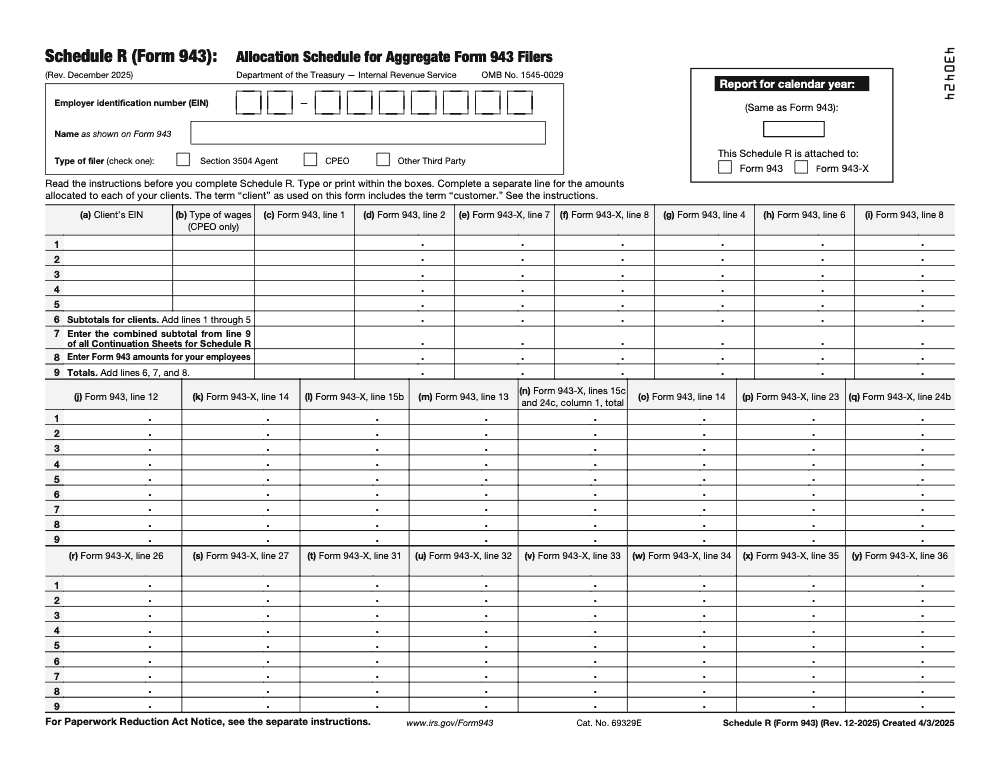
Schedule R (Form 943) is the allocation schedule for aggregate Form 943 filers – section 3504 agents, CPEOs, and other third parties who report agricultural payroll tax for multiple clients on one return. Each client gets its own line keyed to the client's EIN in column (a) (page 1 carries 5 clients on lines 1-5, and line 9 grand totals must tie to the aggregate Form 943), and the December 2025 revision applies to 2025 returns generally due January 31, 2026 (per the IRS Schedule R (Form 943) instructions).
When an aggregate Form 943 goes wrong, it is almost never the wage math. It is the workpapers: client-level allocations scattered across files, no shared rule for who gets what, and a partner stuck untangling it during peak week. Schedule R is how a section 3504 agent or a CPEO breaks one aggregate Form 943 out to each client, with each client keyed to its own EIN in column (a).
Before you can include a client under a section 3504 agent relationship, you need an IRS-approved Form 2678 on file. Page 1 carries 5 clients on lines 1 through 5, and the line 9 grand totals have to tie back to the aggregate Form 943. The December 2025 revision applies to 2025 returns, generally due January 31, 2026, so the older Schedule R layouts no longer fit. Get the workflow right and the schedule stops being where errors hide.
Key Takeaways
- Schedule R allocates an aggregate Form 943 to each client when you file as a section 3504 agent or a CPEO. Other third‑party payers use Schedule R only for specific client‑level credit situations.
- You must have IRS‑approved Form 2678 before you include a client under a section 3504 agent relationship.
- For 2024 and forward, the Schedule R layout was updated. Columns tied to sick and family leave and COBRA are now repurposed and are used only when Schedule R is attached to Form 943‑X. Do not file older Schedule R versions for years after 2023.
- Non‑certified third‑party payers list client‑by‑client amounts only for clients claiming the qualified small business payroll tax credit for increasing research activities. The remaining clients still each get their own line on Schedule R, and page 1, line 8 is reserved for the filer's own non-client employees.
- Form 943 is generally due by January 31 of the following year, or by February 10 if all deposits were made on time, watch the calendar when a due date lands on a weekend or holiday.
What Schedule R for Form 943 is, and why it matters
Schedule R is the allocation worksheet that translates your aggregate Form 943 totals into client‑level wage, tax, and credit data. If you file as a section 3504 agent or as a CPEO, you attach Schedule R every time you file an aggregate Form 943 (a standard agricultural employer filing Form 943 for its own staff does not file Schedule R at all, since the schedule is only for aggregate filers reporting multiple separate clients on one return). It is your control sheet, the place where your “one return” becomes clear, auditable numbers for each client.
Think of Schedule R as your client ledger for the year, it must tie to the cents with Form 943 and your workpapers.
A quick vocabulary check helps:
- “Client” means the employer on an approved Form 2678 for an agent relationship, a customer of a CPEO, or a customer of a non‑certified PEO under applicable regulations.
- Agents and CPEOs must always attach Schedule R to the aggregate Form 943. Other third‑party payers attach Schedule R only in defined credit situations, more on that below.
Who must file Schedule R, and when it is optional
- You must file Schedule R if you are a section 3504 agent approved by the IRS and you file an aggregate Form 943. Approval is granted after the IRS processes Form 2678, and you may only include clients listed on approved 2678 authorizations.
- You must file Schedule R if you are a CPEO filing an aggregate Form 943, and CPEOs generally must e‑file both Form 943 and Schedule R.
- If you are another third‑party payer, such as a non‑certified PEO, you file Schedule R only if a client claims the qualified small business payroll tax credit for increasing research activities. Each remaining client still gets its own line on Schedule R, and page 1, line 8 is reserved for the filer's own non-client employees.
A note on Form 2678 approval
Form 2678 must be filed and approved before a section 3504 agent can include a client on Schedule R. The authorization is effective on the date shown in the IRS approval letter, so track approvals and keep copies in your engagement files.
What changed for 2024–2025 you should know
The IRS updated Schedule R instructions in December 2024 and clarified how certain columns work going forward. Here is the practical impact you will feel at your desk:
- Lines that used to support credits for qualified sick and family leave are no longer on Form 943 for 2024. If you are eligible to claim those credits because you paid qualifying wages in 2024 for an earlier leave period, you claim them on Form 943‑X, not on Form 943. The related Schedule R columns have been repurposed and are used only when Schedule R is attached to Form 943‑X.
- In rare situations, COBRA premium assistance can still be claimed, but that is handled on Form 943‑X, and you must use the current December 2025 revision of Schedule R with that amended return.
- The IRS now supports e‑filing amended Form 943 and the related Schedule R on Modernized e‑File, which is helpful for clean audit trails and faster corrections.
If you are filing a correction on Form 943‑X, follow the current 943‑X instructions, which were revised in April 2025, for how Schedule R attaches to the amended return and which columns apply.
Key rules for Form 943 timing and deposits
- Form 943 is generally due by January 31 of the year after you paid the wages. If all deposits were made on time, you may file by February 10. When the due date falls on a weekend or legal holiday, the deadline shifts to the next business day. Keep this rhythm in your annual calendar to protect penalty‑free status.
- If you file your first Form 943, you must file each year going forward until you file a final return, even if you have no tax to report, and when you do stop you must check the final-return box at the top of Form 943, otherwise the IRS keeps expecting the return and may issue CP259 non-filer notices.
Pro tip, set a recurring task two weeks before January 31. Your reviewers will thank you, and your deposit history will stay spotless.
What to report on Schedule R, by filer type
Reporting matrix
| Filer type | When Schedule R is required | Client‑by‑client details required for | Where non‑credit clients go |
| Section 3504 agent | Every aggregate Form 943 filing | All clients included under approved Form 2678 | Not applicable |
| CPEO | Every aggregate Form 943 filing | All CPEO customers on the aggregate return | Not applicable |
| Other third‑party payer, non‑certified PEO | Only when a client claims the qualified small business payroll tax credit for increasing research activities | Only those credit clients | Each client gets its own line; page 1, line 8 is for the filer's own non-client employees |
Source guidance, see the current Instructions for Schedule R for Form 943.
The clean way to complete Schedule R, step by step
- Confirm your authority Make sure every client on your list has an approved Form 2678 if you are a section 3504 agent. Keep the IRS approval letters with your engagement documentation.
- Match identifiers Enter your EIN and legal name exactly as shown on the attached Form 943 or 943‑X. Check the correct “Type of filer” box. Small mismatches create preventable IRS notices.
- Choose the correct year and form Use the current December 2025 revision of Schedule R for the year you are filing, and indicate whether you are attaching it to Form 943 or Form 943‑X. Do not file earlier revisions for post‑2023 years.
- Build client‑level rows that tie out For each client, enter the EIN and required columns on its own separate line, since clients cannot be combined onto a single line to save space; each line is keyed to that client’s own EIN. If you are filing Schedule R with Form 943‑X, be aware that certain columns, including those related to prior leave credits and COBRA, are used only with 943‑X.
- Tie the math Your client allocations must foot to what you reported on the aggregate Form 943 or 943‑X. Reconcile to the penny.
- Keep your evidence Retain workpapers and source reports as long as they may be material. You will want them ready if you respond to an IRS inquiry.
Keep commas out of amounts over 999.99 when you complete the schedule. It is a small formatting rule that prevents keystroke errors.
Workpapers that make Schedule R reviews fast
I have seen more Schedule R issues caused by messy workpapers than by tax rules. When your files tell a clean story, reviewers breeze through checks, and your aggregate Form 943 ties out without back‑and‑forth.
File naming and folder logic
Use a standard naming pattern for every client so your team can find support in seconds.
- Year_ClientName_EIN_DocumentType_Version.ext
- 2024_SmithOrchards_12-3456789_PayrollRegister_v3.xlsx
- 2024_SmithOrchards_12-3456789_943-Allocations_v2.xlsx
- 2024_SmithOrchards_12-3456789_941-Recon_Q1_v1.pdf
Keep a single “Allocations” workbook per aggregate return, with a tab per client and a control tab that sums to Form 943, Schedule R, and deposit history.
Required support to retain
For each client that appears on Schedule R, keep:
- Payroll registers, quarter by quarter, with totals that reconcile to the annual amounts.
- Employer copies of Forms W‑2 and W‑3 or W‑2c if amended.
- Deposit history by date and amount, plus your semiweekly or monthly deposit schedule.
- Any credit calculations, for example the qualified small business payroll tax credit for increasing research activities, with formulas and source schedules.
- A copy of the approved Form 2678 if filing as a section 3504 agent, and any CPEO customer agreements if you are a CPEO.
- Reconciliation from books to return for Social Security and Medicare wages and tips.
Reviewers should be able to confirm every number on Schedule R by opening two files, the allocation workbook and the payroll register. If they need to go hunting, fix the structure, not the reviewer.
Documentation checklist for your binder
- Signed client list for the aggregate return, with EINs validated.
- Evidence of name and EIN match for every client, avoid IRS CP notices.
- Rollforward of wages and taxes from quarters to the annual return.
- A tie‑out page that shows Schedule R totals equal Form 943 totals, to the cent.
- Notes on any outliers, for example a large Q4 catch‑up or prior period correction.
Example, client‑by‑client allocation that ties to Form 943
Let us walk a simple example so you can see the flow end to end.
- Aggregate facts Your aggregate Form 943 shows total Social Security wages of 2,400,000, Medicare wages of 2,410,000, federal income tax withheld of 310,000, Social Security tax of 297,600, and Medicare tax of 69,890. These totals include three farm clients.
- Client tabs in your allocations workbook
- Smith Orchards, EIN 12‑3456789, Social Security wages 1,050,000, Medicare wages 1,055,000, withholding 132,000.
- Green Valley Dairy, EIN 98‑7654321, Social Security wages 900,000, Medicare wages 905,000, withholding 118,000.
- Riverbend Farms, EIN 11‑1111111, Social Security wages 450,000, Medicare wages 450,000, withholding 60,000.
- Tie‑out Your control tab adds client wages and taxes. Totals equal the aggregate Form 943. If a rounding difference shows up, adjust only in the control tab with a documented penny rounding cell, never inside a client tab.
- Schedule R entry Enter each client’s EIN, name, and amounts. If none of these clients has a client‑level credit, and you are a section 3504 agent or a CPEO, you still list each client on Schedule R because you always file client detail with an aggregate 943. If you are a non‑certified third‑party payer and none claims the qualified small business payroll tax credit for increasing research activities, each of those clients still gets its own line on Schedule R, and page 1, line 8 is reserved for the filer's own non-client employees.
If any client does claim the R&D payroll credit, include that client on a detail line with the credit columns completed, and keep the computation in your binder with sign‑off.
Review protection that cuts partner time in half
Here is the review ladder that keeps reviewers out of the weeds and protects deadlines.
Preparer checks
- Validate client EINs against prior‑year returns or the IRS name control.
- Reconcile aggregate deposits to EFTPS reports, then to the amounts on Form 943.
- Run a “reasonableness scan” of wages versus headcount and prior year.
- Complete internal checklist items, then sign and date the cover sheet.
Senior review
- Confirm the allocation workbook, control tab equals Form 943.
- Spot check two clients per ten for payroll register ties and credit math.
- Review any Schedule R credit columns against supporting schedules.
- Flag issues early and return to preparer with clear notes.
Final reconciliation
- Confirm e‑file readiness, names and EINs match prints.
- Check signatures and the agent or CPEO box.
- Archive a locked PDF set and a read‑only copy of the allocations workbook.
Capacity without chaos for peak season
Schedule R errors spike when teams are overwhelmed. If your in‑house capacity is strained, consider disciplined offshore delivery that works inside your systems, your templates, and your security model. The point is control, not more resumes.
- SOP‑driven execution, so every Schedule R follows the same steps.
- Structured workpapers and version control.
- A multi‑layer review path, preparer to senior to quality to final.
- Turnaround SLAs linked to your calendar.
- Live workflow tracking and early escalation on blockers.
Teams trained on QuickBooks, Xero, UltraTax, CCH Axcess, ProConnect, Lacerte, Drake, Thomson Reuters, Canopy, Karbon, TaxDome, Suralink, and JetPack can plug into your flow without forcing software changes. Used well, this removes bottlenecks and gives partners time back for client strategy.
Common errors on Schedule R, and quick fixes that work
Even strong teams trip on the same handful of issues. Use this list as a pre‑flight check so your allocations pass review the first time.
- EIN or name mismatches Fix it by copying the name control and EIN from prior year prints or the IRS letter. Do not rely on onboarding forms without validation.
- Totals do not tie to Form 943 Run a single control tab that adds every client row. If it does not equal the aggregate return to the cent, stop and find the difference before routing for review.
- Wrong year or wrong revision of Schedule R Confirm the year in the header and that you are using the current revision for the period you are filing. Archive prior versions so no one grabs an outdated file.
- Client included without Form 2678 approval Agents must wait for an approved Form 2678. Track approvals in a simple log with client, date submitted, and date approved, then attach the approval to your binder.
- Missing client‑level credit amounts If a client qualifies for the small business R and D payroll tax credit, the credit must appear in that client’s row with math that ties back to support. Keep the computation with sign‑off.
- Rounded amounts that create penny drift Carry cents all the way through and only format for prints. If you must adjust a rounding penny, do it on the control tab and leave the client rows intact.
- Wrong period or late deposit mapping Tie deposits by date to EFTPS. Use a mini calendar inside your workbook so deposit dates line up with the period in the return.
- Schedule R attached to the wrong form If you are fixing a prior year, attach Schedule R to the amended return that matches that year. Keep year, EIN, and checkboxes consistent across the packet.
If something looks off, it usually is. Slow down for three minutes, check the header, the year, the EIN, and the control tab. Those three minutes can save three days later.
Filing day checklist and simple timeline
A calm filing day starts two weeks earlier. Here is a light structure you can reuse every year.
Two weeks before due date
- Lock your client list and confirm EINs and name controls.
- Reconcile aggregate totals to payroll and deposits.
- Assign preparer and senior reviewer, and book calendar time for both.
One week before due date
- Finish client tabs and complete the control tie‑out.
- Run the internal checklist, then route to senior review with clear notes.
- Prepare signature pages and verify the correct agent or CPEO boxes.
Three days before due date
- Clear review notes and refresh totals.
- Print the PDF packet for archive, then stage e‑file.
- Have one person who did not prepare do a cold read of names and EINs.
Filing day
- Submit the e‑file, then confirm acceptance.
- Save the acceptance ack to the binder and your tracking sheet.
- Send the client confirmation email with a short plain‑English summary.
One week after filing
- Close the job, set a tickler for W‑2s and state reconciliations if any remain.
- Post a retro to your playbook for anything that slowed you down.
- Archive a read‑only copy of the allocations workbook.
Need steadier delivery during peak season
If your team spends nights fixing allocations instead of advising clients, you probably have a delivery problem, not a sales problem. Accountably integrates trained offshore professionals into your workflow with SOPs, structured workpapers, a layered review path, and turnaround SLAs. You keep your systems and templates, you gain stable capacity and cleaner reviews.
The goal is simple, more returns filed right the first time, fewer late nights, and partners back in client strategy.
If you want a quiet peak season, ask us to walk through your current Schedule R workflow. We can show you where review time is getting trapped and how to build a smoother path without giving up control.
Conclusion
When you treat Schedule R like a control sheet rather than a form, the work gets lighter. You confirm authority, you build clean client tabs, you tie out once, and you file with confidence. The result is simple, fewer notices, faster reviews, and partners who can finally focus on the work that grows the firm. If you need extra hands that work your way, we are ready to help.
Common Mistakes We See Every Season
The same handful of Schedule R errors surface every season, and almost all of them trace back to filer type and tie-out discipline rather than math. Here are the ones we catch most often, with the fix we paste into the SOP.
Reusable Checklists
These are copy-paste ready for your firm SOPs. Each step maps to a line or column on Schedule R (Form 943), per the IRS Schedule R (Form 943) instructions, so every preparer and reviewer works the same way each season.
Filer type and authority check
- Confirm which aggregate filer box applies: section 3504 agent, CPEO, or other third party.
- For each section 3504 agent client, verify the IRS has approved Form 2678 and file the approval letter with the engagement.
- Confirm the calendar year at the top of Schedule R matches the attached Form 943 or Form 943-X.
- Check the box for whether Schedule R is attached to Form 943 or to Form 943-X.
- Flag any client claiming the qualified small business payroll tax credit on Form 943 line 12 (Form 8974 attached).
- Note that only CPEOs complete column (b), Type of wages.
Client allocation build
- Open one line per client, keyed to the client's 9-digit EIN in column (a).
- Pull each client's agricultural employee count for the pay period including March 12 into column (c).
- Map wages and taxes to the columns tied to the Form 943 lines: social security wages, Medicare wages, federal income tax withheld, and the line 13 total.
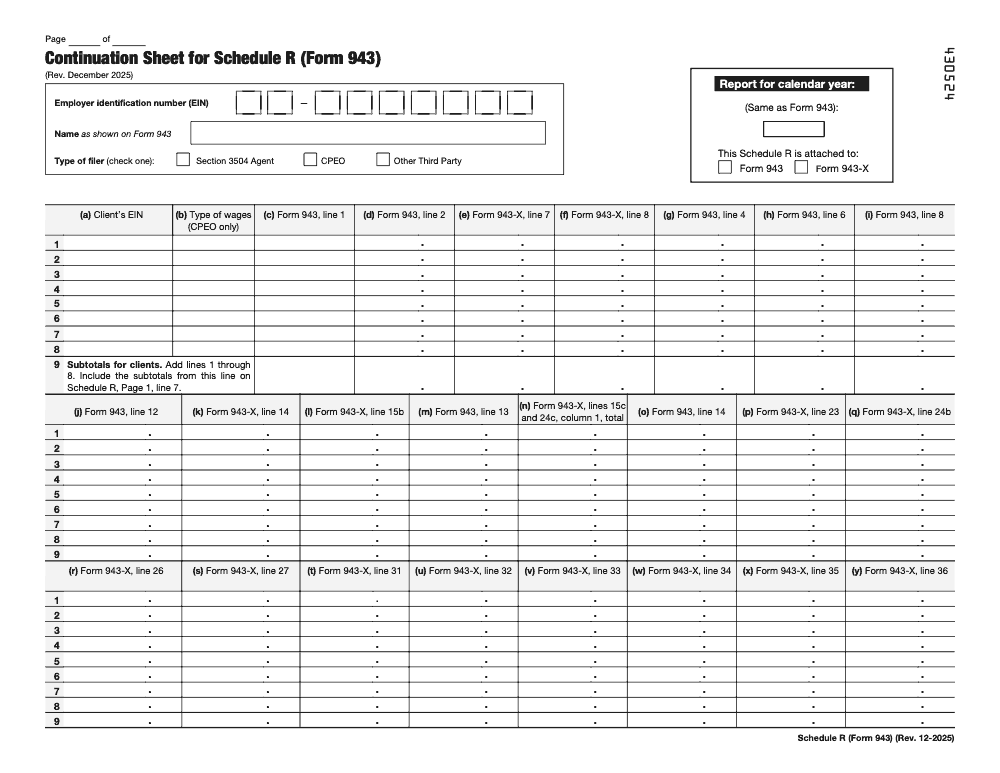
- Place clients 1-5 on page 1; move each additional group of eight clients onto a Continuation Sheet.
- Subtotal each Continuation Sheet on its line 9 and carry it to page 1, line 7.
- Enter your own non-client employees on page 1, line 8.
Schedule R tie-out before filing
- Confirm page 1, line 9 equals lines 6 plus 7 plus 8.
- Tie line 9 column-by-column to the aggregate Form 943 or Form 943-X.
- If you are a monthly schedule depositor, verify Form 943 line 17m equals line 13.
- Confirm the columns used only with Form 943-X are blank on an original Form 943 filing.
- Print or type all entries inside the boxes provided on the form.
- Archive a read-only copy of the allocation workbook with the accepted return.
Keep Form 943 Schedule R Season From Stalling
Schedule R lands in the same tight window as the rest of payroll year-end. Aggregate Form 943 returns are generally due January 31, and the December 2025 revision of Schedule R carries only five client lines on page 1 (per the IRS Schedule R (Form 943) instructions), so a CPEO or section 3504 agent with dozens of clients is stacking Continuation Sheets while W-2s and state reconciliations compete for the same hours.
The fix is not more overtime, it is a repeatable allocation workflow. When every client tab is built the same way and ties to the return before anyone signs, Schedule R stops being where review time disappears.
- Build one tab per client EIN that feeds column (a) through the Form 943 line totals, so the schedule populates from a single source.
- Reconcile page 1, line 9 to the aggregate Form 943 column-by-column before the partner ever opens the file.
- Track Form 2678 approvals for every section 3504 agent client in one log, so no client is listed without authority.
- Carry each Continuation Sheet line 9 subtotal to page 1, line 7 as a checked step, not a memory exercise.
- Keep column (b) blank unless the filer is a CPEO, and flag line 8 for your own employees on every engagement.
That is the kind of structured execution we build for clients who would rather spend January advising than reconciling. Our tax delivery teams work inside your systems and templates, with documented SOPs and a layered review path, so aggregate Form 943 filings go out tied and on time.
FAQs
Schedule R breaks an aggregate Form 943 into client‑level wages, taxes, and any required credits. Agents and CPEOs attach it every time they file an aggregate Form 943. Other third‑party payers use it only when a client’s credit requires client detail. Keep your allocation workbook as the primary support.
Yes if you are filing as a section 3504 agent. You include only clients for whom the IRS has approved Form 2678. Store the approval letters with your engagement files so reviewers can verify them quickly.
Both are allocation schedules, but they attach to different returns. Form 943 covers agricultural payroll on an annual cycle, while Form 941 covers quarterly payroll. Use the correct schedule for the return you are filing and the year that applies.
No for current year original filings. If you discover eligible amounts from prior periods, you address them on the amended return for that year and use the schedule that matches that amended filing. Keep the credit math with dates and citations in your binder.
Yes. Most filers can attach Schedule R electronically with the return. Your software should generate the correct version for the year, then transmit the packet and store the acceptance ack.
If you are not an agent or CPEO, and you have clients without a client‑level credit that requires detail, each of those clients still gets its own line on Schedule R; page 1, line 8 is reserved for the filer's own non-client employees. When in doubt, follow the filer type rules in the instructions and document why a client was or was not listed.
Prepare an amended return for that year and attach the correct Schedule R. Reconcile the change in your control tab, add a short memo that explains the adjustment, then e‑file and archive the acceptance.
Form 943 is due by January 31 for the prior year. If all deposits were made on time, you have until February 10. Always check the calendar when a due date lands on a weekend or holiday, then plan your internal timeline backward from that date.
Other forms this guide names
- Form 943: Agricultural Employer Guide, Deadlines, Filing Steps
- Form 943-X: Correct Agricultural Payroll Tax Returns
- Form 2678: Appointment of Agent: 2025 Guide to IRC §3504
- Form 941: Employer's Quarterly Tax Return Guide 2025
About this guide
Accountably helps US CPA, EA, and accounting firms hire trained accountants and tax preparers in India.
About us Reviewed byJugal Thacker, CPAFounder and CEO at Accountably
A Washington-licensed CPA with 7+ years inside US firms – PwC, a real-estate tax practice, then a full-service firm, rising from reviewer to manager to advisory. This article was reviewed against current IRS guidance for the 2025 tax year and updated for filers preparing late returns, amendments, and 2026 estimates.
View profile →How we research, review, and update this guide
Every Accountably guide is researched against primary IRS sources, reviewed by a U.S. CPA, and refreshed as guidance evolves. Read our Editorial Guidelines to see how we source, fact-check, and update our content.




