
Summarize this article with AI
In Brief
Form 10301 authorizes encrypted CD delivery of CP2100 (Backup Withholding List) and 972CG (proposed penalty) notices – an administrative authorization form on the January 2017 revision, not a tax return (per the Form 10301 instructions published on IRS.gov). Allow 5 business days from IRS receipt, then the designated contact phones (866) 455-7438 Monday through Friday to obtain the encryption code after the CD arrives; the code never ships with the disc. See our tax outsourcing services for B-notice and TIN-mismatch workflows.
A payroll manager once called in a panic over a CP2100 notice flagging dozens of mismatched TINs, with no one in the office sure what Form 10301 was or why it governed how the underlying data file would arrive. The form authorizes the IRS to deliver CP2100 and 972CG notices on an encrypted CD instead of paper.
The part that surprises people is that the encryption code never ships with the disc. You allow about 5 business days from IRS receipt, and once the CD arrives the designated contact phones (866) 455-7438 on a weekday to get the code separately.
Key Takeaways
- Form 10301 is an authorization form that allows payers – typically financial institutions, employers, or their authorized agents – to receive IRS CP2100 and 972CG backup withholding data on encrypted CD rather than on paper.
- Who files: Payers required to perform backup withholding under IRC § 3406 who want electronic delivery of their B-notice data files from the IRS.
- No strict annual deadline exists for this form, but it must be submitted and approved before the IRS will ship your CD; allow 5 business days from IRS receipt before expecting it to be processed.
- Main pitfall: Submitting without a valid Taxpayer Identification Number (TIN) or with an incorrect payer EIN – the IRS will reject the request and mail paper notices instead.
- SOP tip: Log your authorization code in your firm’s compliance calendar with an annual renewal reminder; codes can expire or be revoked if entity information changes.
- Related forms to know: Form W-9 (TIN collection), Form 945 (backup withholding deposits), and IRS Publication 1586 (reasonable cause standards for backup withholding).
What Form 10301 Is and When to Use It
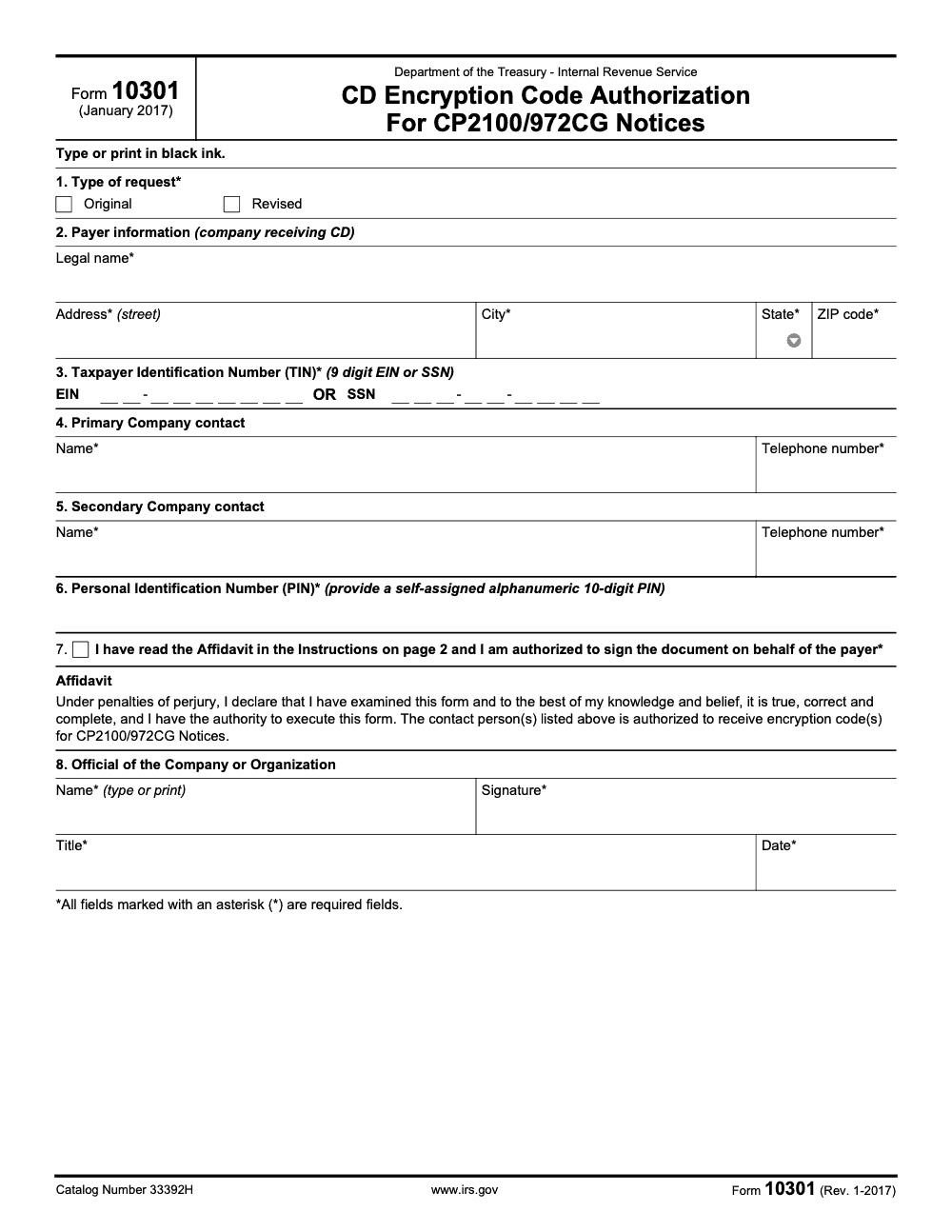
Form 10301, officially titled “CD Encryption Code Authorization For CP2100/972CG Notices,” is an IRS administrative form used by payers to request encrypted access to their CP2100 or 972CG data files. The IRS issues CP2100 notices (and the related 972CG penalty notice) when a payer’s information returns – typically 1099s – contain payee TINs that do not match IRS records. These mismatches trigger backup withholding obligations under IRC § 3406.
Historically, the IRS mailed paper lists of mismatched TINs to payers. For large-volume payers – banks, brokerages, and payroll processors handling thousands of 1099 recipients – a paper list is unworkable. Form 10301 is the mechanism that lets these payers receive their TIN mismatch data on an encrypted CD, which they can then load directly into their compliance systems. Think of it as the key request that unlocks the digital door to your backup withholding data.
Who Needs to File
Any payer that receives CP2100 or 972CG notices and prefers – or operationally requires – electronic delivery of the underlying data file should file Form 10301. This typically includes banks, brokerage firms, insurance companies, payroll service bureaus, and large employers with high 1099 volumes. Smaller payers with only a handful of 1099 recipients rarely need this form, since their paper notice is manageable.
What Triggers a CP2100 in the First Place
The IRS matches every 1099 (and W-2G, 1098, etc.) against its TIN database. When a payee name and TIN combination does not match – often because a payee used a Social Security Number instead of an EIN, changed names after marriage, or simply provided a wrong number – the IRS flags it. Payers accumulate these mismatches across a filing season, and the IRS issues the CP2100 or 972CG to inform them. From my side of the desk, the TIN mismatch rate on 1099-MISC and 1099-NEC returns for firms with large contractor pools can easily hit 3–8% without active TIN verification procedures in place.
The Connection to B Notices
Once a payer receives a CP2100, they are required to send “B notices” to affected payees using the IRS’s First B Notice template. The CD obtained via Form 10301 authorization contains exactly the information needed to generate those B notices efficiently – payee name, account number, TIN, and mismatch reason code. Without the CD, large payers must manually cross-reference paper lists, which is slow and error-prone.
How to Complete Form 10301
Form 10301 is a short administrative form, but precision matters. A single transposed digit in your EIN or a mismatched name will result in rejection. Here is a section-by-section walkthrough.
| Section / Field | What to Enter | Practitioner Tip |
|---|---|---|
| Payer Name | Legal entity name exactly as it appears on your EIN filing with the IRS | Do not use trade names or DBAs; use the exact legal name on your CP-575 or SS-4 |
| Payer TIN (Block 3) | Nine-digit Taxpayer Identification Number – either an Employer Identification Number (EIN) in XX-XXXXXXX format OR, where the payer is an individual/sole proprietor, a Social Security Number (SSN) in XXX-XX-XXXX format | Triple-check this; a transposed digit causes automatic rejection |
| Payer Address | Complete street address of the payer (Block 2) where the IRS should send the CD | Use a physical address that accepts deliveries; PO boxes may create delivery issues for encrypted CDs |
| Contact Name | Name of the primary contact (Block 4) authorized to receive the encryption code for this payer | This person needs access to the decryption software; name your compliance officer or IT contact, not a receptionist |
| Contact Phone Number | Direct phone number for the contact person | IRS may call to verify identity before shipping; a direct line speeds this up |
| Secondary Contact (Block 5) | Name and telephone number of a secondary contact authorized to receive the encryption code | The encryption code is delivered by phone after PIN verification, never by email; brief both primary and secondary contacts on the PIN |
| Authorized Signature | Signature of a principal of the entity – the owner (sole proprietorship), president/VP/other principal officer (corporation), a responsible and duly authorized member or officer (partnership, government entity, or other unincorporated organization), or the fiduciary (trust or estate). An ordinary employee or admin staffer cannot validly sign without an attached power of attorney. | If an attorney-in-fact signs, attach a copy of the Form 2848 power of attorney to Form 10301; Form 8821 does not grant signature authority |
| Title and Date | Signer’s title and signature date | Date must match or precede the submission date; back-dating is never appropriate |
How to Submit
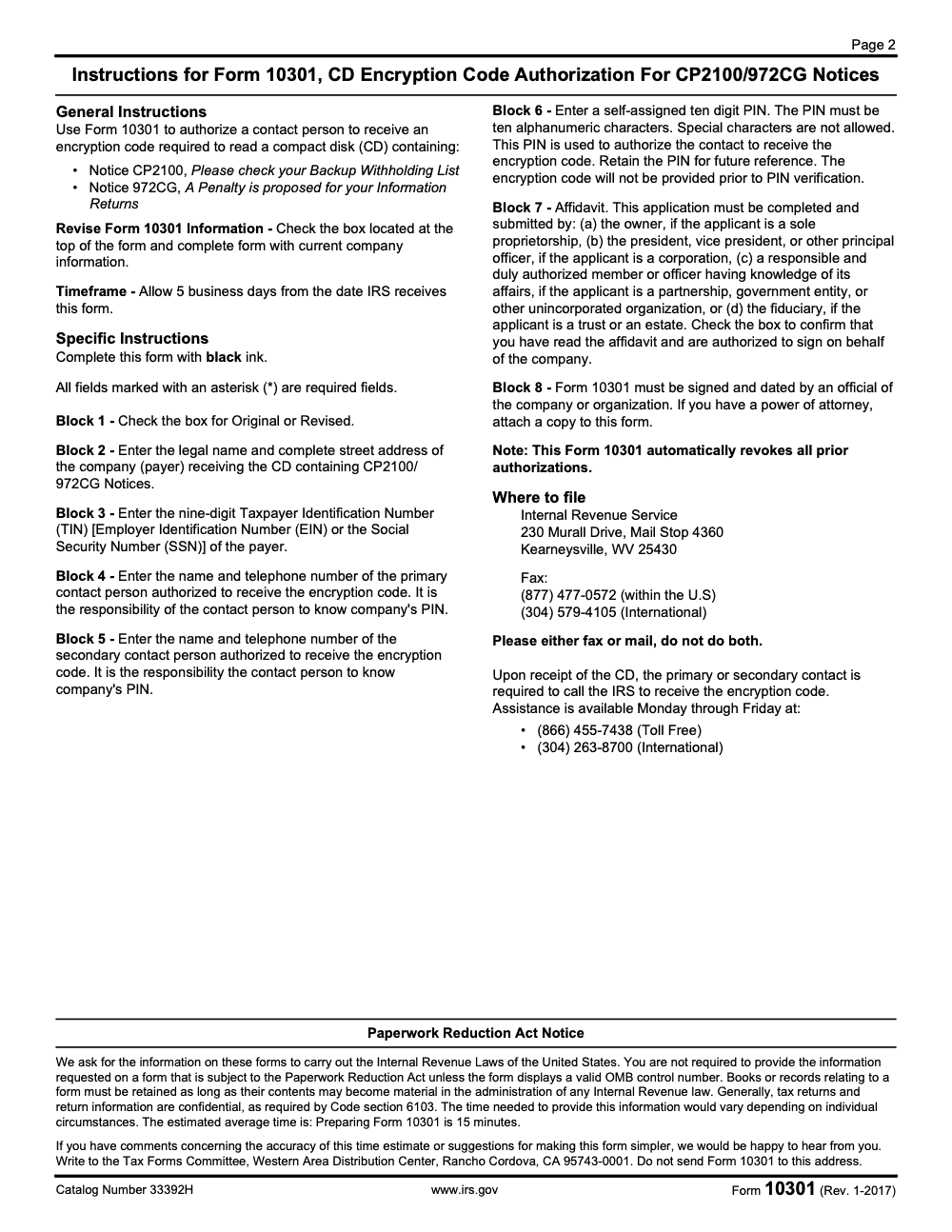
Form 10301 is submitted by mail to Internal Revenue Service, 230 Murall Drive, Mail Stop 4360, Kearneysville, WV 25430. Alternatively, fax the form to (877) 477-0572 domestic or (304) 579-4105 international – pick one channel only, do not do both. Include a cover letter referencing your payer EIN and the specific CP2100 notice number you are responding to, if applicable. Keep a copy of the signed form in your compliance files.
What Happens After Submission
The IRS processes the authorization request and issues an encryption code. When your CP2100 or 972CG data file is ready, the IRS ships it on a CD with password protection tied to that encryption code. Importantly, the encryption code is not shipped with the CD and is not emailed – once the CD arrives, the primary or secondary contact named on Form 10301 must phone the IRS at (866) 455-7438 (toll free) or (304) 263-8700 (international), Monday through Friday, verify the company’s self-assigned PIN, and receive the code over the phone. Load the data into your TIN-matching or backup withholding workflow within the required timeframe for issuing B notices.
Deadlines, Penalties, and Filing Requirements
Form 10301 itself has no standalone IRS-imposed filing deadline. However, the downstream obligations it supports do. Missing those downstream deadlines creates significant penalty exposure.
| Obligation | Deadline | Penalty for Missing |
|---|---|---|
| Submit Form 10301 to authorize CD delivery | No hard deadline; file before CP2100 season (typically Q4–Q1) | None for the form itself; delay means you receive paper notices instead |
| First B Notice to affected payee (after CP2100 receipt) | Within 15 business days of receipt of CP2100 | Potential §3406 backup withholding liability on subsequent payments |
| Second B Notice to affected payee (after second CP2100 in 3 years) | Within 15 business days of receipt of second CP2100 | Failure to withhold at 24% rate on future payments until correct TIN received |
| Form 945 – backup withholding deposits | Quarterly or monthly EFTPS deposits; annual return by January 31 | Failure-to-deposit penalty: 2–15% depending on how late |
| 972CG response / abatement request | 45 days from the date of the 972CG notice | Penalty stands if no response; typically $50 per failure, up to $1.5M annually |
Penalty Abatement and Reasonable Cause
If a payer fails to send B notices or impose backup withholding because they did not receive the CP2100 in time – for example, because it went to an old address – they may request abatement of the 972CG penalty by demonstrating reasonable cause under IRS Publication 1586. Quick rule you can copy into your SOP: always update your payer address with the IRS when it changes, and keep your Form 10301 authorization current to avoid disruption in CD delivery.
The B Notice Workflow: What Comes After Form 10301
Form 10301 is a gateway, not an endpoint. Once you receive your encrypted CD and decrypt the TIN mismatch file, you enter the B notice workflow. This is where most compliance failures actually happen – not in the authorization step, but in execution.
First B Notice Procedures
Send the First B Notice letter to each affected payee within 15 business days of receiving the CP2100. The IRS provides a template in Publication 1281. The payee must return a signed Form W-9 within 30 business days. If they do not respond within that window, you must begin backup withholding at 24% on all subsequent reportable payments to that payee.
Second B Notice Procedures
If you receive a second CP2100 for the same payee within a three-year period, you must send the Second B Notice. This notice tells the payee they cannot simply provide a new W-9 – they must instead contact the IRS directly to obtain a TIN validation letter. Backup withholding begins immediately after the payee’s 30-business-day response window closes without the required IRS letter.
Documentation Your Firm Must Retain
From my side of the desk, the most important thing after running this process is documentation. You need to retain: the CP2100 notice itself, proof you sent the B notice (certified mail is best), the payee’s response (or a log showing no response was received), and your backup withholding calculation records. The IRS can audit this workflow during an employment tax examination, and “we sent the letter” is not enough without the proof.
Integrating TIN Verification to Prevent CP2100 Notices
The best Form 10301 workflow is one you rarely need to use. From my experience, firms that run payees through the IRS’s free TIN Matching program before filing their information returns dramatically reduce their CP2100 exposure. The IRS e-Services TIN Matching program allows bulk verification of up to 100,000 TIN/name combinations at a time.
When to Run TIN Matching
Run TIN matching after collecting W-9s from new vendors or contractors, and again before your January 1099 filing run. If a TIN match fails, go back to the payee for a corrected W-9 before you file. Corrected information returns filed before the IRS flags them cost you nothing. B notices issued after a CP2100 cost you time, staff hours, and potential penalties.
System-Level Controls to Build
Quick rule you can copy into your SOP: any new vendor in your AP system should be blocked from payment until a valid W-9 is on file and TIN-matched. Build that gate into your onboarding workflow. Similarly, set a calendar trigger to verify TINs for existing vendors annually, particularly for those who have changed names due to marriage, corporate restructuring, or DBA shifts.
Common Mistakes That Slow Things Down
Form 10301 is short – two pages including instructions – but the rejection patterns repeat across payers. Here are the six traps we see most often when high-volume 1099 filers submit it for the first time.
Practical Checklists You Can Reuse
Copy these into your firm's CP2100/972CG SOP for any payer where 1099 volume justifies CD delivery. Each list is structured so a senior reviewer can sign off in one pass.
Pre-submission packet for Form 10301
- Confirm the payer's legal name and street address match the IRS EIN record (not the DBA) for Block 2.
- Verify the 9-digit EIN or SSN entered in Block 3 against the most recent 1099 filing batch.
- Generate a 10-character alphanumeric PIN for Block 6 and log it in the password vault keyed to the payer EIN.
- Name a primary contact (Block 4) and a secondary contact (Block 5); both must know the PIN before submission.
- Check the Block 7 affidavit box and route the form to an authorized principal (owner, officer, member, or fiduciary) for signature in Block 8.
- Complete every field in black ink only, typed or printed, with no blue or gel ink.
- Pick ONE submission channel: fax (877) 477-0572 domestic, fax (304) 579-4105 international, or mail to Kearneysville, WV 25430. Never both.
- Calendar a 5-business-day check-in from the expected IRS receipt date before chasing status.
CD arrival and encryption-code call sequence
- Log the CD arrival date on the engagement file the moment it lands.
- Confirm which contact (primary or secondary) is making the call and that they have the PIN, payer EIN, and a callback number ready.
- Phone IRS at (866) 455-7438 toll-free or (304) 263-8700 international, Monday through Friday only.
- Verify the Block 6 PIN over the line; the IRS will not release the code without a PIN match.
- Record the encryption code in the password vault under the same EIN entry as the PIN.
- Decrypt the CD on an offline workstation before moving any files into the engagement folder.
- Destroy or vault the physical disc per your firm's data retention policy once the data file is loaded.
B-notice handoff after CD decryption
- Map each mismatched TIN on the CP2100 list back to the original 1099-NEC, 1099-MISC, or 1099-INT filing.
- Classify each mismatch as a First-B or Second-B notice based on prior cycles for the same payee.
- Draft First-B or Second-B notice letters within 15 business days of CD receipt, per IRS Publication 1281.
- Flag any payee with two B notices in three years for backup-withholding setup in the payer's payroll system.
- If a 972CG arrived alongside CP2100, calendar the 45-day abatement window and tee up the reasonable-cause file.
- Log the closeout date and store the encrypted file copy with the engagement workpaper set.
Keep 10301 Season From Stalling
CP2100 cycles do not land on a tidy calendar. They arrive in waves once the IRS finishes matching the prior year's information returns, and for payers with high 1099 volume a single encrypted CD can carry hundreds of mismatched TINs. Per IRS Publication 1281, each mismatch starts a 15-business-day B-notice clock, and the Form 10301 instructions note that the form itself takes about 15 minutes to prepare while the downstream B-notice work can absorb a full week of senior time when the firm is not set up for it.
The fix is treating Form 10301 less as a one-off authorization and more as the trigger for a repeatable B-notice production line. Build the workflow once, then plug each payer into the same SOP.
- Pre-load Blocks 2 through 6 from a payer-master sheet so a preparer can complete the form in under 10 minutes without chasing EINs or generating PINs ad hoc.
- Keep one password-vault entry per payer holding the Block 6 PIN, the eventual encryption code, and the Block 4 and Block 5 contact names.
- Calendar three checkpoints per submission: day-of-fax confirmation, day-5 IRS receipt window close, and day-of-CD-arrival to trigger the (866) 455-7438 call.
- Standardize the First-B and Second-B letter templates so payee notice production starts the day decryption completes, not the week after.
- Track every CP2100 file through to a 972CG check 60 days later, so any proposed penalty gets a reasonable-cause response inside the 45-day window.
This is the same delivery discipline our team applies to every backup-withholding cycle for client payers – PINs vaulted, SOPs documented, encryption-code calls scheduled the moment the CD lands. If your team is buried in CP2100 cleanup each year, our tax execution service handles the Form 10301 packet, the post-CD call, and the downstream B-notice production end to end.
FAQs
Form 10301 is used by payers to authorize the IRS to send CP2100 and 972CG backup withholding data on an encrypted CD rather than paper. It is an administrative authorization form, not a tax return. Once approved and the CD arrives, the designated contact must phone the IRS at (866) 455-7438 Monday through Friday and verify the company’s PIN to receive the encryption code; the code never ships with the disc.
Submission is voluntary but practically necessary for high-volume payers. Any payer that files a large number of 1099 information returns and expects to receive CP2100 notices should file Form 10301 to receive their mismatch data electronically. Small payers with only a handful of 1099s will typically receive paper CP2100 notices that are manageable without CD delivery.
A B notice is a letter a payer sends to a payee informing them that their TIN does not match IRS records and requesting a corrected Form W-9. The obligation to send B notices is triggered by a CP2100 notice from the IRS. Form 10301 authorizes encrypted CD delivery of the data file that lists which payees triggered the mismatch – making B notice generation faster and more accurate for high-volume payers.
The IRS provides the encryption code to the designated contact by phone – not by email and not bundled with the CD – after Form 10301 is approved, and only after the primary or secondary contact verifies the company’s self-assigned 10-character alphanumeric PIN from Block 6. The code is specific to each payer authorization request. You will need compatible decryption software – the IRS provides guidance on approved software in the instructions accompanying the CD shipment. Contact the IRS Martinsburg Computing Center if you have trouble accessing the file.
CP2100 is an informational notice: it tells you which payees have TIN mismatches so you can send B notices and begin backup withholding if needed. Notice 972CG proposes a penalty for information return filing failures (for example, filing 1099s with missing or incorrect payee TINs), not for failure to backup withhold itself. If you respond to CP2100 properly and on time, you typically reduce 972CG exposure. If you receive a 972CG, you have 45 days to respond with an abatement request under Publication 1586.
Yes. A third party – such as a CPA firm or payroll service bureau – can submit Form 10301 on behalf of a client payer. The signer must have authority to act for the payer. If an attorney-in-fact signs under a power of attorney, a copy of the Form 2848 must be attached to Form 10301 itself – not merely on file with the IRS. Note that Form 8821 (Tax Information Authorization) does not grant signature authority; only a Form 2848 power of attorney does. The IRS may verify this authorization before processing the Form 10301 request.
Other forms this guide names
- Form W-9: Guide & Instructions
- Form 2848: Guide to Line 3, Filing, and Rules
- Form 945: Backup Withholding, Deadlines, and Deposits
- Form 1099‑MISC: Deadlines, Boxes, Thresholds & Filing Guide
- Form 1099-NEC: Rules, Who Gets One, How to File
- Form 8821: Tax Information Authorization
About this guide
Accountably helps US CPA, EA, and accounting firms hire trained accountants and tax preparers in India.
About us Reviewed byJugal Thacker, CPAFounder and CEO at Accountably
A Washington-licensed CPA with 7+ years inside US firms – PwC, a real-estate tax practice, then a full-service firm, rising from reviewer to manager to advisory. This article was reviewed against current IRS guidance for the 2025 tax year and updated for filers preparing late returns, amendments, and 2026 estimates.
View profile →How we research, review, and update this guide
Every Accountably guide is researched against primary IRS sources, reviewed by a U.S. CPA, and refreshed as guidance evolves. Read our Editorial Guidelines to see how we source, fact-check, and update our content.




