
Summarize this article with AI
In Brief
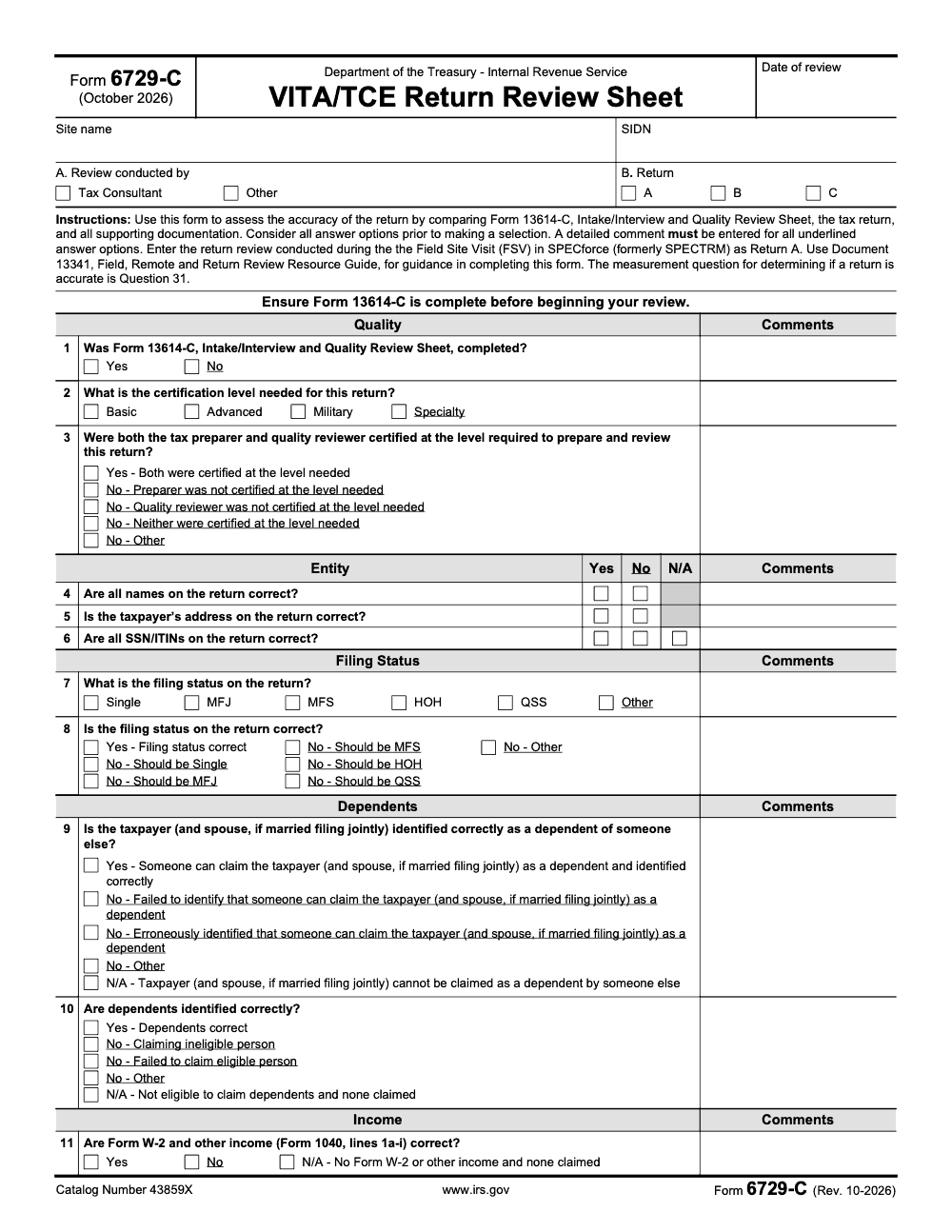
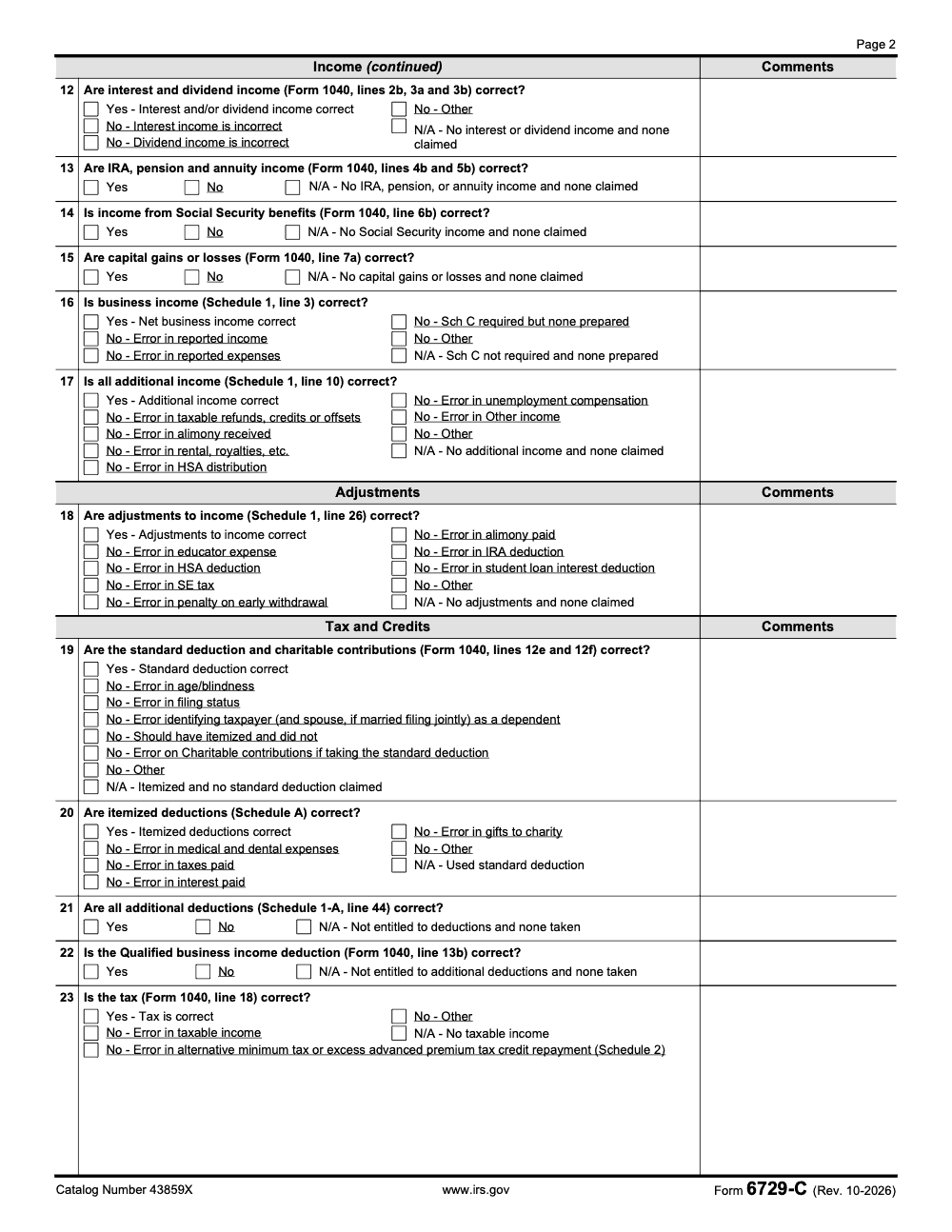
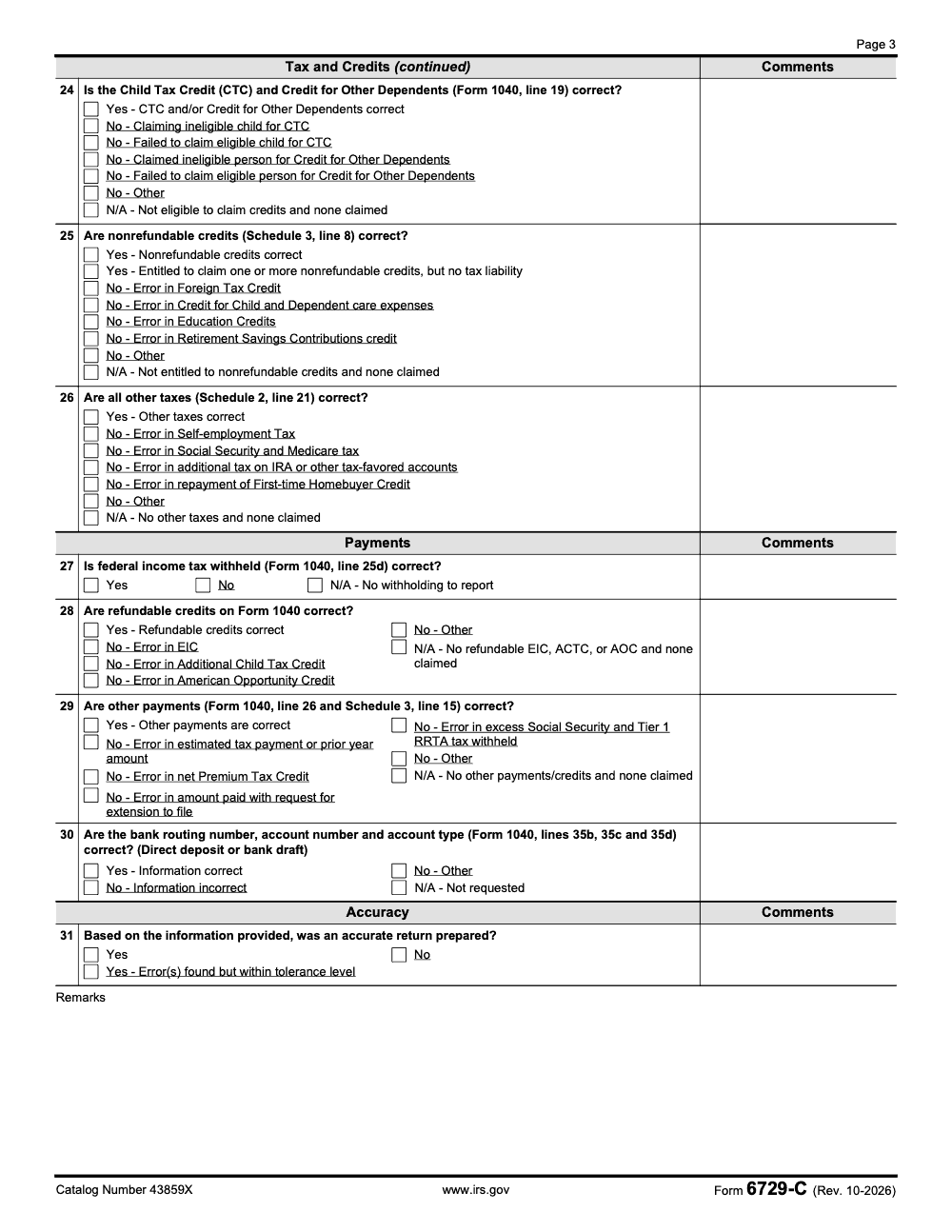
Form 6729-C (Rev. October 2025) is the IRS VITA/TCE Return Review Sheet (per IRS.gov, Catalog Number 43859X), a three-page form with 31 questions used by quality reviewers and Field Site Visit staff to verify volunteer-prepared returns against Form 13614-C. Question 31 is the single measurement question that determines accuracy, and FSV reviews are recorded in SPECforce (formerly SPECTRM) as Return A.
A quality reviewer working a VITA site taps a checkbox on 6729-C every time something looks off and adds a one-line note, and within minutes she has a clean list of fixes the site coordinator can act on. That is the real job of this form. It compares Form 13614-C, the return, and the source documents, and it keeps the review consistent when everything around it is moving fast.
This is the October 2025 revision, a three-page form with 31 questions. Question 31 is the single accuracy measurement; the other questions support that call but do not score it. Reviews done during a Field Site Visit are recorded by IRS reviewers in SPECforce, the internal system that replaced the SPECTRM naming. You do not attach 6729-C to any taxpayer return, so treat it as an internal quality document and store notes under VITA/TCE privacy rules.
Key Takeaways
- The latest 6729‑C is the VITA/TCE Return Review Sheet, revised in October 2025, with 31 questions, not 34. Question 31 is the “accurate return prepared” measurement (Questions 1-30 support that determination but are not themselves the measurement).
- Use 6729‑C to compare Form 13614‑C, the tax return, and source docs, then document findings and accuracy, especially during Field Site Visits or remote partner reviews. Results are entered in SPECforce by IRS reviewers.
- Partners can also use 6729‑C as an optional review tool, guided by Publication 5140 and anchored to the Quality Site Requirements in Publication 5166.
- This is an internal quality document, you do not attach it to a taxpayer return. Follow VITA/TCE privacy and data‑minimization rules in Publication 4299 when storing any review notes.
- “FSV” on the form means Field Site Visit, not Foreign Service. Out‑of‑scope issues must be flagged and handled per VITA/TCE policy.
What is IRS Form 6729‑C
Form 6729‑C is the IRS VITA/TCE Return Review Sheet. You use it to check a finished volunteer‑prepared return against intake data and source documents, then decide if it is accurate. The October 2025 version opens with instructions to compare Form 13614‑C, the return, and all supporting documentation, and it calls out that the “measurement question” is Question 31.
The form groups your checks into logical buckets, entity data, filing status, dependents, income, adjustments, tax and credits, payments, and the final accuracy call. It is designed for reviews performed by SPEC during Field Site Visits and Remote Site Reviews, and partners can use it as a structured checklist when they conduct their own internal reviews. Publication 5140 is the official job aid that explains how to answer each question on 6729‑C and 6729‑D.
You will see a specific instruction on page 1 to enter FSV return reviews in SPECforce, formerly SPECTRM, as “Return A.” That detail matters because it confirms 6729‑C is a quality‑control record, not a taxpayer‑facing filing.
What Changed In The 2025 Revision
- The header shows “Form 6729‑C (Rev. 10‑2025).”
- The form references SPECforce and directs FSV reviewers to enter their Return A there.
- The checklist tops out at 31 questions, and the form explicitly names Question 31 as the accuracy measure, so do not reuse older training that talks about 34 checkpoints.
If your site binder still says “34 questions,” update it, point your team to the Site Coordinator Corner page that links the current 6729‑C, and refresh your review scripts.
Who Should Use This Form
- IRS relationship managers and tax consultants during Field Site Visits and Remote Site Reviews use 6729‑C to record return‑level quality outcomes.
- Partner organizations can adopt 6729‑C for internal return reviews, which is encouraged in Publication 5140, paired with 6729‑D for site reviews and anchored to the Quality Site Requirements in Publication 5166.
Remember, your day‑to‑day quality review during preparation still starts with Form 13614‑C and the intake, interview, and quality review process. Link & Learn training reinforces that flow, use the intake sheet to drive the review, then tie every answer back to the return.
6729‑C vs. 13614‑C, When to Use Which
- Use 13614‑C every time you prepare and quality review a return with the taxpayer.
- Use 6729‑C when you are formally reviewing a completed return for accuracy, for example during a Field Site Visit or a partner’s internal QA sweep.
The Sections, What They Cover, And How To Think About Them
Each section lines up with how you scan a 1040. Work in order, it keeps your review tight and less emotional, and it makes Question 31 feel automatic.
| Section | What you confirm | Common proof you check |
| Entity | Names, address, SSN or ITIN are correct | Photo ID, Social Security card or ITIN letter, intake sheet |
| Filing Status | Status on return is supported | 12/31 marital status, dependents, support and living facts |
| Dependents | Who qualifies, who does not | Relationship, residency, age, support tests |
| Income | W‑2, 1099 series, Sch 1 items, Social Security, pensions, capital gains | Source docs, year‑end statements, brokerage 1099‑B support |
| Adjustments | Above‑the‑line items | HSA forms, IRA receipts, SE tax calc, student loan interest |
| Tax and Credits | Standard vs itemized, CTC, education, clean energy credits | Pub 4012 references, worksheets, Schedule A records |
| Payments | Withholding, refundable credits, estimated payments | W‑2 and 1099 withholding, ES payment confirmations |
| Accuracy | Final call, accurate or not | Question 31 decision on page 3 |
Publication 5140 walks through each area and how to evaluate answers on 6729‑C. If you need to tie your review back to site requirements or volunteer roles, Publication 5166 is your north star for QSR.
Pro tip, read the return once for structure, then do a second pass only on differences between the return and Form 13614‑C answers. It is faster, and your notes are cleaner.
How To Complete Form 6729‑C Step By Step
You will move faster when you run the same routine every time. I use a two‑pass method, a quick scan to see the whole return, then a slower pass to answer each checklist question and record proof.
Pass 1, Anchor The File
- Header, fill in reviewer name, review date, site location, and taxpayer names as they appear on the return.
- Pull up the intake sheet, Form 13614‑C, side by side with the tax return (the IRS instructs reviewers to confirm Form 13614‑C is complete before starting any 6729‑C question, since the review relies on intake‑sheet data).
- Stack source documents, W‑2, 1099 series, Social Security SSA‑1099, brokerage composite, education statements, HSA forms, plus any foreign or state attachments.
- Confirm privacy basics, screens are not visible to others, only necessary data is on the desk, and your storage path is secured.
One minute spent setting the table saves five minutes of rework later.
Pass 2, Work The Checklist In Order
- Identity and entity, match names, SSN or ITIN, and address to ID and intake. Note any name spelling or suffix issues.
- Filing status, tie the status back to year‑end facts, marital status, dependents in the home, and support.
- Dependents, test relationship, age, residency, and support for each person claimed.
- Income, reconcile the return to the W‑2s and 1099s on your desk. If you see prior‑year carryovers, check if they still apply.
- Adjustments, confirm HSA, IRA, student loan interest, self‑employment calculations.
- Deductions and credits, choose standard vs itemized with a simple compare, then validate Child Tax Credit, education credits, and any clean energy credits with their proofs (Form 6729‑C combines the Residential Clean Energy Credit and the Energy Efficient Home Improvement Credit into a single Question 25 answer option, so don't look for two separate checkboxes).
- Payments, confirm withholding and estimated tax payments.
- Final call, record notes and make your accuracy decision (Question 31 offers a "Yes - Error(s) found but within tolerance level" option, so minor errors inside the IRS-defined tolerance band can still receive an accurate determination).
Keep notes short and specific. “1099‑INT from FirstBank missing, $42 interest added, Sch B updated.” Good notes are gold if a coordinator needs to audit your review later.
Quick Reference Checklist
| Step | What you do | What you look at |
| 1 | Verify identity | Photo ID, SSN or ITIN letter, 13614‑C |
| 2 | Confirm filing status | Year‑end facts, dependents, support |
| 3 | Test dependents | Relationship, residency, age, support |
| 4 | Reconcile income | W‑2, 1099‑NEC, 1099‑R, 1099‑B, SSA‑1099 |
| 5 | Validate adjustments | HSA 5498‑SA, IRA 5498, SE calc, tuition receipts |
| 6 | Check deductions and credits | Standard vs Schedule A, CTC, AOTC/LLC |
| 7 | Confirm payments | Withholding, estimated vouchers, prior credit |
| 8 | Decide accuracy | Document notes, sign and date the review |
Required Documentation And Evidence That Speeds Reviews
Think proof first, then entries. When you reach a question, ask yourself, what would I show a coordinator if asked?
- Identity, photo ID, SSN or ITIN letter, and names that match Social Security records.
- Filing status, if there is any doubt, keep a simple fact note, married on 12/31, lived apart from June, child lived with taxpayer all year.
- Dependents, keep a short note that covers relationship, residency months, and support.
- Income, organize statements by type, wages, interest, dividends, self‑employment, retirement, Social Security, brokerage, other income.
- Credits, keep receipts or worksheets for education credits, child care, and clean energy credits.
- Adjustments, IRA and HSA statements, health insurance marketplace forms, and self‑employment worksheets.
- If your site reviews returns with foreign items, keep copies of foreign wage statements and any exclusion worksheets.
Label documents to the return line or schedule they support, add a date stamp, and record where the digital copy is stored. You will thank yourself during site closeout.
Common Errors And Simple Ways To Avoid Them
Even seasoned reviewers miss small things when the room gets loud or the queue gets long. Here are the misses I see most, and the habits that prevent them.
- Identity drift, the return spells the last name differently from the Social Security card. Fix it on the spot.
- Filing status chosen by habit rather than facts. Pause, ask the 12/31 questions, and choose based on living and support details.
- Dependent test shortcuts, a child who stayed with a relative for part of the year needs extra attention on residency and support. Write a two‑line note so the next reviewer understands your decision.
- Unreported small interest or dividends, the $15 1099‑INT left in a wallet can trigger a notice. Scan the intake for “yes” answers about bank interest, then ask again.
- Education credits doubled, the 1098‑T covers the student, not the parent. Confirm who paid and who is eligible, and keep proof of qualified expenses.
- Schedule C mismatches, income on 1099‑NEC is entered, but expenses are estimates. If records are thin, stay conservative, and document the conversation.
- Withholding transposed, $5,140 becomes $5,410, which is a big swing. Re‑key withholding numbers with a second set of eyes.
When in doubt, slow down for sixty seconds. The time you save by rushing is lost three times over in fixes.
A Simple Review Playbook You Can Train In One Meeting
If you coordinate a site or lead a small review team, you can standardize your approach in a single training hour.
The Four Non‑Negotiables
- Every review compares the return to the 13614‑C intake and the source documents.
- Every review has a note for each correction, one line, clear and dated.
- Every review ends with an accuracy decision, not a maybe.
- Every reviewer signs and dates the sheet and stores it where your privacy policy requires.
Smart Tools That Help
- A one‑page reviewer cover sheet that lists all expected documents for the scenario.
- A standard naming convention for digital workpapers, taxpayer name, TY, doc type, date.
- A short script for asking follow‑up questions without creating anxiety for the taxpayer.
- A two‑minute peer check for withholding and routing numbers before you finalize.
If you run an accounting firm and want your production reviews to feel this calm and traceable, this is exactly where disciplined delivery shines. At Accountably, we integrate trained teams into your workflow, we standardize workpapers, and we set clear review gates so partners get time back for advisory. Keep this in your back pocket if you are at the point where reviews are eating your calendar.
Filing Methods And How To Store Your Review
Form 6729‑C is an internal quality document, you do not attach it to a taxpayer’s federal return. Store your completed sheet with your site’s quality records, following VITA/TCE privacy rules and your partner’s retention policy. If you are part of an IRS Field Site Visit team, record the review in the current IRS review system, and keep your notes consistent with what you enter there.
Keep storage simple and safe. Use a secure folder with access limited to those who need it, name files in a standard way, and avoid email for anything that includes personal information. If your site uses a secure portal, upload the completed review sheet with a short note that lists any corrections you made. If your reviewer notes reference sensitive conversations, keep them factual and brief.
Submission And Acknowledgment Basics
- Follow your site’s instructions for capturing and reporting quality reviews.
- If your partner requires periodic uploads, batch them on a set day each week.
- Keep proof of submission, a time stamp, a confirmation screen, or a short log entry.
- If a correction is needed, document the fix and add a line that it was completed.
Good documentation is like a seatbelt. Most days you do not need it, on the day you do, you are grateful it is there.
Related IRS Forms And Resources
You will get more value from 6729‑C when you pair it with the core training set. Here is a quick map you can share with new reviewers.
| Resource | Why it matters |
| Form 13614‑C, Intake, Interview and Quality Review Sheet | Drives the interview and sets the facts you must match in your review |
| Publication 4012, Volunteer Resource Guide | Practical how to steps for most 1040 topics, quick tabbed lookups |
| Publication 4491, VITA/TCE Training Guide | Training content you can use for refreshers during peak season |
| Publication 5166, Quality Site Requirements | The rules your site must follow, useful for reviewer checklists |
| Form 6744, VITA/TCE Test | Keeps skills sharp and helps align review scripts |
| Form 6729‑D, Site Review Sheet | Complements 6729‑C when you need a wider review of site processes |
If you run reviewer trainings, print this table and keep it at the front of your binder. It reminds everyone that 6729‑C is part of a larger quality system, not a standalone sheet.
Practical Tips For Speed And Accuracy
- Read the return once without touching anything, then review with the checklist.
- Work from facts first, intake answers and documents, then confirm entries on the return.
- Use two monitors or split screen so you can see intake and the return side by side.
- Write one‑line notes for every correction, include what changed and why.
- Re‑key withholding and direct deposit routing numbers with a second set of eyes (Question 30's routing, account number, and account-type check applies to both direct-deposit refunds and bank-draft payments, not refunds only).
- If something feels off, slow down for one minute. Ask one more question.
- End every review with a clear decision, accurate or not accurate, then sign and date.
A Short Example You Can Reuse In Training
A married taxpayer files jointly and claims two children. Intake says both kids lived with the parents all year. On review, you spot a 1099‑INT on the intake that is missing from the return. You add the $36, update Schedule B, and write a one‑line note, “Added 1099‑INT FirstBank $36, Schedule B updated, refund changed by $5.” You re‑check Child Tax Credit eligibility, confirm withholding, and then answer the final accuracy question on 6729‑C as accurate. The coordinator reads your notes and approves in under a minute because everything is clear.
That is the goal, a review anyone on your team could pick up and understand in seconds.
Conclusion And Next Step
You now have a working playbook for Form 6729‑C. Use it to check facts, line up entries, and make a clear accuracy decision every time. Train your team on a single routine, pair the checklist with 13614‑C, and keep notes short and specific. If you want the same discipline inside an accounting firm environment, where workpapers are clean and reviews move fast, Accountably can help by building the structure that keeps quality high while partners focus on clients.
Common Mistakes We See Every Season
The same handful of slips show up across VITA and TCE sites every season. Each one trips a tolerance call on Question 31, the single accuracy-measurement question on Form 6729-C.
Reusable Checklists
These three checklists drop straight into your site SOP or firm training binder. The page saves your checked state in your browser, so you can run a live review without losing your place.
Pre-review intake confirmation
- Form 13614-C signed and dated by the taxpayer and the preparer.
- No blanks in the Yes/No/Unsure columns on the intake sheet.
- Photo ID and Social Security verification documents matched against the return.
- Preparer certification level recorded and matches the return complexity (Basic, Advanced, Military, or Specialty).
- Reviewer certification level recorded for Question 3.
- Site name, SIDN, and date of review entered on the Form 6729-C header.
Section-by-section walkthrough
- Quality (Questions 1 to 3): confirm intake review and certification-level alignment.
- Entity (Questions 4 to 6): verify taxpayer, spouse, and dependent identity entries.
- Filing Status (Questions 7 to 8): select Single, MFJ, MFS, HOH, QSS, or Other. Do not look for the retired Qualifying Widow(er) label.
- Dependents (Questions 9 to 10): check the dependent-of-someone-else flag.
- Income (Questions 11 to 17): tie each entry to Form 1040 lines 1a through 7a, plus Schedule 1 lines 3 and 10.
- Adjustments (Question 18): confirm Schedule 1, line 26 total.
- Tax and Credits (Questions 19 to 26): confirm Form 1040 line 12e standard deduction, line 13a QBI, line 18 tax, line 19 CTC and ODC.
- Payments (Questions 27 to 30): verify Form 1040 line 25d withholding and lines 35b, 35c, 35d direct-deposit fields.
- Accuracy (Question 31): make the tolerance call and document it in Remarks.
Field Site Visit closeout and SPECforce entry
- Question 31 answered: Yes, Yes (within tolerance), or No.
- Every underlined option has a Remarks comment attached.
- FSV review labeled Return A in SPECforce (not B or C).
- Schedule 1-A line 38 confirmed if Question 22 applies.
- Document 13341, Field, Remote and Return Review Resource Guide, referenced for any borderline tolerance call.
- Completed Form 6729-C filed per site retention policy.
Keep 6729-C Season From Stalling
VITA and TCE sites face the same January-through-April crunch professional firms hit, with one extra constraint: volunteer reviewers and a tighter quality oversight loop. Each Form 6729-C (Rev. October 2025) carries 31 questions across 9 review sections, and a single sheet can cover up to three returns labeled A, B, and C (per the IRS Form 6729-C instructions). When site coordinators run dozens of reviews per week, the workflow either holds together on Question 31 or it breaks down there.
The fix is procedural, not heroic. Make every reviewer follow the same sequence so the accuracy decision on Question 31 stays defensible, and so Field Site Visits do not surface preventable findings.
- Confirm Form 13614-C is finalized before any Form 6729-C question is touched (the IRS spells this out in Document 13341).
- Verify preparer and reviewer certification levels match the return's complexity before answering Question 3.
- Treat every underlined answer option as a mandatory Remarks comment; skipped comments invalidate the review.
- Record Field Site Visit reviews in SPECforce as Return A, never as B or C.
- Document tolerance calls explicitly on Question 31 so a return with minor errors still earns a defensible Yes determination.
The same review discipline carries into firm work. Accountably's tax delivery teams apply a multi-layer preparer-to-reviewer structure modeled on the quality programs the IRS uses at VITA and TCE sites, so client returns ship with documented review trails and senior preparers reclaim hours during peak filing weeks.
FAQs
No. Form 6729‑C is a quality review sheet. It helps you verify accuracy and document findings. Keep it with site quality records based on your partner’s retention policy.
Follow your site’s retention policy and privacy rules. Many partners keep quality records for multiple seasons so they can track trends and improve training. When in doubt, ask your site coordinator before you purge any records.
You do not file Form 1095‑C with a return. Keep it for your records. If the taxpayer had marketplace coverage with a premium tax credit, you reconcile that on Form 8962 using the 1095‑A, not the 1095‑C.
File Schedule C when a taxpayer has self employment income from a sole proprietorship or a single member LLC. If the activity is a hobby, report income on Schedule 1 and do not claim business deductions. Good records matter, even for a small side business.
Repeated losses can draw attention, especially when records are thin or deductions look high. Keep receipts, logs, and a simple note on business purpose. Show a real intent to make a profit and keep estimates conservative.
You can deduct state and local business taxes, real estate taxes tied to business property, personal property taxes on business equipment, and the employer share of payroll taxes. You cannot deduct federal income tax. Also track meals, home office, depreciation, and cost of goods sold when they apply.
Yes, confirm the document source, the currency treatment, and any exclusion or credit worksheets. Keep copies of foreign statements and note how you supported the entry on the return. If the scenario is out of scope for your site, mark it and refer per policy.
Other forms this guide names
- Form 1040: Filing Guide for 2025 Returns (AGI, Deductions, Deadlines)
- Form W‑2: Deadlines, E‑File Rules, Boxes, and W‑2c Corrections
- Form 1099‑INT: Guide to Boxes, Reporting, Deadlines
- Form 1095‑C: Deadlines, Codes, and Employer Filing Guide
- Form 6729-D: VITA/TCE Site Review Sheet Guide
- Form 1099-NEC: Rules, Who Gets One, How to File
Summarize this article with AI
About this guide
Accountably helps US CPA, EA, and accounting firms hire trained accountants and tax preparers in India.
About us Reviewed byJugal Thacker, CPAFounder and CEO at Accountably
A US-licensed CPA with 7+ years inside US firms – PwC, a real-estate tax practice, then a full-service firm, rising from reviewer to manager to advisory. This article was reviewed against current IRS guidance for the 2025 tax year and updated for filers preparing late returns, amendments, and 2026 estimates.
View profile →How we research, review, and update this guide
Every Accountably guide is researched against primary IRS sources, reviewed by a U.S. CPA, and refreshed as guidance evolves. Read our Editorial Guidelines to see how we source, fact-check, and update our content.




